














Which platform lowers enterprise friction, GitHub or GitLab, and which one just looks simpler because the hidden work has been pushed somewhere else?
At the CTO level, that question matters more than feature checklists. GitHub vs GitLab is a decision about operating model, compliance posture, and how much integration work your teams want to own over time. GitHub's scale is hard to ignore, while GitLab's appeal is its more bundled DevSecOps stack and tighter workflow integration, so the choice is usually about total platform cost, not sticker price.
| Dimension | GitHub | GitLab |
|---|---|---|
| Market posture | Broader developer footprint and ecosystem gravity | More integrated DevSecOps suite |
| CI/CD model | GitHub Actions, composable and marketplace-driven | GitLab CI/CD, built in and workflow-centric |
| Security packaging | Split across Advanced Security, CodeQL, Dependabot, and add-ons | Built-in SAST, DAST, dependency scanning, container scanning, secret scanning, compliance frameworks, audit events, value stream analytics, and DORA metrics |
| Enterprise trade-off | Strong extensibility, more integration decisions | More consolidation, less tool stitching |
| Cost question | Add-ons can shift cost later | Tool consolidation can lower operational overhead |
| Capability | GitHub | GitLab |
|---|---|---|
| CI/CD model | GitHub Actions with marketplace extensibility | GitLab CI/CD built in |
| Free-tier runtime | 2,000 minutes of Actions runtime per month for private repos (comparison source) | 400 minutes total on Free (comparison source) |
| Integration style | Composable, extension-driven | Integrated, workflow-centric |
| Operational shape | More custom assembly choices | More native workflow consistency |
The runtime difference is not a side detail. For teams with frequent pipelines, minutes become a hard consumption limit, not an abstract plan feature. A platform that looks similar in a demo can feel very different once pipelines run every day across multiple repos and environments.
The maintenance question most buyers miss
Custom actions are powerful, but every extra integration component becomes something someone has to own. That ownership shows up in version pinning, dependency drift, debugging, and security review. GitLab's more bundled approach can reduce that integration burden because more of the delivery flow lives inside one system. GitHub can still be the better choice if your teams value composability and already have a mature platform engineering function to keep the moving parts aligned.
For a detailed implementation lens, it helps to compare platform design with broader DevOps operating patterns in this CI/CD platform comparison guide, especially if your teams are deciding between standardizing on one workflow or composing one from many parts.
What changes in multi-stage pipelines
Complex pipelines tend to punish ambiguity. If build, test, scan, publish, and deploy each live in separate tools, every handoff adds another failure surface. GitLab's integrated design reduces that coordination burden. GitHub's composability gives teams more flexibility, but flexibility usually shifts the burden to internal engineering time.
Operational takeaway: the question isn't whether GitHub Actions or GitLab CI/CD can run your pipeline. It's which one your team can keep healthy without turning pipeline maintenance into a second job.
Security and Compliance Tooling Depth
Security is where the GitHub vs GitLab comparison stops being academic. GitLab's strongest technical advantage is that it bundles more of the DevSecOps stack natively, including SAST, DAST, dependency scanning, container scanning, secret scanning, compliance frameworks, audit events, value stream analytics, and DORA metrics (feature comparison). GitHub can cover comparable ground, but that capability is split across GitHub Advanced Security, CodeQL, Dependabot, marketplace actions, and enterprise add-ons (feature comparison).
Bundled security versus modular security
GitLab's model reduces the number of places security teams need to configure, review, and audit. That matters in regulated environments, where every external dependency can create another governance question. GitHub's modular model gives teams more freedom to choose exactly what they need, but that freedom often comes with more integration and lifecycle management work.
The operating model matters more than the feature list. A security team that wants one place to look for scan results, compliance controls, and audit events may find GitLab easier to govern. A team that already has strong internal standards and prefers best-of-breed components may accept the extra assembly that GitHub requires.
Why compliance leaders should care about integration depth
A separate compliance lens matters for outsourced or mixed-governance environments, and it's worth pairing platform choice with the broader governance patterns described in the role of compliance in IT outsourcing. If vendor oversight, audit evidence, and policy traceability are central concerns, bundled controls can reduce the chance that gaps appear between tools.
GitHub is still attractive for organizations that want a broader ecosystem and tighter marketplace extensibility. GitLab is often stronger when the requirement is to keep security controls close to the code and the pipeline. The practical difference is not theoretical, it affects how many systems your auditors, security engineers, and platform teams need to reconcile.
The hard question for leadership is whether security should be assembled from components or delivered as a governed suite. For many regulated organizations, that question decides the platform long before the price sheet does.
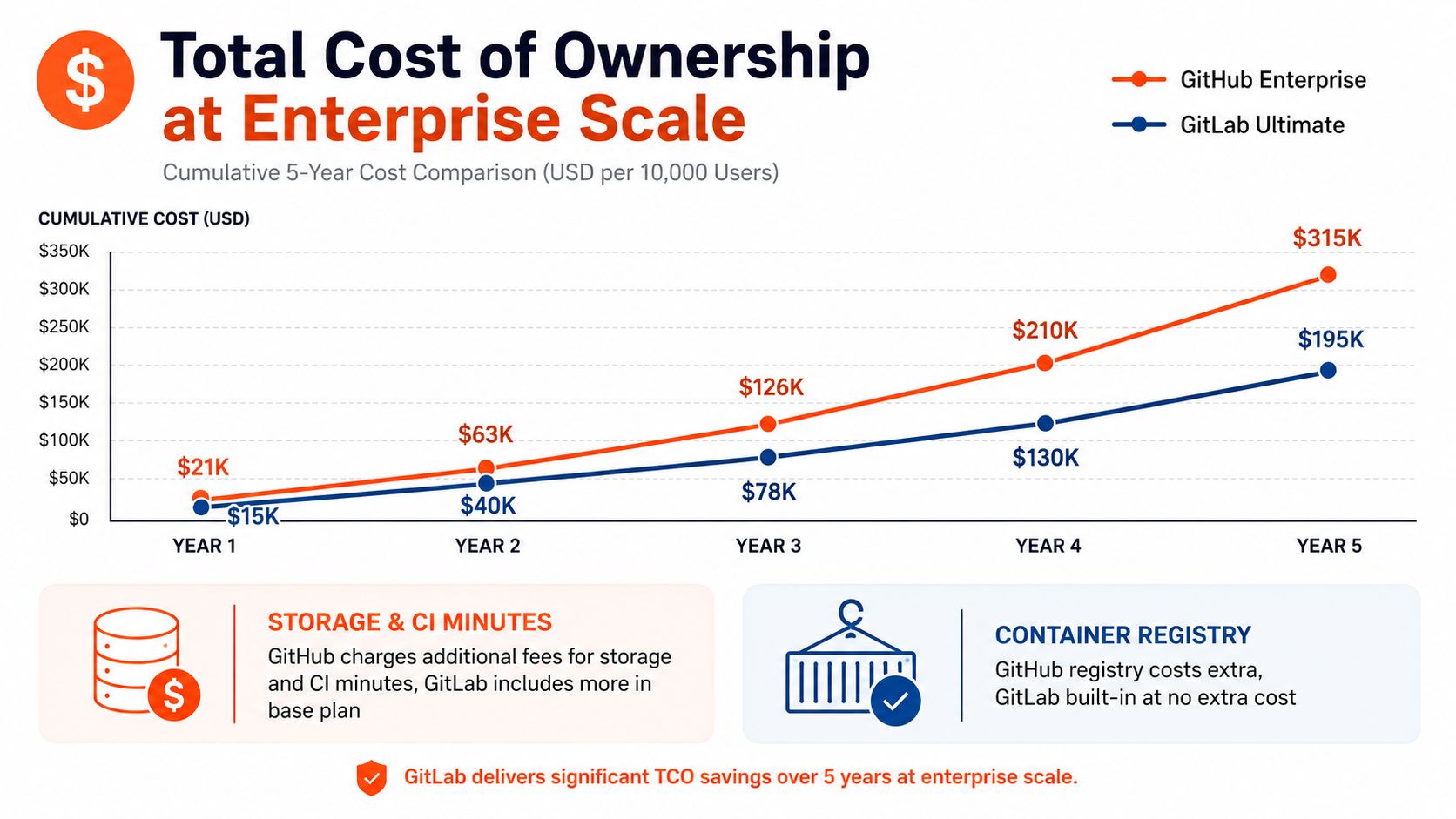
Total Cost of Ownership at Enterprise Scale
Sticker price is the least interesting cost in enterprise DevOps. The true cost shows up in license layering, extra security add-ons, CI consumption, registry usage, and the engineering time needed to keep a multi-tool chain from fraying.
The comparison sources make this point indirectly but clearly. Neutral coverage notes that GitHub's security, AI, and advanced CI/CD capabilities are often paid add-ons, while GitLab positions itself as an integrated suite that can reduce the number of tools and integrations to manage (platform choice guide). That means a low initial bill can become a higher operating cost if the organization is buying and maintaining several adjacent capabilities anyway.
Where the hidden costs appear
The biggest surprises usually come from friction, not invoices. A platform that requires multiple external tools can create extra maintenance around permissions, service connections, audit setup, and troubleshooting. A bundled platform can reduce that coordination work, but only if the built-in features cover the team's needs.
A useful way to think about cost is to separate it into three layers.
- License layer: what you pay to use the platform itself.
- Tooling layer: what you pay for security, CI/CD, and add-ons that are not fully included.
- Operations layer: what your engineers spend maintaining integrations, permissions, and workflow consistency.
That third layer is where GitLab can outperform GitHub in enterprise-scale scenarios, especially when the organization is replacing several separate products with one governed system. GitHub can still win economically if the team already has most of the surrounding stack in place and only needs one or two missing pieces.
Why TCO changes with maturity
Early-stage teams usually optimize for speed and familiarity. Mature organizations optimize for repeatability and control. That's why platform economics change as the company scales. Once multiple teams, repos, and compliance boundaries are involved, the cost of stitching systems together often grows faster than the cost of the software itself.
The right TCO model should include migration effort, internal platform support, and the overhead of maintaining policy parity across tools. If you only compare subscription fees, you'll miss the spend that keeps the platform functioning after purchase.
Storage Limits and Registry Constraints
Storage and registry limits rarely dominate the first buying decision. They do, however, become visible when teams start shipping containers at scale or moving large numbers of artifacts through the delivery pipeline.
GitHub Free provides unlimited public and private repositories, and unlimited container registry storage for public repositories, but it caps outbound registry bandwidth at 500 MB per user per month (storage comparison). GitLab Free allows 5 GB container registry storage per project and a 10 GB outbound download limit per project (storage comparison). One comparison also notes GitHub Free includes unlimited repositories while GitLab Free keeps the 5 GB per project registry cap (storage comparison).
| Resource Type | GitHub Free | GitLab Free |
|---|---|---|
| Repositories | Unlimited public and private repositories | Unlimited repositories, with registry storage limits applying per project |
| Container registry storage | Unlimited for public repositories | 5 GB per project |
| Outbound registry bandwidth | 500 MB per user per month | 10 GB per project |
How to interpret those limits
If your delivery pipeline depends on frequent image pulls, large artifacts, or tightly managed registries, the quota details matter more than the logo on the homepage. GitHub's bandwidth cap can become the more relevant constraint in high-churn environments. GitLab's per-project storage model can be easier to reason about if teams are already organized around clear project boundaries.
Decision rule: if your release pipeline moves containers constantly, model registry usage before you standardize on a platform. Don't assume the free tier or base plan will stay invisible once delivery volume increases.
What to ask before you choose
First, check whether your teams need registry bandwidth as much as registry storage. Second, map out how many projects will carry their own artifacts. Third, decide whether you prefer limits framed per user or per project, because that changes how usage gets monitored and governed.
Teams sometimes focus on repository count and miss the fact that registry and artifact movement can become the hidden tax on deployment velocity. The cheapest platform on day one can still be the most constrained platform at scale if delivery traffic grows faster than the plan assumptions.
Decision Framework and Situational Recommendations
A sensible recommendation starts with workload shape, not platform loyalty. A team that wants broad ecosystem access, public-code visibility, and the least resistance from developers who already know GitHub usually stays happier on GitHub. A team that wants stronger consolidation, built-in compliance, and fewer tools to govern usually gets more value from GitLab.
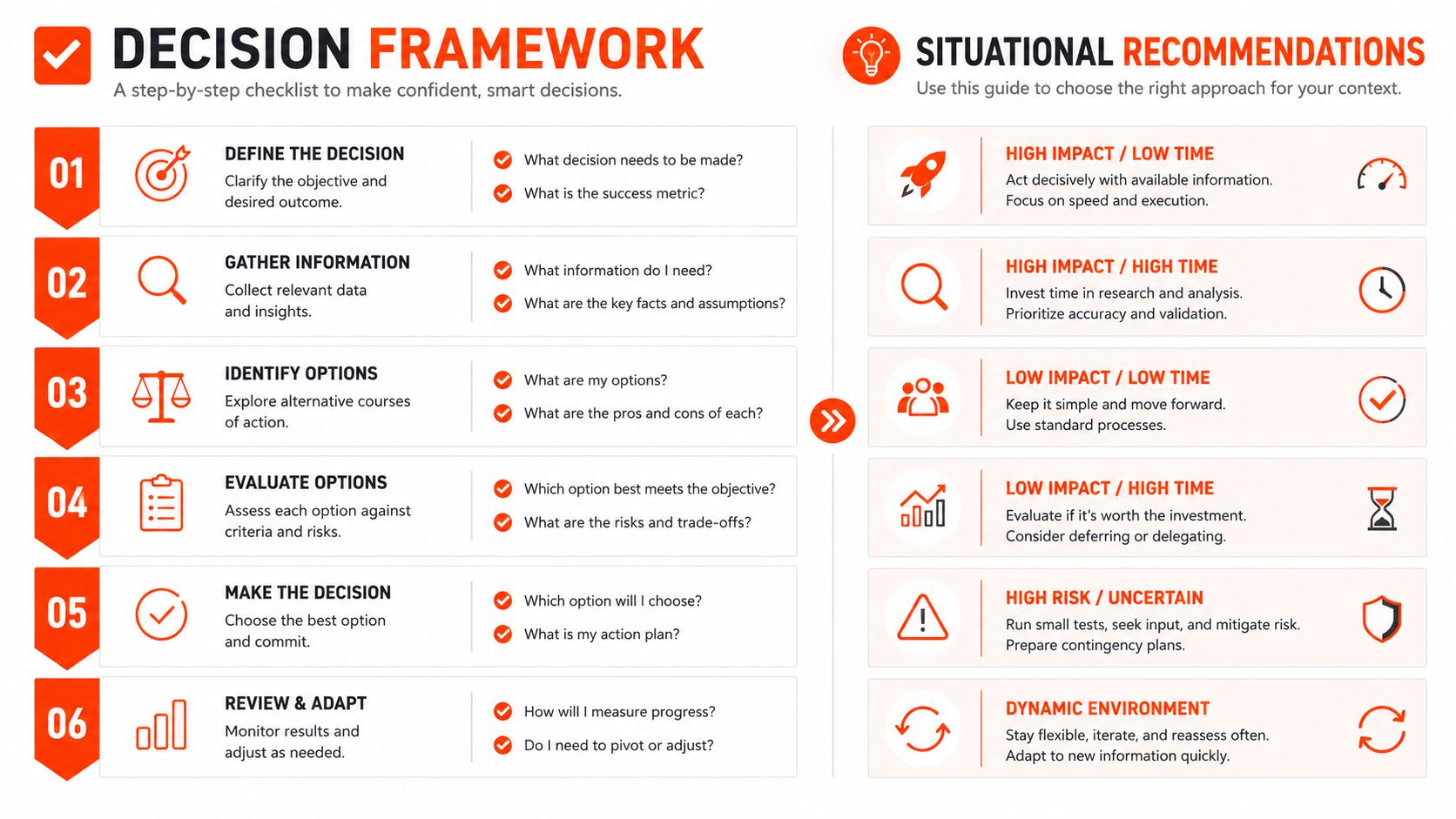
The migration question matters too. Switching platforms is rarely just a repository move, it's a process change. Teams need to migrate CI definitions, re-establish access patterns, review secrets handling, and validate that the new platform matches the old one for audit and release workflows. That's why the right answer depends on whether you are buying a greenfield standard or trying to consolidate a messy existing stack.
A useful practical lens comes from broader technology evaluation work, and the technology partner evaluation guide 2026 success offers a helpful way to think about operational fit, not just feature completeness.
Situational recommendations
- Choose GitHub if your teams rely on a broad community and third-party integrations, because the ecosystem depth makes it easier to assemble the rest of your stack.
- Choose GitHub if your developers already live in GitHub workflows and your delivery model values extensibility over consolidation.
- Choose GitLab if you want a more integrated DevOps pipeline and fewer tools to govern across security, compliance, and delivery.
- Choose GitLab if your organization is under heavier regulatory pressure and wants built-in controls without assembling them from multiple products.
- Choose GitLab if operational consolidation is the strategic objective, especially when multiple tools are already creating process overhead.
Bottom line: startups often choose for speed, scale-ups choose for flexibility, and regulated enterprises usually choose for control.
For small teams, the practical difference may stay hidden for a while. For larger organizations, the platform that reduces integration sprawl tends to create a more predictable operating model, even if the initial procurement discussion looks more expensive. That's the part most comparisons miss, and it's the part a CTO has to get right.
If you're weighing GitHub vs GitLab for an enterprise platform decision, devPulse can help you assess the true operating cost, not just the feature list. The team works across architecture, DevOps, compliance, and platform modernization, so it can map these trade-offs to your current delivery model and governance needs. Visit devPulse to start a platform evaluation that's grounded in how your organization builds and ships software.