














58% of organizations automate more than half of their regression suites, yet only 12% have reached full autonomy, so reliable test automation quality assurance depends less on adding tests and more on building deterministic, maintainable systems. The teams that ship confidently treat coverage as an input, not proof that their release signal can be trusted.
A familiar enterprise pattern looks different on a dashboard than it feels during release week. The automation report shows strong regression coverage, the pipeline turns green, and product leadership approves deployment. Hours later, a checkout workflow fails in production because the test suite had been passing around an unstable data dependency, while another test had been quarantined after repeated intermittent failures.
The team didn't lack tools. It lacked confidence in what the tools were reporting. A large suite can still provide weak protection when tests depend on shared environments, timing-sensitive selectors, mutable data, or recovery logic that hides the original failure.
Table of Contents
- The Reality Behind High Automation Coverage
- Understanding the Evolution of Test Automation
- Mastering the Test Pyramid Strategy
- Selecting the Right Automation Toolchain
- Integrating Automation into CI/CD Pipelines
- Measuring Quality with Actionable Metrics
- Addressing the Hidden Costs of Flaky Tests
- Strategic Roadmap for Enterprise Adoption
The Reality Behind High Automation Coverage
A team I worked with once celebrated a major expansion of its automated regression suite. The coverage report looked impressive, but release reviews still relied on senior testers manually checking the same critical journeys. Engineers had learned that a red pipeline might indicate a product defect, a browser timing issue, or a stale test account. A green pipeline was hardly more reassuring because several unstable tests were routinely rerun until they passed.
That pattern exposes the central distinction in test automation quality assurance: coverage measures what a suite attempts, while reliability measures whether its result deserves action. Automation creates value only when the organization can interpret failures quickly and reproduce them consistently.
The problem also explains why teams struggle to progress from partial automation to mature quality engineering. One industry report says teams automate about 40% of testing on average and aim for 63% by the following year, while 47% report understaffing as a barrier. The same source notes that only 11% of teams had reached an optimized QA maturity stage. TestRail's software testing and quality report puts the organizational constraint beside the technical one.
Coverage is not release confidence
High automation percentages often conceal uneven distribution. A team may automate many low-risk paths while leaving a complex payment, permissions, or data migration workflow dependent on manual checks. Another team may automate the workflow but run it against synthetic data that doesn't resemble production conditions.
Use quality assurance best practices as a broader quality discipline, not as a checklist for adding scripts. The practical test is whether each automated check has a clear owner, stable data, meaningful assertions, useful diagnostics, and a defined response when it fails.
Practical rule: If engineers regularly rerun a failed test without investigating it, the suite is already charging an operational tax.
The answer isn't to automate every remaining manual step. It's to remove low-value tests, move fragile checks to more stable layers, isolate dependencies, and make failure artifacts useful. Mature teams measure the health of the signal itself, not just the size of the suite.
Understanding the Evolution of Test Automation
Test automation emerged as a structural response to software complexity. Microsoft's history of software testing describes the shift from manual testing to automated testing as a major evolutionary phase in quality work. That history matters because automation wasn't merely a new tool category. It changed how teams scaled verification when manual execution could no longer keep pace with delivery.
Regression testing became the natural starting point. Repeating the same checks after every code change is expensive for people but well suited to machines, provided the checks have stable inputs and observable outcomes. The historical lesson is straightforward: automation becomes strategically important when release frequency and system complexity outgrow manual capacity.
Current adoption shows that organizations have made significant progress, but adoption and autonomy aren't the same thing. A 2023 to 2024 industry survey reported that 58% of organizations automated more than half of their regression test suite, up from 51% in 2021, and 26% exceeded 75% automation coverage. Those figures show broad use of automation, not proof that automated quality decisions are independent of human investigation.
The maturity gap
A 2026 industry summary citing BrowserStack's survey reported that 94% of software-testing teams use AI in testing, but only 12% have reached full autonomy. That contrast reveals the current operating reality: teams are experimenting with AI-assisted generation, analysis, and maintenance, while people still define risk, review changes, investigate failures, and decide whether a build should proceed. Quality engineering and quality assurance differ precisely in how broadly that responsibility is embedded across engineering practices.
Google internal research also found that flaky tests account for 4.56% of CI test failures and consume over 2% of developer coding time, as summarized with the underlying context in this QA automation statistics overview. The figures don't suggest that automation has failed. They show that the work has moved from script creation toward test design, maintainability, governance, and operational ownership.
A mature program therefore asks different questions. Which failures are actionable? Which tests protect critical business behavior? Which environments produce misleading results? And who is accountable for restoring trust when a check becomes unreliable?
Mastering the Test Pyramid Strategy
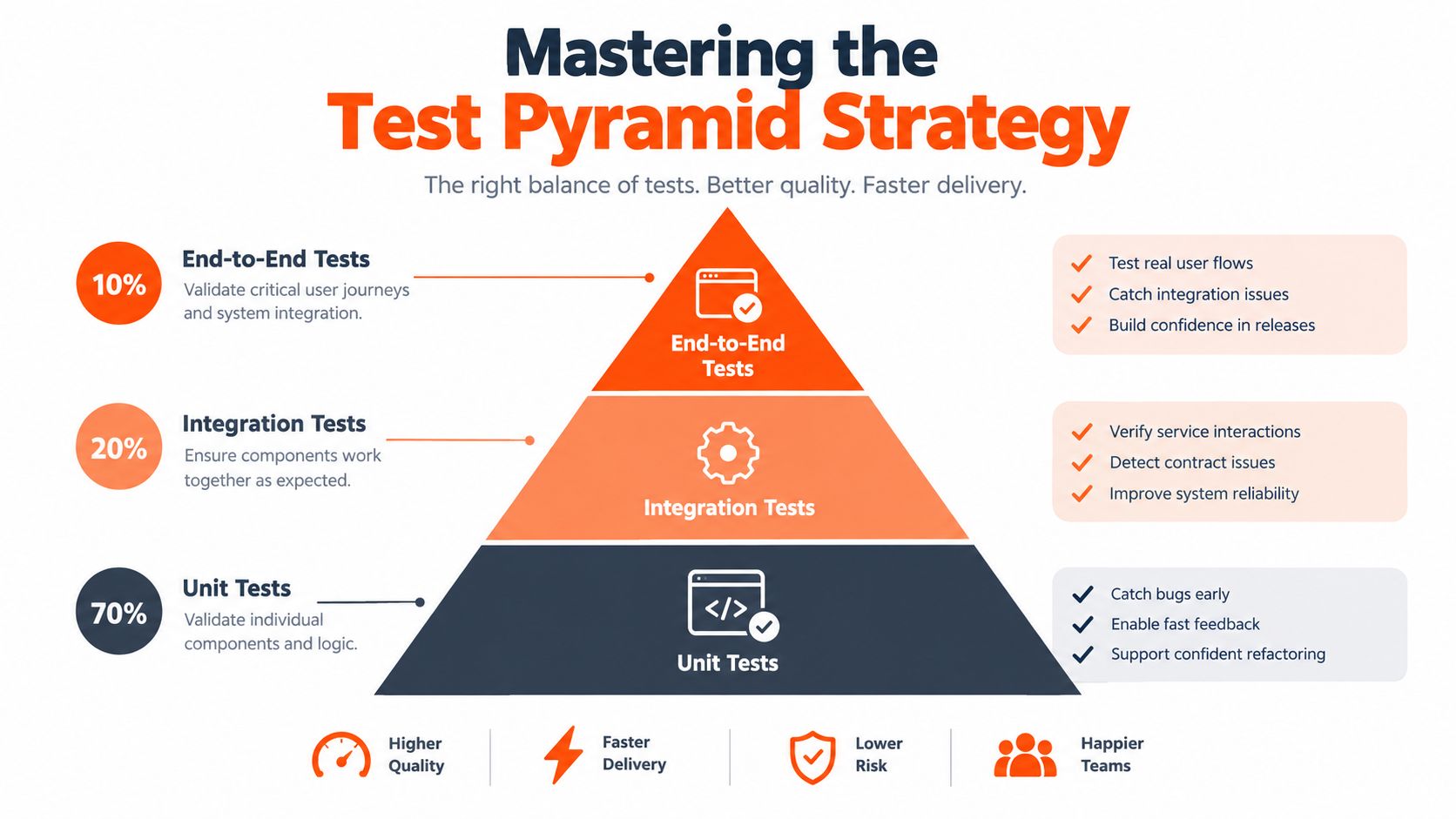
The test pyramid is a resource allocation model, not a rule that every team must follow mechanically. It encourages teams to place fast, focused checks at the base, broader service and integration checks in the middle, and a deliberately small set of end-to-end UI checks at the top.
Start with behavior that can be verified close to the code. Unit tests should validate business rules, transformations, validation logic, and error handling without requiring browsers, remote services, or shared infrastructure. They run quickly and usually produce precise failures, but they won't prove that separate services, authentication flows, or deployment configuration work together.
Service and integration tests occupy the middle layer. They verify API contracts, persistence behavior, message handling, and interactions between components. These tests cover more realistic system behavior than unit checks while avoiding much of the timing and rendering volatility associated with browser automation.
UI and end-to-end tests belong at the top because they validate complete user journeys. They're valuable for proving that the system works from the user's perspective, but they cost more to execute and diagnose. A selector can break after a harmless interface change, and a failure may originate in the browser, application, network, data, or an upstream service.
Allocate by failure cost
Use the pyramid in four practical steps:
- Identify critical behavior. Map revenue, safety, compliance, access control, and data integrity risks before selecting a framework.
- Push assertions downward. Test business rules and service contracts at the lowest layer that can observe them reliably.
- Reserve UI checks for journeys. Keep browser tests for workflows where integrated behavior, rendering, navigation, or accessibility context matters.
- Review the shape continuously. If UI tests multiply because lower layers are difficult to access, improve service seams instead of accepting a fragile top-heavy suite.
| Layer | Speed | Maintenance Cost | Coverage Scope |
|---|---|---|---|
| Unit | Fast | Low when isolated | Functions, components, and business rules |
| Service and integration | Moderate | Moderate | APIs, services, persistence, and contracts |
| UI and end-to-end | Slowest | Highest | Complete user journeys and rendered behavior |
The pyramid doesn't eliminate manual testing. Exploratory work, usability review, accessibility evaluation, and ambiguous new features still benefit from human judgment. It also doesn't mean a critical workflow needs only one end-to-end test. It means the workflow's detailed rules should be covered lower down, so the UI layer proves composition rather than carrying every assertion.
Teams that need a practical way to map behavior, risk, and layer selection can use a test strategy template as a working artifact. The document should evolve with architecture, not sit unchanged in a project folder.
Selecting the Right Automation Toolchain
Tool selection becomes easier when the organization separates four decisions: where tests execute, who owns the code, how failures are diagnosed, and what maintenance the platform absorbs. Framework popularity shouldn't decide those questions.
A self-managed open-source stack built around tools such as Playwright, Cypress, Selenium, Appium, or API clients gives engineers portability and control. Teams can version test code with the application, run it in their own CI infrastructure, tune browsers and environments, and integrate results with existing observability. The trade-off is real ownership of runners, upgrades, parallelization, test data, reporting, and failure triage.
Commercial platforms usually reduce infrastructure work and may provide visual authoring, managed execution, dashboards, or adaptive locator features. That can help a team with limited framework expertise start quickly. The risk is less about licensing alone and more about ownership boundaries. If execution happens inside a proprietary environment or test behavior changes dynamically, engineers may find it harder to reproduce a failure outside the platform or review exactly what changed.
Evaluate the operating model
Ask vendors and internal platform teams these questions:
- Can the suite run deterministically? A tool that adapts during execution may reduce script maintenance, but it can also make failures harder to reproduce.
- Can the team inspect and version the test? Portable code supports review, rollback, and migration.
- What does a failure contain? Screenshots, traces, console output, network information, and application logs shorten diagnosis.
- Who maintains the environment? Clarify responsibility for browser versions, devices, secrets, test data, and parallel workers.
- How does the tool handle generated tests? Generation expands coverage, but every generated check still needs assertions, ownership, and stability validation.
Use a commercial platform when managed infrastructure and faster authoring solve a material delivery constraint. Choose a self-managed framework when portability, deep customization, regulated execution, or direct engineering ownership matters more. A hybrid model often works: teams manage core unit, service, and contract checks while using a specialized platform for visual validation, device coverage, or selected end-to-end workflows.
devPulse provides quality engineering services that include automation framework design, UI and API automation, regression suites, cross-browser and mobile testing, and CI/CD-integrated validation. Treat that kind of consultancy as an extension of the operating model, not a substitute for internal ownership. The enterprise still needs clear standards for what qualifies as a trustworthy test.
Integrating Automation into CI/CD Pipelines
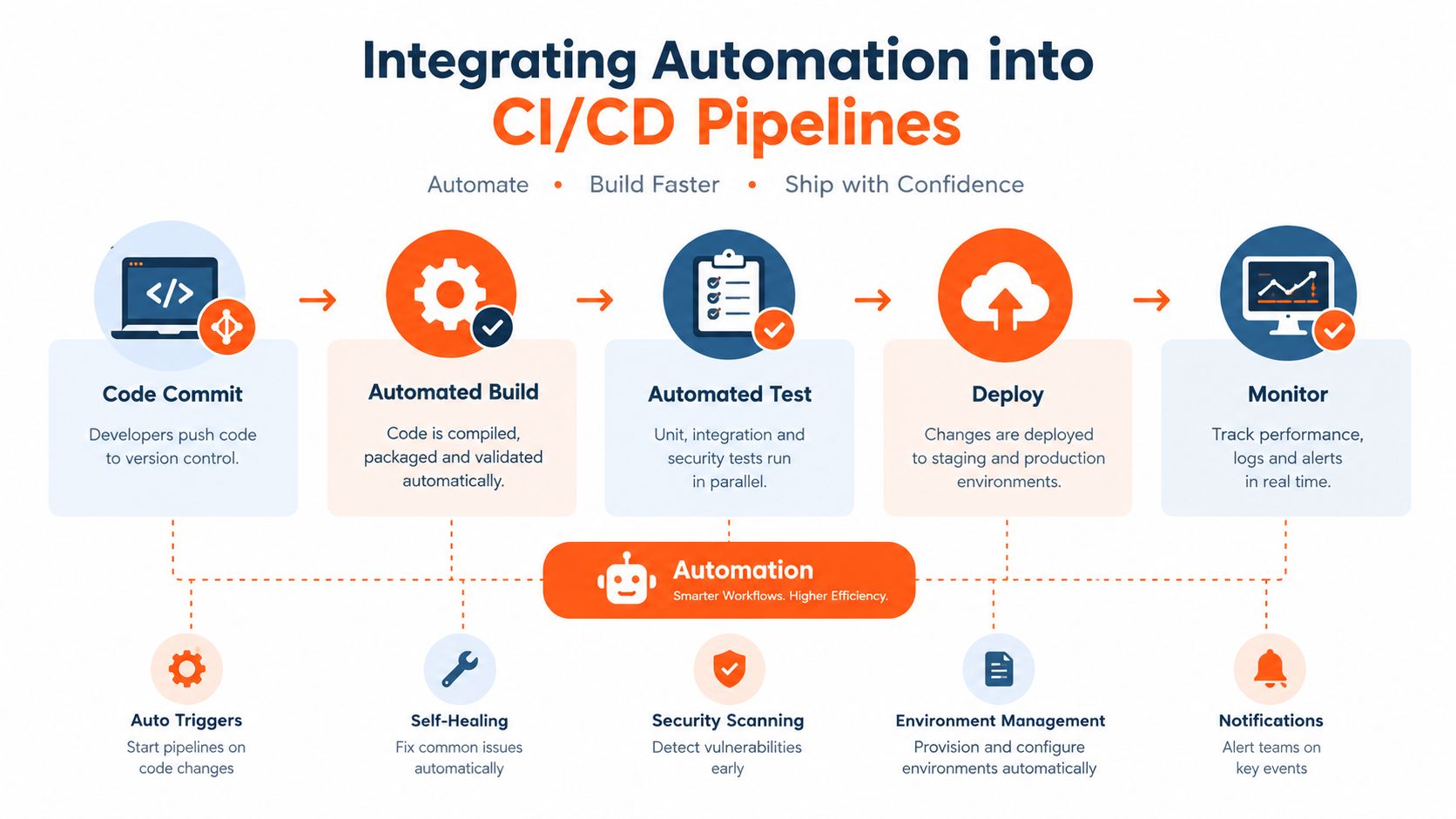
A pipeline should answer a developer's immediate question without forcing the entire regression estate into every pull request. The most useful design separates fast pre-merge feedback from broader validation after deployment, then connects both to a clear release policy.
Begin with a small pre-merge layer. Run unit checks, static analysis, contract tests, and targeted service tests close to the changed code. Add a focused smoke path when a change affects a critical journey. Keep this stage predictable, because a slow or noisy gate encourages developers to bypass it.
After merge, expand the scope. Run broader integration suites, cross-browser checks, visual validation, mobile scenarios, and selected end-to-end workflows in parallel where the dependencies allow it. Post-deployment validation should confirm that the deployed artifact behaves correctly in its target environment, while monitoring should detect failures that controlled test environments cannot represent.
Design gates around risk
A useful pipeline has explicit outcomes:
- Run. Select tests by changed components, risk, and dependency impact.
- Classify. Separate product failures from infrastructure issues and known flaky behavior.
- Gate. Block promotion for credible failures on critical paths, not for every untriaged anomaly.
- Record. Preserve logs, traces, screenshots, environment details, and test data identifiers.
- Improve. Feed recurring failures into ownership queues instead of hiding them with indefinite retries.
Retries have a narrow role. A controlled rerun can distinguish transient infrastructure noise from a repeatable product defect, but unlimited retries turn red builds green without improving quality. The pipeline should expose the original failure and record when a retry changed the result.
For teams focused on browser behavior, testing UI components with DOM Studio can complement functional checks with visual regression analysis. Visual comparison is useful when layout and component rendering matter, but it should sit beside semantic assertions rather than replace them.
Enterprise teams can use a CI/CD approach for enterprise delivery to define ownership, approvals, environment promotion, and rollback behavior. The key architectural decision is to make automation part of delivery flow, not a separate QA destination that developers consult only after a failure.
Measuring Quality with Actionable Metrics
A dashboard should help a release decision, not merely display activity. Start with a small set of measures that connect execution behavior to customer and engineering risk.
Track pass rate, flaky test rate, execution time, mean time to detect, mean time to repair, coverage, defect escape rate, failure clustering, release confidence, and a broader stability score. TestDino's automation analytics guidance gives reference thresholds of a 95% or higher pass rate, below 1% flaky tests, under 10 minutes for pull request execution, under 1 hour MTTD, under 4 hours MTTR, 80% or higher critical coverage, and under 5% defect escape rate.
Treat those figures as operational benchmarks, not universal laws. A regulated medical workflow, a consumer interface, and an internal administration tool may need different gates. What matters is that the organization defines its own acceptable risk and watches whether the trend moves toward or away from trustworthiness.
Build charts that explain movement
A practical reporting view should include at least three visual perspectives:
- Run timeline: Show daily or release-based pass and fail distribution so stakeholders can see whether instability is isolated or persistent.
- Duration and volume chart: Plot average tests per run, execution duration, and parallel thread counts to expose capacity pressure.
- Failure cluster view: Group failures by test, component, environment, and suspected cause so teams fix systemic problems instead of counting duplicates.
Testmo's automation metrics report describes a Run Timeline by Day that separates pass and fail results, along with a Run Metrics by Day view for average tests per run, duration, and thread counts. Those chart types work because they show behavior over time rather than presenting a single snapshot.
A second metric layer should connect test execution to shipped quality. One practical KPI set uses defect density below 1.0 per KLOC, defect escape rate below 2%, critical-path coverage above 90%, regression automation above 70%, pipeline pass rate above 95%, and test flakiness below 2%, as outlined by ThinkSys's software testing metrics guide.
Industry volume makes this reporting necessary. A 2025 survey of nearly 4,000 software quality and security professionals found that 57% of tests were automated, according to Quashbugs' test automation statistics. At that scale, manual inspection of individual runs no longer provides a credible management view.
Addressing the Hidden Costs of Flaky Tests
A flaky test passes and fails under materially similar conditions. That behavior damages the value of the whole suite because engineers can't tell whether a red result represents a product regression, an environment defect, or randomness.
The operational impact becomes visible at scale. In a study across four projects that analyzed 8.8 billion test executions, undetected flaky failures represented 9.8% to 16.3% of failed pipeline runs. Researchers also identified 1.7 million flaky failures across 154,000 distinct test cases, showing that flakiness can spread through a mature pipeline rather than remain confined to one badly written check. The industrial-scale flaky test study provides the evidence behind those findings.

Generated tests need acceptance criteria
Automatic generation expands the number of checks, but it doesn't guarantee repeatability. An empirical study sampled 6,356 Java and Python projects, executed generated tests 200 times each, and ran almost 1.2 million tests. It found 9,568 flaky tests overall, with roughly two-thirds coming from generated tests. The research on flaky automatically generated tests also observed only 1% flaky tests for one commercial proprietary generator, indicating that tool design and environmental controls matter.
The response should be systematic:
- Control state: Provision isolated, known test data and reset it deliberately.
- Remove timing assumptions: Prefer explicit conditions and domain events over arbitrary waits.
- Stabilize boundaries: Mock or virtualize external systems when the contract is the subject of the test.
- Repeat before accepting: Run new generated tests repeatedly before adding them to a release gate.
- Delete when necessary: A test that can't become deterministic may be less valuable than no test at all.
Reruns can help classify noise, but they shouldn't become a permanent treatment. Reliability improves when teams fix the source of nondeterminism and make ownership visible.
Strategic Roadmap for Enterprise Adoption
Enterprise adoption works best as a sequence of operating improvements rather than a framework migration. Start by inventorying the current suite: map tests to business risks, identify quarantined checks, record owners, and separate meaningful coverage from duplicated assertions. The first deliverable should be a trustworthy baseline, not a larger test count.
Next, establish architecture standards. Define where unit, service, contract, integration, UI, performance, and exploratory testing belong. Require deterministic data handling, stable selectors, isolated environments where practical, useful artifacts, and explicit failure classification. These standards prevent every product team from solving the same reliability problem differently.
A staged operating model
Stabilize the signal. Remove obsolete tests, repair the most disruptive flaky checks, and make pipeline failures diagnosable. Don't increase the release gate until the existing gate deserves trust.
Prioritize critical paths. Select workflows based on business impact, change frequency, compliance exposure, and defect history. Build lower-layer coverage for rules and contracts, then retain a concise set of end-to-end journeys to verify composition.
Connect quality to delivery. Put fast checks before merge, broader validation after merge, and deployment verification after release. Define who can override a gate, what evidence that decision requires, and when the exception expires.
Add AI with governance. AI can help generate scenarios, summarize failures, suggest maintenance changes, and identify patterns across runs. Engineers should review generated tests, confirm their assertions, and reject adaptive behavior that hides meaningful regressions.
Measure outcomes. Review pass rate, flakiness, execution time, detection and repair time, critical coverage, and escaped defects as an operating review. A stable suite that protects fewer high-value behaviors is more useful than a large suite nobody trusts.
Manual testing remains part of this model. Exploratory testing finds ambiguity, usability problems, and unexpected workflows that scripted checks may never express. Automation handles repeatable verification; people investigate uncertainty and decide what quality means for a changing product.
The strategic destination isn't full autonomy as a vanity metric. It's a system where teams can change software quickly, receive credible feedback, understand failures, and improve the safety net continuously. High adoption is a starting condition. Resilience, ownership, and decision-quality signals are the true measures of test automation quality assurance maturity.
devPulse helps enterprises design quality engineering systems that combine test automation, performance testing, CI/CD integration, observability, and long-term platform support. Visit devPulse to discuss a practical roadmap for stabilizing your current suite, prioritizing critical workflows, and building automation that remains trustworthy as the product evolves.