













The popular advice is to write one authoritative software architecture document, polish the diagrams, obtain approval, and store the result in a wiki. That workflow produces attractive historical records, not reliable engineering guidance. A document that isn't connected to code, deployment, decisions, and production evidence eventually tells a convincing story about a system that no longer exists.
A durable document works differently. It gives each stakeholder a useful view, preserves the reasoning behind consequential choices, and creates enough traceability for engineers to compare intended architecture with runtime reality. The practical target isn't exhaustive detail. It's the smallest, navigable set of evidence that prevents expensive misunderstandings during delivery, incidents, audits, reorganizations, and migrations.
Table of Contents
- Why Most Architecture Documents Stop Working
- Standards That Shape a Modern Architecture Document
- Narrative Documents vs View-Based Documents
- Core Views Every Architecture Document Should Include
- Diagram Hierarchy Using the C4 Model
- Architecture Decision Records That Preserve Rationale
- Document Structure and Section Template
- Capturing Distributed-System Trade-offs
- Keeping the Document Trustworthy Over Time
- Worked Example for an Enterprise Modernization
- Quick Reference and Checklists
Why Most Architecture Documents Stop Working
An architecture document usually fails after its first major change, not because the original author couldn't write. The failure starts when the team treats documentation as a project deliverable instead of part of the engineering workflow. A new service lands without a corresponding view update, a deployment manifest changes without a topology review, and an old assumption remains in the document because nobody owns its removal.
The distinction between an architecture and an architecture description matters here. The architecture is the system's significant structures, relationships, constraints, and decisions. The architecture description is the coordinated work product used to communicate those things to people with different concerns. IEEE's architecture-description lineage established this stakeholder-oriented approach, later developed internationally through ISO/IEC/IEEE 42010. The practical implication is straightforward: one diagram can't represent every useful truth about a system.
The single-document myth
Developers need responsibilities and dependencies. Operators need runtime placement, failure behavior, and ownership. Security reviewers need trust boundaries and data flows. Business owners need scope and external relationships. Compliance teams need evidence that controls and obligations connect to implementation.
A single narrative can contain all that information, but readers shouldn't have to excavate it. A view-based document separates concerns while preserving cross-references between them.
Practical rule: If a diagram has no named audience and no architectural question to answer, remove it.
The most important change is operational. Assign an owner, define update triggers, and link views to repositories, infrastructure definitions, ADRs, tests, monitoring, and security controls. A polished document without those connections becomes stale faster than a plain document with disciplined maintenance.
Standards That Shape a Modern Architecture Document
The vocabulary behind a modern software architecture document comes from a useful standards lineage. Architecture-description work began through the Software Engineering Standards Committee in April 1996, became formalized through IEEE Std 1471-2000, and was adopted internationally in 2007. ISO/IEC/IEEE 42010:2011 and the later ISO/IEC/IEEE 42010:2022 framework refined the same core idea: architecture documentation should connect stakeholder concerns to explicit viewpoints and views. The SEI overview of architecture description explains why the architecture itself must be distinguished from the artifact used to describe it.
A stakeholder is anyone with a meaningful interest in the system. A concern is the question or property that matters to that stakeholder, such as availability, data residency, latency, maintainability, regulatory compliance, or operational ownership. A viewpoint defines the conventions and methods for addressing a class of concerns. A view is the resulting representation of the system from that viewpoint.
That terminology prevents a common design error. Teams often label a collection of diagrams an architecture document, even when the charts have no stated purpose, audience, or relationship to decisions. A standards-aligned document makes those relationships visible.
Turn standards into working traceability
For each important concern, record:
- Owner: The stakeholder accountable for the concern.
- Scenario: The condition that makes the concern testable.
- Viewpoint: The conventions used to represent it.
- Evidence: The view, ADR, test, control, or runtime signal that supports the claim.
- Review path: The person or team responsible for keeping it current.
This structure is useful whether you're documenting a new platform or a legacy migration. It also complements the practical principles collected in DevPulse's software architecture principles guide, where architectural choices are treated as constraints and trade-offs rather than decorative abstractions.
Standards don't require a giant document. They provide a disciplined way to decide what belongs, who needs it, and how a reviewer can verify it. That is what makes an architecture description useful to governance teams as well as engineers.
Narrative Documents vs View-Based Documents
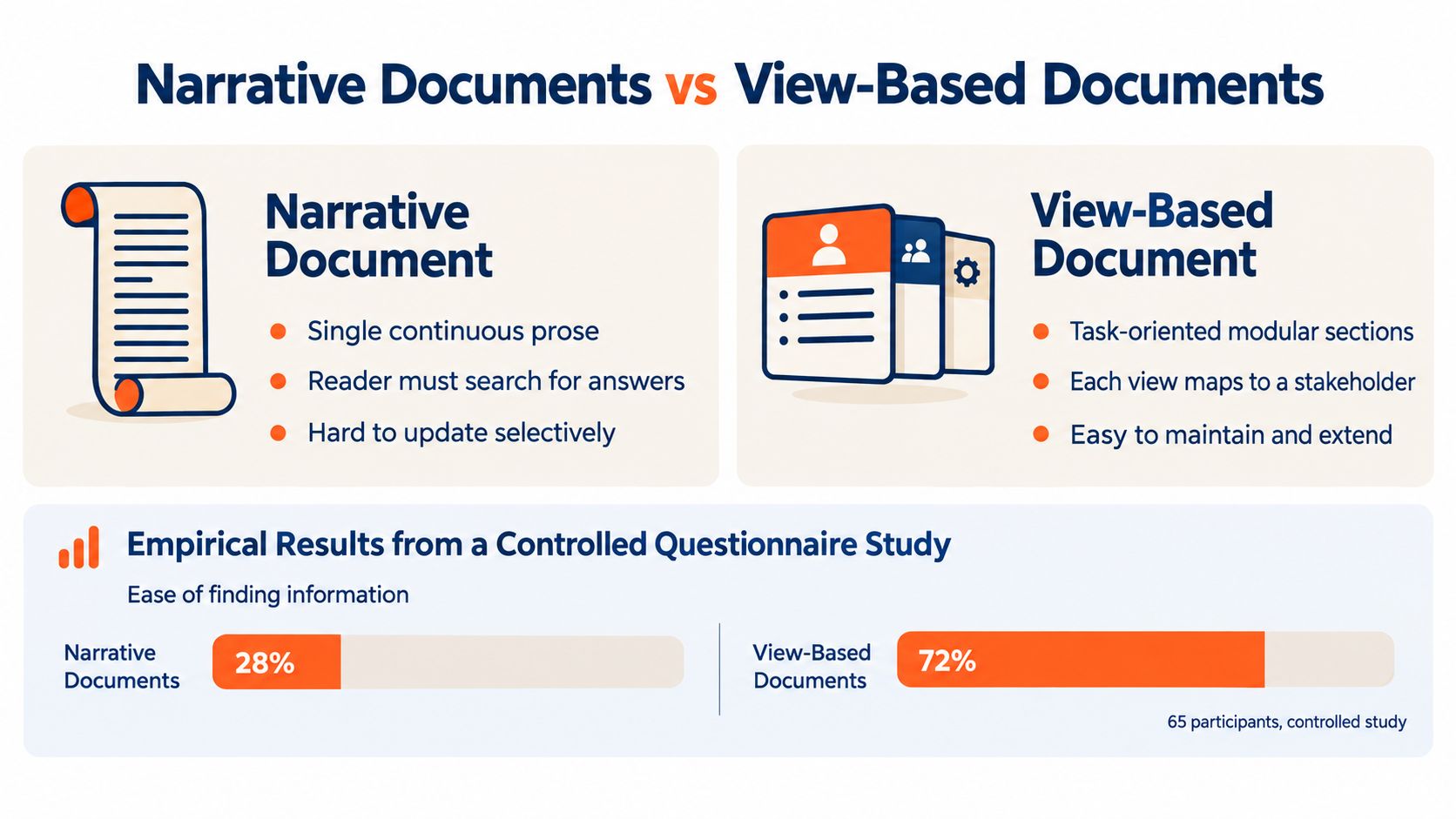
A narrative document is tempting because prose feels efficient. The author can explain context, describe the technology, insert a few diagrams, and send one link to everyone. That approach works for a small system with a stable audience. It becomes awkward when readers arrive with different questions and different levels of technical context.
A controlled questionnaire study involving 65 participants compared narrative essays with structured architecture documents while participants answered questions about a system supported by approximately 1,000 words of architectural documentation. The study found no statistically significant association between document format and performance on architecture-understanding tasks. Prior exposure to the system's source code was the dominant factor associated with answer quality, especially for questions requiring participants to apply or create architectural knowledge. The study's findings on architecture-document usefulness support a more precise conclusion: format alone doesn't make a document useful.
Choose structure by task
A separate industrial survey involving 147 participants found that architecture documentation was often outdated and inconsistent, and that a one-size-fits-all document didn't serve different tasks and contexts well. That doesn't prove every team needs a large collection of views. It does show why a single narrative shouldn't be the default answer for every reader.
| Narrative approach | View-based approach |
|---|---|
| Efficient for a small, stable system | Better for varied stakeholder questions |
| Encourages contextual explanation | Makes concerns and ownership explicit |
| Readers search for relevant passages | Readers navigate directly to a task-oriented view |
| Updates can affect a long chain of prose | Individual views can change selectively |
| Easy to start | Easier to govern as complexity grows |
The strongest structure is usually hybrid. Use concise prose for scope, assumptions, constraints, and rationale. Use views for system relationships. Use ADRs for decisions that may need reconsideration. Link all three to implementation and operational evidence.
The test is simple: give a reader a question, not a tour. If an operations engineer asks where a workload runs and what happens when its dependency fails, the document should lead directly to the deployment and process views. If a security reviewer asks where regulated data crosses a boundary, the data-flow and security views should answer without requiring a full read.
Core Views Every Architecture Document Should Include
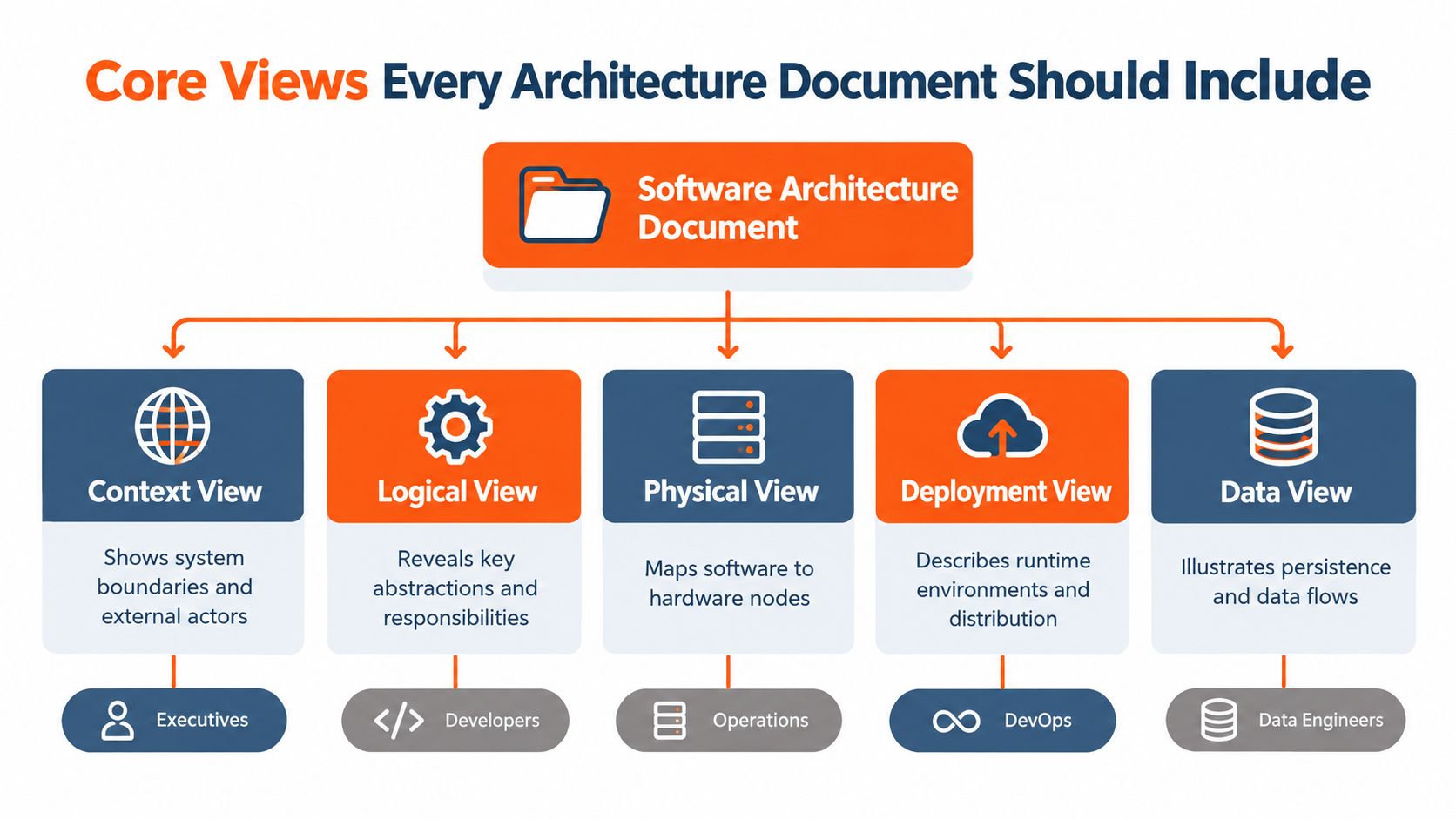
A production architecture document earns its place by answering stakeholder questions with the right view. It should not become a gallery of diagrams maintained for appearance. The SEI's Views and Beyond guidance offers a useful rule: create a view when it addresses concerns held by an explicitly identified stakeholder group. That keeps each diagram tied to a decision, responsibility, or operational need.
Begin with the context view. Show the system boundary, users, external systems, major integrations, and interaction direction. Business owners and executives usually need this first because it defines what the platform does, where responsibility begins, and where it ends.
The logical or container view describes major responsibilities and deployable units. Name important applications, services, queues, databases, and external dependencies. Leave out implementation trivia. Developers should understand ownership and interaction without reading every class.
Map concerns to evidence
A component view goes deeper inside a meaningful service or module. Use it when internal boundaries, interfaces, or team ownership affect delivery or change risk. A deployment view maps software to environments, nodes, clusters, regions, or managed services. Show distribution, network relationships, scaling boundaries, and operational ownership.
An information or data view identifies important entities, stores, flows, retention responsibilities, and transformations. For regulated systems, add a security view covering trust boundaries, identity flows, privileged operations, encryption responsibilities, and control ownership.
Process and operational views describe runtime behavior. Include synchronous and asynchronous interactions, retries, timeouts, failure isolation, scheduled work, alert ownership, and recovery paths. An operational view must show failure paths, not only the happy path.
| Concern | Useful view | Evidence to attach |
|---|---|---|
| Business scope | Context | Goals, actors, external contracts |
| Maintainability | Logical and component | Ownership, interfaces, repository links |
| Availability | Deployment and process | Failure scenarios, alerts, recovery tests |
| Privacy and compliance | Data and security | Data classification, controls, audit evidence |
| Runtime ownership | Deployment and operational | Manifests, dashboards, runbooks |
Cross-reference the same element across views. A service in the logical view should have a deployment representation, an owner, relevant ADRs, and links to its repository and runtime signals. This traceability provides more value than another ornamental chart. For related vocabulary and examples, DevPulse's architecture patterns resource helps teams compare structural choices before recording them.
Treat each view as a living, evidence-linked artifact. Connect it to deployment manifests, repository ownership, ADRs, dashboards, and runbooks. When those sources disagree, the mismatch signals architectural drift before the document misrepresents the running system.
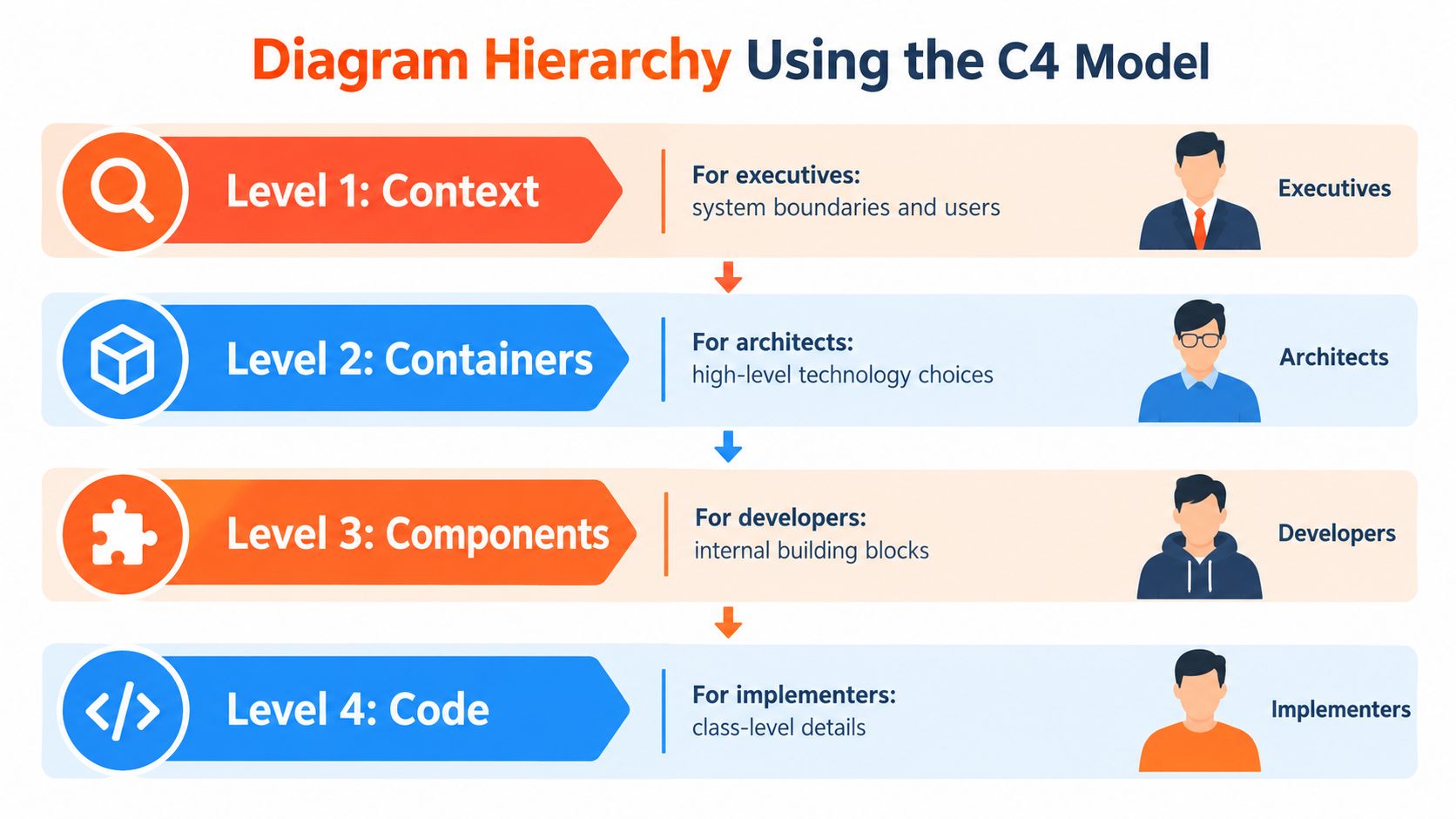
Diagram Hierarchy Using the C4 Model
The C4 model gives architecture documents a usable hierarchy: context, containers, components, and code. The labels matter less than the progressive disclosure they provide. Readers can stop at the level that answers their question, while engineers can follow the same system into greater detail.
Start with the context view. It places the system beside its users and external systems, showing boundaries and important relationships. Keep this view stable enough for executives, product owners, and integration stakeholders. Leave internal technology choices out unless they affect an external relationship.
A container view divides the system into major deployable or executable units. A container may be a service, web application, database, message broker, or batch process. For each one, state its responsibility, technology where relevant, owner, and key relationships. Link the element to its ADRs, deployment definition, repository, and relevant observability signals so the diagram can be checked against the running system.
Detail with a reason
Use a component view for a selected container when internal structure affects a quality attribute, team boundary, security decision, migration path, or maintenance task. Creating one for every service produces maintenance work without helping a reader.
The code level earns space when class or implementation detail helps maintainers work safely, particularly in unfamiliar legacy code or around high-risk interfaces. Remove it when it merely copies source code. A stale code diagram creates another false reference point.
A C4 chart should make these facts explicit:
- Scope: The system, container, or component shown.
- Audience: The intended readers and the question they need answered.
- Elements: What each box represents.
- Relationships: Direction, protocol, dependency, or data movement.
- Constraints: Important limits, assumptions, and quality attributes.
- Links: Repositories, manifests, ADRs, tests, dashboards, runbooks, or other evidence.
During modernization, context and container views can describe the target boundary while component and code views expose legacy coupling. Keep both states visible. A target-state diagram that hides existing dependencies can misdirect migration work. For related vocabulary and examples, DevPulse's architecture patterns resource helps teams compare structural choices before recording them.
Architecture Decision Records That Preserve Rationale
A technology inventory records what exists. It cannot explain why the team chose it, which alternatives failed review, or which constraints made the choice reasonable. An Architecture Decision Record, or ADR, preserves that reasoning while the implementation, team, and operating environment change.
Microsoft recommends creating ADRs at the start of a workload and maintaining them throughout its lifespan. Its ADR guidance treats the record as a lifecycle artifact rather than a post-project summary. Google Cloud presents a similar approach, recording the options, requirements, and design decisions behind infrastructure or application choices. Google Cloud's ADR reference provides a useful reference for teams standardizing decision records.
Write the ADR for a future engineer who must question, replace, or operate the decision. A compact record can carry that context:
- Title: A searchable name that states the decision.
- Status: Proposed, accepted, superseded, or rejected.
- Date and owners: The decision date and accountable decision makers.
- Context: The problem, boundaries, constraints, and architecturally significant requirements.
- Decision drivers: Availability, latency, compliance, team capability, cost, delivery risk, and other relevant forces.
- Options and evaluation: The alternatives considered and the criteria used to compare them.
- Decision: The selected option and its justification.
- Consequences: Benefits, new risks, operational work, and trade-offs.
- Rejected alternatives: Why the other options were not selected.
- Security and compliance impact: Controls, data handling, and review obligations.
- Operational impact: Monitoring, support, failure behavior, recovery, and ownership.
- Review links: Related views, requirements, risks, tests, change requests, or superseding ADRs.
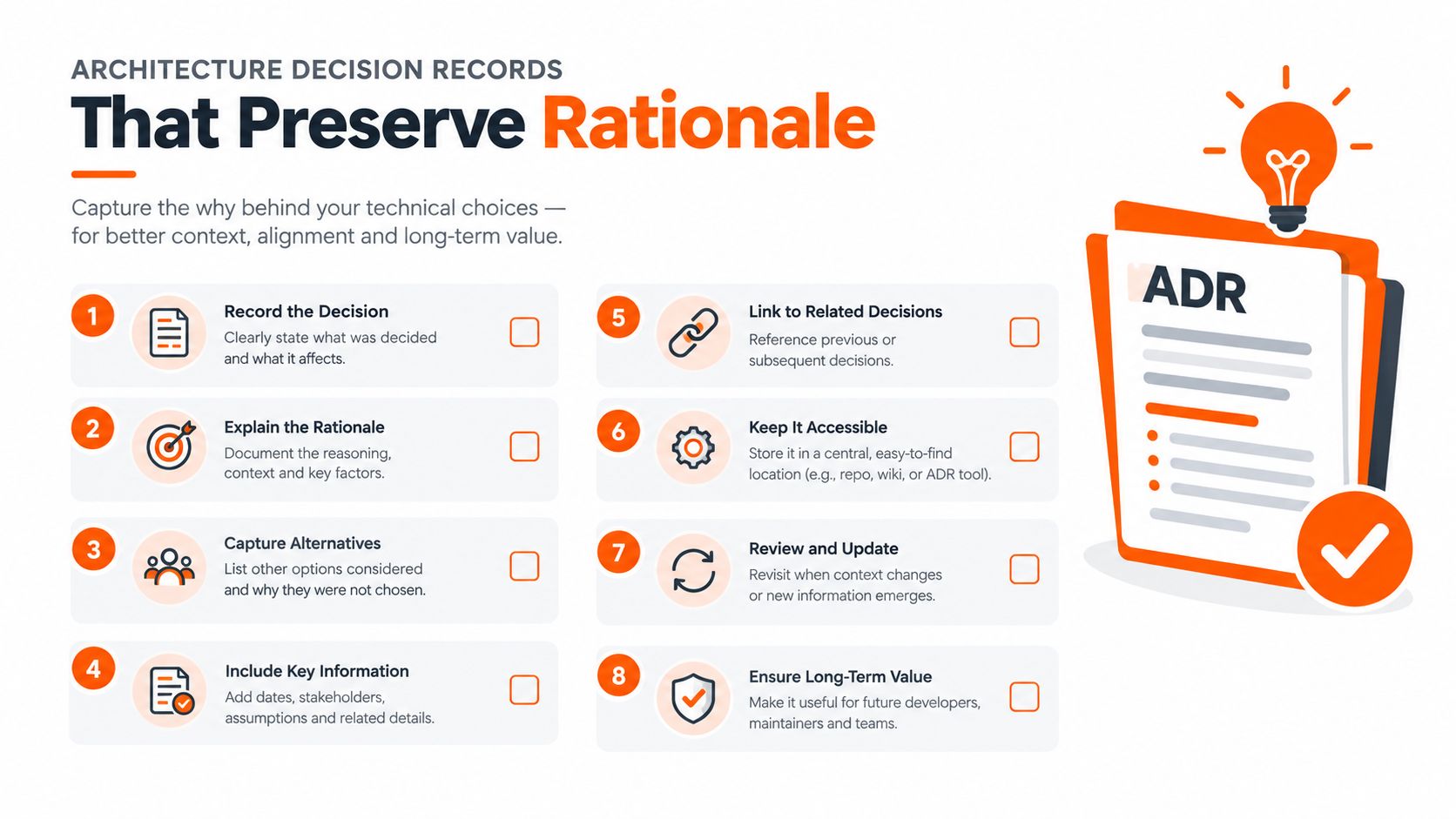
Keep ADRs in version control with code and infrastructure, or in a documentation repository that provides equivalent review and history. A wiki page outside the implementation workflow will become stale.
Tie each material decision to evidence. For asynchronous messaging, record the required throughput and failure-isolation target, then specify delivery semantics, retries, ordering limits, dead-letter handling, and observability obligations. Link the ADR to the process view, quality scenario, deployment manifest, and tests that verify whether the system still meets the decision's conditions. Those links turn an ADR into a living, evidence-linked artifact and help expose architectural drift before the document becomes outdated.
Document Structure and Section Template
A reusable software architecture document should be easy for humans to read and structured enough for tooling to index. The following skeleton works for a new product, a regulated platform, or a legacy modernization dossier.
Copy-ready structure
Introduction and scope
State the system purpose, boundaries, audience, status, owners, and document conventions.Stakeholders and concerns
Map stakeholder communities to concerns, viewpoints, views, owners, and review obligations.Quality attribute scenarios
Describe scenarios for availability, performance, security, privacy, maintainability, interoperability, and operational recovery. Include an owner and verification method for each material scenario.Context and scope view
Show users, external systems, interfaces, assumptions, and responsibilities.Solution strategy
Explain the major architectural approach, constraints, technology principles, and intentional compromises.Container and component views
Describe responsibilities, ownership, interfaces, dependencies, and important boundaries.Deployment view
Connect software to environments, infrastructure, regions, nodes, network zones, and operational teams.Security and data views
Show trust boundaries, identity flows, sensitive data, storage, retention, movement, and controls.Process and operational views
Document critical runtime scenarios, failure behavior, retries, alerts, recovery, and support paths.Cross-cutting concerns
Capture logging, observability, configuration, resilience, localization, tenancy, and shared platform rules.ADR index
Link each significant decision to affected views, requirements, risks, and review status.Risks, technical debt, and glossary
Name unresolved risks, intentional debt, domain terms, abbreviations, and ownership.
Appendices can hold detailed interface contracts, environment inventories, migration stages, evidence registers, and generated diagrams. Keep the main path readable. If a reviewer must move through every appendix to understand the system boundary, the structure has already failed.
Capturing Distributed-System Trade-offs
ADRs alone leave distributed behavior undocumented, so pair each decision record with data-flow and failure evidence. An action-research study found that ADRs can improve documentation culture, knowledge transfer, information prioritization, and cooperation between teams, while questions involving shared and distributed components may remain unresolved. A separate study identified recurring tensions around documenting too much or too little, deciding where information belongs, prioritizing decisions, and keeping content current. The research on ADR limitations in distributed environments supports linking decision records to operational evidence.
Many teams have not adopted ADRs, so an architecture document cannot assume that every significant decision already has a record. Capture missing rationale directly, then link it to the affected system behavior and the evidence used to validate it.
Connect decisions to system behavior
For each distributed flow, record:
- Context and dependency views: Show team boundaries, external dependencies, ownership, and contract direction.
- Data-flow views: Identify replication, transformation, consistency expectations, retention, and sensitive-data movement.
- Failure scenarios: Describe timeouts, retries, duplicate delivery, reordering, partial completion, and recovery ownership.
- ADR links: Preserve selected and rejected alternatives, including the constraints that made them reasonable.
- Runtime evidence: Link service-level objectives, dashboards, traces, alert rules, incident reports, and recovery tests.
- Evolution markers: Identify decisions that are temporary, under review, or constrained by legacy behavior.
Event-driven systems expose the gaps quickly. A broker name says little about delivery semantics, consumer lag, poison messages, schema evolution, or ownership during an incident. A concise context diagram, data-flow view, ADR, and operational evidence can answer those questions without turning the document into an encyclopedia. Teams reviewing these boundaries can use DevPulse's event-driven architecture guide to examine integration trade-offs.
Keeping the Document Trustworthy Over Time
A trustworthy architecture document needs an explicit maintenance model. Assign an owner, while keeping updates with the teams that understand each system. Service owners should revise views affected by their changes, and an architecture owner or review group should check consistency across system boundaries.
Tie maintenance to engineering events instead of relying on calendar reminders. Useful triggers include:
- Pull requests: Changes to interfaces, persistence, deployment, security boundaries, or service ownership require a view or ADR review.
- Infrastructure changes: Updates to manifests, infrastructure as code, networking, regions, or managed services trigger deployment-view checks.
- Operational evidence: Repeated incidents, new alerts, changed service-level objectives, or recovery-test results can invalidate process and deployment assumptions.
- Security changes: New data classifications, controls, identity flows, or audit findings update security and information views.
- Organizational changes: Reorganizations and vendor changes require ownership and responsibility reviews.
Documentation drifts when these events leave no trace in the document. Link relevant pull requests, deployment manifests, ownership records, dashboards, incidents, and ADRs so reviewers can inspect evidence instead of relying on memory. AI can detect differences and draft updates, but it cannot decide whether a discrepancy reflects an intentional transition, a temporary exception, or a system defect.
Maintenance test: Compare the intended deployment view with manifests, ownership data, observability, security controls, and recent incidents. Any unexplained difference is architectural drift.
Track last review dates, linked evidence status, unresolved discrepancies, and stale ownership references. Treat those indicators as review signals, not proof that the document is accurate. A page can have a recent timestamp and still describe the wrong runtime behavior.
The document remains trustworthy when each material change leaves an evidence trail and someone accepts or resolves the resulting discrepancy. That practice keeps architecture documentation connected to the system it describes, rather than turning it into a polished record of an earlier design.
Worked Example for an Enterprise Modernization
Consider a regulated healthcare platform replacing a legacy case-management core while keeping existing records and external integrations operational. The document opens with scope, data classifications, migration constraints, and the target outcomes. The context view shows patients, staff, identity services, partner systems, the legacy platform, and the modernization boundary.
Each stakeholder reads a different path:
- Executive sponsor: Context view, migration stages, major risks, and decision summary.
- Security reviewer: Trust boundaries, identity flows, sensitive-data paths, encryption responsibilities, and related ADRs.
- Platform engineer: Container and deployment views, infrastructure links, resilience decisions, dashboards, and runbooks.
- Compliance auditor: Stakeholder-concern map, data view, control ownership, retention rules, verification evidence, and review history.
- Support engineer: Process views for critical workflows, failure behavior, alert ownership, recovery steps, and known legacy dependencies.
An ADR records the choice to introduce an integration boundary instead of allowing the new services to call the legacy database directly. The context names the migration constraint. The decision drivers include data ownership, auditability, failure isolation, and reversible rollout. The consequences include additional synchronization and operational monitoring, while the rejected direct-database option links to the security and data views.
The deployment view links each environment to infrastructure definitions. The operational view links important flows to dashboards and incident procedures. During each migration increment, reviewers compare those links with production evidence before marking a decision or view current.
Quick Reference and Checklists
A minimal trustworthy document needs named stakeholders, concerns, quality scenarios, purposeful views, linked ADRs, ownership, and evidence. Use the C4 hierarchy for progressive detail, then add security, data, process, and operational views where stakeholder questions require them.
Document checklist: Confirm scope, owners, context, logical structure, deployment, data, security, runtime behavior, risks, glossary, and ADR index.
ADR checklist: Record status, context, drivers, options, decision, consequences, rejected alternatives, security impact, operational impact, and review links.
Maintenance checklist: Review changes through pull requests, compare diagrams with manifests, check ownership, inspect observability and incidents, validate controls, and retire superseded content.
| View | Primary Stakeholders | Concerns Addressed | Typical Diagram |
|---|---|---|---|
| Context | Executives, product, partners | Scope and boundaries | System-context diagram |
| Logical | Architects, developers | Responsibilities and dependencies | Container or component diagram |
| Deployment | Platform and operations | Runtime placement and resilience | Deployment topology |
| Data | Data, security, compliance | Flows, storage, retention | Data-flow diagram |
| Process | Support, operations, developers | Runtime behavior and failure | Sequence or state diagram |
Treat the document as a navigable evidence system, not a frozen report. If your team needs help assessing a legacy platform, defining an architecture roadmap, or connecting documentation with implementation and operations, devPulse provides architecture planning, technical audits, modernization, DevOps, observability, and ongoing engineering support. Visit devPulse to discuss a practical documentation and modernization approach for your system.