









An e-learning platform is software that delivers, manages, and tracks learning content for a defined audience. For most organizations, a cloud-based LMS (Learning Management System) is the right starting point: lower upfront cost, faster deployment, and predictable maintenance. The main exception is when you need granular cross-platform analytics via xAPI, an embedded Learning Record Store (LRS), or deep integrations with proprietary systems. In those cases, a custom build is worth the investment.
Here is what to weigh before you commit to either path:
- Default choice: A SaaS LMS handles SCORM-based compliance training, onboarding, and certification programs with minimal IT overhead.
- Custom build: Justified when your analytics requirements exceed what packaged platforms export, when you need white-label multi-tenancy, or when the platform itself is a revenue-generating product.
- Open-source middle ground: Self-hosted platforms like Moodle give you full data control at the cost of higher operational overhead.
- Market signal: Statista’s online learning platform outlook shows sustained global growth, which means the vendor ecosystem is expanding and pricing is becoming more competitive, but so is the complexity of choosing well.
Key Takeaways
A SaaS LMS is the right default for most organizations; commission a custom build only when the platform is a revenue-generating product or your analytics requirements exceed what packaged software can export.
| Point | Details |
|---|---|
| SaaS vs custom decision | Default to a SaaS LMS; build custom only when the platform generates revenue or needs proprietary analytics. |
| Standards support | Confirm SCORM 1.2 or 2004 at minimum; add xAPI only when you have a defined LRS architecture and analytics use case. |
| Pilot before committing | Run a pilot lasting several weeks with a representative group of real learners, real content, and at least one live integration before signing a full contract. |
| Data portability | Secure contractual rights to export all learner data and course packages in standard formats at any time. |
| Devpulse for custom builds | Devpulse offers discovery-first custom platform development covering SCORM/xAPI integration, web/mobile apps, and analytics pipelines. |
Table of Contents
- What is an e-learning platform, and which type fits your needs?
- What core features should every modern e-learning platform have?
- How are e-learning platforms hosted and priced?
- Which organizations benefit most from each platform type?
- How do you choose the right platform for your organization?
- What do SCORM, xAPI, LTI, and SSO actually mean for your platform?
- What does a realistic implementation timeline look like?
- When should you build vs buy? A Devpulse perspective
- Devpulse builds custom e-learning platforms when off-the-shelf falls short
- Sources
What is an e-learning platform, and which type fits your needs?
An e-learning platform is any software system that organizes and delivers educational or training content to learners, tracks their progress, and reports outcomes to administrators. The term covers several distinct product categories, and picking the wrong one is the most common procurement mistake.
The main platform types:
- LMS (Learning Management System): The traditional backbone of corporate training and higher education. An LMS manages course enrollment, tracks completion, issues certificates, and generates compliance reports. SCORM is the dominant content standard here.
- LXP (Learning Experience Platform): A learner-centric layer on top of or alongside an LMS. LXPs surface personalized content recommendations, social learning feeds, and skill pathways. Think of it as the Netflix-style interface for corporate learning.
- Marketplace platform: A multi-vendor catalog where instructors publish courses for individual purchase. Coursera exemplifies this model, where credentialing and skill benchmarking shape professional development expectations. Khan Academy shows the free-access variant, though most university students access a dedicated institutional LMS after enrollment rather than a public resource.
- Virtual classroom: Synchronous delivery tools (Zoom, Webex, or purpose-built platforms) that add scheduling, breakout rooms, and attendance tracking. Often integrated into an LMS rather than used standalone.
- Open-source / self-hosted: Platforms like Moodle give institutions complete control over data and customization. The trade-off is that your team owns patching, backups, and scaling.
Quick signals for which type fits:
- You run compliance training for a regulated workforce. Use a SCORM-compliant LMS.
- You want to sell courses publicly. Use a marketplace platform or build a custom storefront.
- You need personalized skill pathways at enterprise scale. Add an LXP layer or build one.
- You want full data sovereignty and have IT capacity. Consider open-source self-hosted.
- You need proprietary analytics, multi-tenant architecture, or a productized learning offering. Commission a custom build.
What core features should every modern e-learning platform have?
Features separate a functional platform from one that creates ongoing operational debt. Evaluate these categories during any vendor demo or custom-build scoping session.
User and course management
Role-based access (learner, instructor, admin, manager), group and cohort management, bulk enrollment, and automated re-enrollment for recurring compliance cycles. Without granular role controls, administrative overhead scales badly.
Authoring and content delivery
Native authoring tools or clean import of SCORM, xAPI, and video packages. Streaming video with adaptive bitrate, downloadable content for offline access, and virtual classroom integrations (Zoom, Microsoft Teams) round out delivery. Platforms like Alison demonstrate how mobile and offline access can be prioritized for accessibility-first strategies.
Assessments and certifications
Quiz builders, branching scenarios, competency frameworks, and automated certificate issuance. If you operate in a regulated industry, you need audit-ready completion records with timestamps.
Reporting, analytics, and data export
Dashboards for completion rates, assessment scores, and time-on-task. More advanced platforms add learner journey analytics and predictive dropout signals. Critically, you need clean data export (CSV, API, or LRS push) so you are never locked into a vendor’s reporting UI.
Integrations
- SSO via SAML 2.0, OAuth 2.0, or OpenID Connect
- LTI for interoperable content launches between systems
- HRIS/SCIM for automated user provisioning
- Webhooks and REST APIs for custom event pipelines
- LRS connectivity for xAPI statement routing
Administration and enterprise features
Multi-tenancy, localization, SLA-backed uptime guarantees, and security certifications. Verifying security posture matters: the Cloud Security Alliance STAR registry shows that some platforms carry third-party security attestations, and you should ask for equivalent evidence from any vendor you evaluate.
Pro Tip: When scoping an MVP, cut to three non-negotiables: standards support (SCORM at minimum), clean data export, and SSO. Every other feature can be phased in. Platforms that cannot deliver these three on day one will cost you more in workarounds than a better-fit vendor would have cost upfront.
How are e-learning platforms hosted and priced?
Hosting model and pricing structure are the two variables that most directly affect your total cost of ownership over a three-year horizon.
| Hosting model | Who manages infrastructure | Typical pricing shape | Best fit |
|---|---|---|---|
| SaaS / cloud-managed | Vendor | Per-active-user/month or seat tiers | Most organizations; fastest deployment |
| Self-hosted (open-source) | Your IT team | Free license; infrastructure + labor costs | Institutions needing full data control |
| Cloud IaaS (self-managed) | Your DevOps team | Infrastructure cost + license or custom build | Teams with DevOps capacity wanting cloud flexibility |
| Managed / private cloud | Vendor or MSP | Enterprise flat fee or custom contract | Regulated industries needing dedicated tenancy |
What drives cost up:
- Learner volume: per-active-user pricing scales linearly, so a large deployment costs significantly more than a small one.
- Video storage and bandwidth: high-volume video libraries add meaningful infrastructure cost, especially on SaaS tiers with storage caps.
- Custom integrations: connecting an LRS, HRIS, or proprietary data warehouse requires engineering time whether you build or configure.
- Security and compliance: SOC 2, HIPAA, or FedRAMP requirements narrow your vendor options and raise contract costs.
- SLA tiers: 99.9% uptime SLAs are standard; 99.99% typically requires an enterprise contract.
For custom builds, industry cost references indicate that a basic custom e-learning platform commonly starts at a relatively low cost, increasing substantially with advanced features, while advanced features, integrations, and analytics raise total project cost substantially. Self-hosted open-source platforms eliminate license fees but shift cost to infrastructure, DevOps labor, and ongoing maintenance, which often exceeds fees for SaaS platforms at larger scales.
Which organizations benefit most from each platform type?
Use case determines architecture. Here is how common scenarios map to platform choices.
K-12 and higher education
Institutions typically need an LMS with LTI support to connect third-party content tools, SSO tied to their identity provider, and FERPA-compliant data handling. Open-source platforms like Moodle are common in higher ed for data sovereignty reasons. Public resources like Khan Academy supplement instruction but do not replace institutional LMS access.
Corporate compliance and onboarding
The highest-volume LMS use case in the US. SCORM-packaged courses, automated re-enrollment, and completion reporting to HR systems are the core requirements. Speed to deploy and HRIS integration matter more than advanced analytics here.
Customer training and partner enablement
External-facing training portals need multi-tenancy (separate branded environments per customer or partner), SSO with customer identity providers, and often a public-facing course catalog. Platforms like Udemy for Business show how marketplace content can be layered into enterprise training programs.
Public course marketplaces
Platforms like Coursera and edX demonstrate the credentialing model, where certificates carry institutional weight and skill benchmarking shapes learner expectations. Building a competing marketplace from scratch requires significant investment in payment processing, content review workflows, and SEO infrastructure.
Upskilling, micro-credentials, and productized learning
Organizations building learning as a product (not just internal training) need custom architecture: white-label branding, subscription billing, adaptive content sequencing, and learner analytics that feed product decisions. This is where a custom build or heavily customized open-source deployment pays off. The advantages of e-learning in this context extend beyond cost savings to measurable skill development and retention improvements.
How do you choose the right platform for your organization?
A structured evaluation process prevents the most expensive mistake in this category: buying a platform that fits your current state but cannot scale to your two-year roadmap.
Core selection criteria
- Scale: How many learners today, and what is the realistic 24-month ceiling? Price your shortlisted vendors at both figures.
- Content types: Do you need SCORM, video, live sessions, simulations, or user-generated content? Confirm native support for each.
- Analytics depth: Completion rates and quiz scores, or full learner journey data with xAPI statements? The answer determines whether you need an LRS.
- Integrations: Map your existing HR, CRM, SSO, and data warehouse systems. Ask vendors for documented integration guides, not just checkbox claims.
- Security and compliance: Identify your regulatory requirements (FERPA, HIPAA, SOC 2) before shortlisting vendors.
- Budget and TCO: Include implementation, migration, ongoing license, integration maintenance, and internal admin time.
- UX and accessibility: WCAG 2.1 AA compliance is a baseline for US-based organizations serving diverse learner populations.
Questions to ask every vendor
- What is your SLA for uptime and support response time, and what are the remedies for breach?
- Can I export all learner data and course packages in standard formats at any time?
- Do you support SCORM 1.2, SCORM 2004, xAPI, and LTI 1.3?
- Who owns the data stored on your platform?
- What does your product roadmap look like for the next 12 months, and how do customers influence it?
Red flags during a demo
- No sandbox or trial environment available before contract signing.
- Reporting is locked to the vendor’s UI with no API or CSV export.
- The vendor cannot demonstrate SCORM or xAPI content running in their system live.
- Data portability is buried in contract terms or requires a paid export service.
Running a fair pilot
- Define a pilot cohort of 20–50 learners representing your actual user mix.
- Load at least two real courses, including one SCORM package.
- Test SSO, enrollment automation, and one integration (HRIS or webhook).
- Run for 4–6 weeks and measure completion rates, support tickets, and admin time.
- Export all data at the end and confirm it opens cleanly in your analytics tool.
What do SCORM, xAPI, LTI, and SSO actually mean for your platform?
These four standards determine whether your content, users, and data can move freely between systems. Getting this wrong at the architecture stage is expensive to fix later.
SCORM vs xAPI: the practical answer
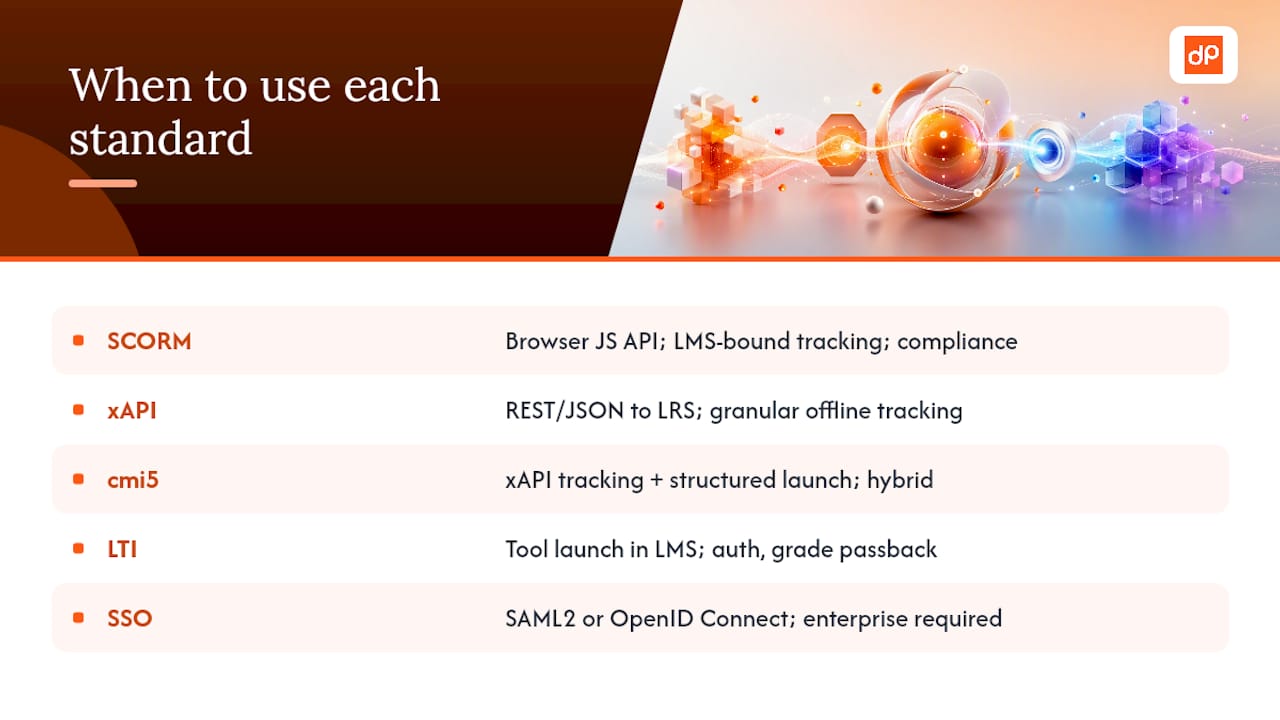
SCORM handles LMS-bound course tracking reliably and remains the dominant standard for compliance training. It uses a browser-based JavaScript API to communicate completion, score, and time data back to the LMS. xAPI (Experience API, also called Tin Can) uses REST/JSON and routes statements to a Learning Record Store rather than directly to the LMS. That architecture enables cross-platform tracking, offline mobile learning, and granular interaction data that SCORM cannot capture.
Industry guidance is consistent: use SCORM when your training lives primarily in the LMS and you need reliable, low-maintenance tracking. Use xAPI when you need omnichannel analytics, offline or mobile-first delivery, or data that feeds a broader learning analytics pipeline.
cmi5
cmi5 is a hybrid specification that combines xAPI’s tracking model with structured launch behavior similar to SCORM. It is the most modern option for organizations building new content from scratch and wanting both portability and rich data.
LTI (Learning Tools Interoperability)
LTI lets external tools launch inside an LMS with shared authentication and grade passback. It is the standard mechanism for connecting third-party simulations, publisher content, or assessment tools without building custom integrations.
SSO
SAML 2.0 and OpenID Connect are the two dominant protocols. Most enterprise LMS deployments require SSO to avoid separate credential management. Confirm which protocol your identity provider (Okta, Azure AD, Google Workspace) supports before finalizing a vendor.
When do you need an LRS?
Only when you are using xAPI. An LRS is a dedicated database that receives, stores, and queries xAPI statements. Some LMS platforms include a built-in LRS; others require a standalone service. If you are not using xAPI, you do not need an LRS.
Pro Tip: Do not default to xAPI because it sounds more advanced. Most organizations running compliance or onboarding training get everything they need from a SCORM-compliant LMS. Adopt xAPI only when you have a defined analytics use case, a clear LRS architecture, and the engineering capacity to maintain it.
What does a realistic implementation timeline look like?
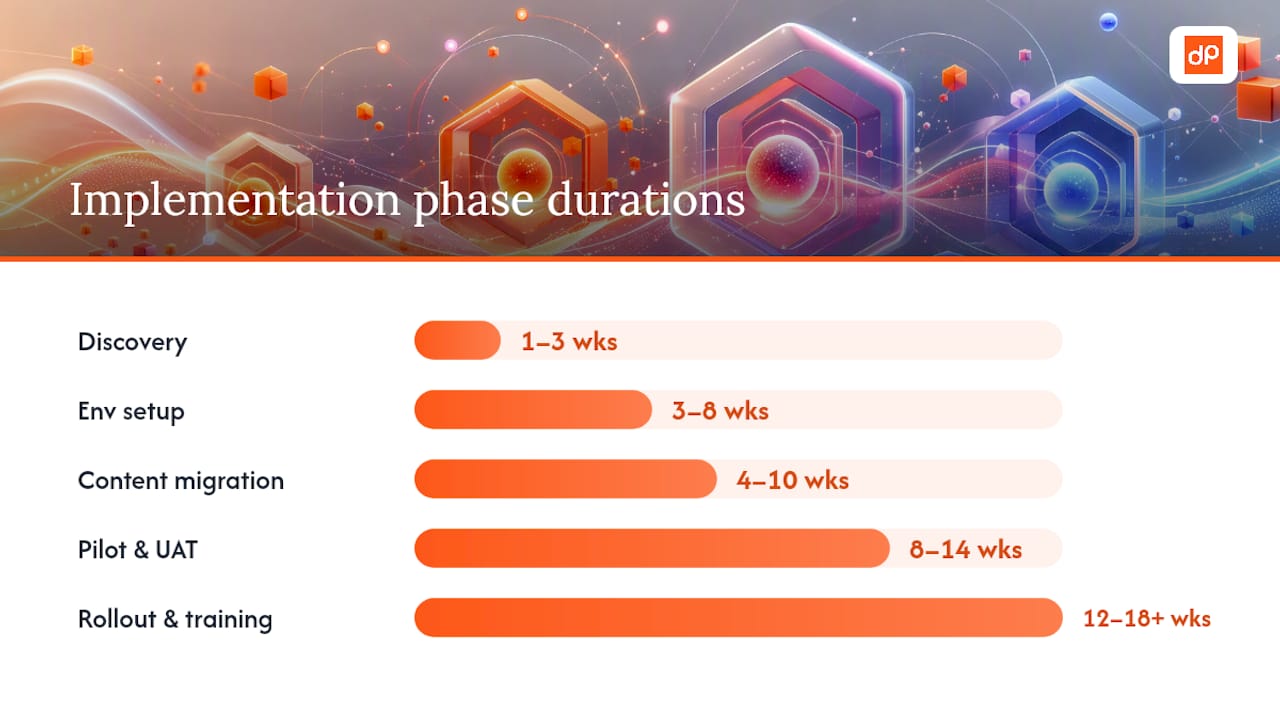
Expect 6–12 weeks for a standard SaaS LMS pilot and 3–9+ months for a meaningful custom build, depending on scope and integration complexity.
Typical implementation phases:
- Discovery and requirements (weeks 1–3): Stakeholder interviews, content inventory, integration mapping, and standards confirmation (SCORM vs xAPI). This phase prevents scope creep later.
- MVP scoping and vendor/architecture selection (weeks 2–4): Finalize platform choice or custom architecture. Define the pilot feature set.
- Environment setup and integrations (weeks 3–8): Configure SSO, HRIS sync, and LRS if applicable. For custom builds, this phase includes API development and data pipeline setup.
- Content migration (weeks 4–10): Package and upload existing SCORM content. Reauthor only when the analytics case requires xAPI-level data. Incomplete content inventories are the most common cause of migration delays.
- Pilot and UAT (weeks 8–14): Run the 4–6 week pilot cohort described in the evaluation section. Capture bugs, UX issues, and integration failures.
- Rollout and training (weeks 12–18+): Phased rollout by department or region. Admin training and learner communication plan.
- Post-launch support (ongoing): SLA monitoring, content updates, integration maintenance, and quarterly analytics reviews.
For custom builds, cost estimates scale with integration depth and analytics complexity. Budget for a discovery engagement before committing to a full build contract. Devpulse’s smart learning platform case study shows how a structured discovery process can produce a ready product plan in six weeks, reducing risk before a dollar of development is spent.
Pro Tip: Always build a staging environment that mirrors production before go-live. Run a rollback drill with your team so you know exactly what to do if a critical integration fails on launch day. Pilot cohort selection matters too: choose early adopters who will report bugs honestly, not just the most tech-comfortable users.
When should you build vs buy? A Devpulse perspective
The default answer is buy. A SaaS LMS gets you to production faster, keeps infrastructure off your plate, and costs less to operate for most training programs. The total cost of ownership argument for custom builds only holds when the platform itself generates revenue or when your analytics requirements are genuinely beyond what packaged software can export.
Where a custom build makes sense: you are building a productized learning offering (a platform you sell, not just use internally), you need proprietary learner analytics that feed a recommendation engine or adaptive content system, your workflow integrations are unusual enough that every SaaS vendor quotes a significant custom integration fee, or you need white-label multi-tenancy at a scale where per-tenant SaaS pricing becomes prohibitive.
What people underestimate is the ongoing cost of a custom build. Development is the beginning, not the end. You are committing to infrastructure management, security patching, feature development, and support. That overhead is manageable when the platform is a core business asset.
Devpulse’s work in edtech and e-learning consistently shows that the organizations who get the most from a custom build are those who arrive with a clear product thesis: a specific learner outcome they cannot achieve with off-the-shelf tools, and a business model that justifies the engineering investment. The ones who struggle are those who commission a custom platform because they disliked the UI of the SaaS options they evaluated. That is a solvable problem with configuration, not custom code.
Devpulse builds custom e-learning platforms when off-the-shelf falls short
When your requirements outgrow what packaged platforms can deliver, Devpulse designs and engineers the custom solution. Our edtech engineering practice covers the full stack: product discovery and MVP scoping, SCORM and xAPI integration with standalone or embedded LRS architecture, web and mobile application development, custom analytics pipelines and data engineering, and ongoing support and maintenance after launch.
A discovery engagement typically runs four to six weeks and produces a scoped architecture, integration map, and cost estimate. That gives you a concrete basis for a build decision without committing to a full development contract upfront. Our AI-enhanced collaboration case study shows what that looks like in practice for an education-focused product.
Ready to scope your platform? Talk to the Devpulse engineering team about a technical audit or discovery engagement.