











A software rollout is a structured, organization-wide process that takes a new or updated application from planning and testing through deployment, training, and post-launch support, with the goal of realizing measurable business value, not just installing code. Your single first action: map your blast radius — define exactly which users, systems, and workflows are affected if something goes wrong — then choose a rollout strategy that matches your risk tolerance.
Before your next planning meeting, do three things:
- Map your blast radius. List every system, integration, and user group the new software touches. This one exercise shapes every strategy decision that follows.
- Identify key stakeholders. Confirm who owns technical delivery, who owns user adoption, and who has authority to halt or roll back the release.
- Choose your pilot cohort. Select a representative pilot group from your user base to validate both technical stability and onboarding quality before wider deployment.
To convert this into a one-page plan for leadership review, fill in three fields: scope (which systems and users), blast radius (what breaks if it fails), and success metrics (the two or three numbers that define “done”). That single page becomes your north star for every decision in the weeks ahead.
Table of Contents
- How does a software rollout differ from deployment and implementation?
- What are the key stages of an effective software rollout?
- Which rollout strategy fits your situation?
- How do you build a practical rollout plan template?
- How should you design a pilot to catch real problems?
- How do you drive user adoption through change management?
- What KPIs tell you whether a rollout is succeeding?
- What are the most common rollout risks and how do you mitigate them?
- Which tools does your rollout stack need?
- Sample 8–12 week rollout plan: week by week
- Devpulse’s rollout readiness checklist and common fixes
- Why data migration and integrity assurance belong in your rollout plan from day one
- Key Takeaways
- The part of rollout planning most teams get wrong
- Devpulse’s engineering and DevOps services for rollouts
- Useful sources and further reading
How does a software rollout differ from deployment and implementation?
These three terms get used interchangeably in most planning decks, and that confusion has real consequences. When a team treats a rollout as a pure deployment task, they ship code on time and miss adoption entirely. When they treat it as an implementation project, they over-engineer governance and under-invest in day-one user readiness.

A software rollout is the broadest of the three: it encompasses planning, testing, deployment, training, in-app guidance, and post-launch support, with success measured by user adoption and business outcomes. Poor rollouts reduce ROI and productivity; well-run ones accelerate value realization.
Deployment is a technical sub-activity within a rollout. It is the act of moving code from one environment to another, as Wikipedia’s software deployment entry describes: all activities that make a software system available for use. Deployment success is measured by uptime, error rates, and release velocity.
Implementation typically refers to the configuration, integration, and customization work required to make a system fit a specific organization, often used in the context of ERP or CRM projects. It sits between deployment and full rollout.
| Activity | Who owns it | How success is measured |
|---|---|---|
| Deployment | Engineering / DevOps / SRE | Uptime, error rate, release velocity |
| Implementation | Technical lead + solution architect | Configuration completeness, integration health |
| Rollout | Product, PM, change management, business sponsor | Adoption rate, time-to-proficiency, business KPIs |
Practical consequences of mixing these up:
- A deployment-focused plan ships on time but has no training schedule, producing a wave of support tickets and low adoption.
- An implementation-focused plan configures every field correctly but never defines what “good adoption” looks like, so leadership has no signal on ROI.
- A rollout plan that ignores deployment rigor ships a brittle release and triggers a rollback that destroys user trust.
Assign a named owner to each activity before planning starts. The moment “rollout” and “deployment” share one owner and one success metric, something important falls through.
What are the key stages of an effective software rollout?
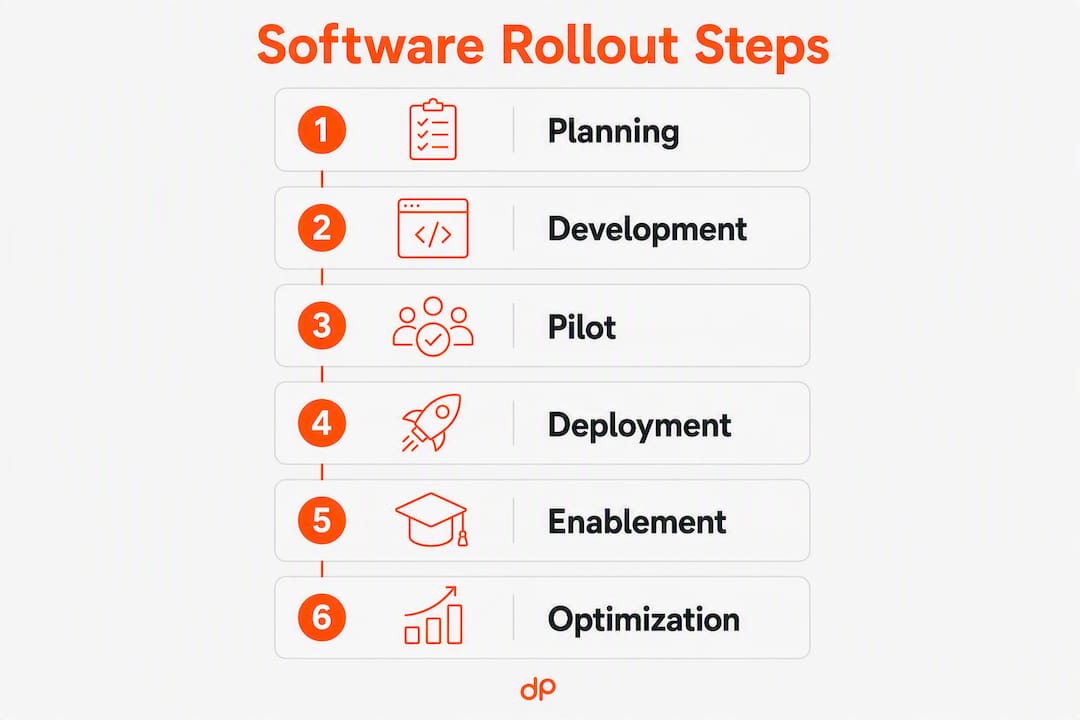
The six stages are: planning and assessment → development and testing → pilot → phased deployment → enablement → post-launch optimization. Each stage has a primary deliverable and a named owner; skipping one typically surfaces as a crisis in a later stage.

Planning and assessment
The PM and business sponsor define scope, blast radius, success metrics, and rollout strategy. The primary deliverable is a one-page rollout brief approved by leadership. Duration: 1–2 weeks.
Development and testing
Engineering and QA build, integrate, and validate the software against acceptance criteria. Deliverables include a test report, a runbook, and a rollback plan. Duration: 2–4 weeks, running in parallel with pilot preparation.
Pilot
A representative cohort (5–10% of users) runs the software in production conditions. The product team and change management lead monitor adoption metrics and collect structured feedback. Deliverable: a pilot readiness report with a go/no-go recommendation. Duration: 1–2 weeks.
Phased deployment
Engineering and SRE release to progressively larger user groups, using feature flags or ring-based controls to limit blast radius. Progressive delivery frames canary releases, flags, rings, and observability as a combined approach that enables frequent releases while reducing risk. Duration: 1–3 weeks depending on strategy.
Enablement
Change management and support deliver training, job aids, and in-app guidance. Internal advocates are activated. Deliverable: training completion report and a support ticket baseline. Duration: overlaps with phased deployment.
Post-launch optimization
The PM and product team review KPIs, run retrospectives, and prioritize fixes. Deliverable: a 30/60/90-day review report. Duration: ongoing.
Deliverables and owners by stage:
| Stage | Core artifact | Primary owner |
|---|---|---|
| Planning | Rollout brief, RACI | PM + business sponsor |
| Development/testing | Test report, runbook, rollback plan | Engineering + QA |
| Pilot | Pilot readiness report | Product + change management |
| Phased deployment | Release log, monitoring dashboard | Engineering + SRE |
| Enablement | Training completion report | Change management + support |
| Post-launch | 30/60/90-day KPI review | PM + business sponsor |
For a typical mid-size enterprise internal application, the full arc runs several weeks. Sufficient pre-launch preparation correlates to stronger day-one performance and sustained momentum, a pattern that holds for internal enterprise rollouts as much as for consumer app launches.
Which rollout strategy fits your situation?
The right strategy depends on one question: how much can you afford to get wrong at once? Enterprise teams choose deployment strategies by desired blast radius, and phased approaches are the most common choice in enterprise contexts because they limit disruption while still enabling frequent releases.
Big Bang replaces the old system for all users simultaneously. It is the fastest path to full adoption but carries the highest blast radius. Use it only when the old system cannot run in parallel, the user base is small and technically confident, and a tested rollback path exists.
Phased/Ring deployment releases to progressively larger rings of users: internal testers, then a small external group, then broader segments. It limits blast radius at each gate and gives teams time to absorb feedback. Most enterprise rollouts default here.
Canary release routes a small percentage of real traffic to the new version while the rest stays on the stable version. It requires strong observability and automated rollback gates. A/B tests, shadow traffic, and canary releases are useful for validating behavior under real traffic without exposing all users to risk.
Blue-Green deployment runs two identical production environments. Traffic switches from Blue (current) to Green (new) in one step, with instant rollback by flipping traffic back. It requires double the infrastructure but delivers near-zero downtime. Modern deployment strategies include blue/green, canary, shadow, and continuous deployment, with automation and repeatability as the keys to low-risk execution.
Feature flags decouple deployment from release entirely. Code ships to production but features stay hidden until a flag is toggled. Decoupling deployment from release with feature flags lets engineering deploy continuously while product teams control user exposure, enabling fast rollback and partial exposure strategies.
| Strategy | Blast radius | Reversibility | Infrastructure cost | Observability need |
|---|---|---|---|---|
| Big Bang | Maximum | Low (full rollback only) | Low | Moderate |
| Phased/Ring | Incremental | High (per ring) | Low | Moderate |
| Canary | Minimal (% of traffic) | High (automated) | Low-moderate | High |
| Blue-Green | Near-zero | Instant (traffic flip) | High (2x infra) | Moderate |
| Feature flags | Configurable | Instant (flag toggle) | Low | Moderate-high |
Decision criteria for enterprise scenarios:
- Choose Big Bang when the legacy system cannot coexist with the new one and the user base is relatively small and technically confident.
- Choose Phased/Ring as the default for most internal enterprise applications with a reasonably large user base.
- Choose Canary when you need real-traffic validation and have mature monitoring in place.
- Choose Blue-Green when uptime SLAs are strict and infrastructure budget allows.
- Use feature flags whenever you want to decouple engineering velocity from business release decisions.
Pro Tip: Combine strategies rather than choosing one in isolation. A common pattern: deploy with feature flags (instant rollback), then use a ring-based exposure schedule to widen access progressively. This gives you the reversibility of flags and the controlled pacing of rings.
How do you build a practical rollout plan template?
Start with three fields before anything else: scope (which systems, integrations, and user groups), blast radius (what fails and who is affected if the release goes wrong), and success metrics (the two or three KPIs that define a healthy rollout). Everything else in the plan flows from these.
RACI matrix
| Activity | Engineering | SRE/DevOps | Product/PM | Security | Support | Business owner |
|---|---|---|---|---|---|---|
| Rollout strategy decision | C | C | R/A | C | I | A |
| Runbook and rollback plan | R | R | A | C | I | I |
| Pilot execution | R | C | A | I | C | I |
| Feature flag configuration | R | R | A | C | I | I |
| Training delivery | I | I | A | I | R | C |
| Go/no-go gate decision | C | C | A | C | I | R |
| Post-launch KPI review | C | C | R | I | C | A |
R = Responsible, A = Accountable, C = Consulted, I = Informed
Rollback checklist and decision gates
A rollback is a business decision, not just a technical one. Define the trigger criteria before launch day so no one is improvising under pressure.
- Define rollback triggers: error rate threshold, latency spike, adoption drop, or data integrity alert.
- Name the single person authorized to call a rollback (typically the SRE lead or PM, confirmed by the business owner).
- Verify the rollback path for every data migration or schema change using parallel-change (expand/contract) patterns before go-live.
- Run a rollback drill in staging at least once before the pilot begins.
- Document the safe rollback steps in the runbook with estimated time-to-restore.
Communication timeline
| Milestone | Audience | Channel | Timing |
|---|---|---|---|
| Rollout announcement | All affected users | Email + intranet | 3 weeks before launch |
| Pilot invitation | Pilot cohort | Direct email + manager briefing | 1 week before pilot |
| Pilot feedback loop | Pilot cohort + PM | Survey + weekly sync | During pilot |
| Launch day notice | All users | Email + in-app banner | Launch day |
| Post-launch check-in | All users + managers | Email + team meeting | 2 weeks post-launch |
| 30-day review | Leadership | Dashboard + slide deck | 30 days post-launch |
For IT team onboarding and technical enablement, align the communication timeline with the training schedule so users receive context before they receive access.
How should you design a pilot to catch real problems?
A pilot’s job is to reduce blast radius and validate your onboarding funnel before you scale. Define its scope in one sentence: which users, which features, and which success criteria must pass before you widen the release.
Pilot design template
- Cohort selection: Choose 5–10% of your total user base. Include a mix of power users, average users, and at least one skeptic. Avoid selecting only enthusiastic early adopters — they mask onboarding friction that will surface at scale.
- Sample size guidance: For an internal application with 500 users, a pilot of 25–50 users is sufficient to surface most critical issues. For 5,000 users, aim for 150–250.
- Duration: Run the pilot for 1–2 weeks minimum. Shorter pilots miss usage patterns that only emerge after the novelty wears off.
- Monitoring requirements: Instrument error rates, feature activation rates, time-to-first-value, and support ticket volume from day one of the pilot.
Acceptance criteria examples
| Category | Criterion | Suggested threshold |
|---|---|---|
| Technical | Error rate in production | — |
| Performance | Page/screen load time | Under 2 seconds at P95 |
| UX | Task completion rate (core workflow) | — |
| Business | Core workflow adoption | — |
| Support | Ticket volume vs. baseline | No more than 1.5x pre-rollout baseline |
Converting pilot insights into fixes
- Categorize feedback into three buckets: blocking issues (stop the rollout), high-friction issues (fix before scale), and nice-to-have improvements (backlog).
- Prioritize blocking and high-friction issues by frequency, not by who reported them loudest.
- Re-test every blocking fix in staging before widening the release.
- Share a summary of pilot findings with leadership before the go/no-go gate — this builds confidence and surfaces resource needs early.
How do you drive user adoption through change management?
Adoption is the primary success control for any rollout. Three tactics have the highest impact: targeted communications before access is granted, role-based training tied to real workflows, and an internal advocate program that creates peer-to-peer momentum. Technical delivery without these three produces a system that is available but unused.
Communications plan
| Audience | Channel | Message | Cadence |
|---|---|---|---|
| All users | Email + intranet | Why this change, what to expect | 3 weeks before, 1 week before, launch day |
| Managers | Briefing + FAQ doc | How to support their teams | 2 weeks before launch |
| Power users / advocates | Direct outreach | Early access invitation, feedback role | 4 weeks before launch |
| Support team | Training session | Known issues, escalation path | 1 week before launch |
Training matrix
| Role | Training type | Format | Timing |
|---|---|---|---|
| End users | Core workflow walkthrough | Live session + job aid | 1 week before launch |
| Power users | Deep-dive feature training | Hands-on workshop | 2 weeks before launch |
| Managers | Change leadership briefing | 30-minute briefing | 2 weeks before launch |
| Support staff | Issue triage and escalation | Live session + runbook | 1 week before launch |
| IT/DevOps | System admin and monitoring | Technical documentation | During pilot |
Digital adoption platforms (DAPs) such as in-app walkthroughs and contextual tooltips reduce the burden on live training by surfacing guidance at the moment of need. They are particularly effective for complex workflows where users are unlikely to remember a one-time training session.
Internal advocate program
Recruit 3–5 advocates per department from the pilot cohort. These are users who found the software genuinely useful and are willing to answer peer questions. Give them early access, a direct feedback channel to the PM, and recognition from leadership.
Pro Tip: Avoid recruiting only the most technically confident users as advocates. A mid-level user who struggled initially and then succeeded is a far more credible peer voice than a power user who found everything intuitive.
What KPIs tell you whether a rollout is succeeding?
Six KPI groups give you a complete picture: adoption rate, time-to-proficiency, workflow efficiency, support ticket volume, system health, and business outcomes. Track all six from day one of the pilot; waiting until full launch to instrument metrics means you are flying blind during the highest-risk phase.
Core metrics and alert thresholds
- Adoption rate: percentage of licensed users who have completed at least one core workflow. Alert if below 50% at the 2-week mark post-launch.
- Time-to-proficiency: median time from first login to independent task completion without support. Benchmark against your pilot cohort’s baseline.
- Workflow efficiency: task completion time compared to the legacy system. A regression here is an early signal of UX friction.
- Support ticket volume: track tickets per 100 users per week. A spike above 1.5x the pilot baseline warrants a pause and investigation.
- System health: error rate, latency at P95, and uptime. These are your technical go/no-go signals.
- Business outcomes: the two or three metrics your business sponsor defined in the rollout brief (e.g., processing time reduction, revenue per user, compliance completion rate).
Instrumentation approach
Instrument adoption analytics at the event level: log feature activations, workflow completions, and drop-off points rather than just page views. Segment by cohort (pilot vs. ring 1 vs. ring 2) so you can compare adoption curves across groups and identify where onboarding breaks down.
For canary and pilot analysis, apply basic sanity checks before drawing conclusions: confirm your sample is representative, run for long enough to capture weekly usage patterns, and separate novelty-driven early spikes from sustained engagement.
Reliability engineering principles hold that rollouts succeed when changes are small, reversible, and measurable. Your KPI dashboard is the “measurable” leg of that triad.
What are the most common rollout risks and how do you mitigate them?
The top risks fall into three categories: technical (integration failure, data corruption, performance degradation), operational (runbook gaps, support overload, timeline compression), and people (change resistance, insufficient training, advocate burnout). Most rollout failures involve at least two of these simultaneously.
| Risk | Likelihood | Impact | Mitigation | Owner |
|---|---|---|---|---|
| Integration failure | Medium | High | API compatibility testing in staging; contract tests before go-live | Engineering |
| Data migration error | Medium | High | Parallel-change patterns; data validation scripts; rollback tested | Engineering + DBA |
| Performance degradation | Medium | High | Load testing at 2x expected peak; P95 latency alerts | SRE |
| Change resistance | High | High | Early advocate program; manager briefings; clear “why” messaging | Change management |
| Support overload | Medium | Medium | Pre-launch support training; tiered escalation path; FAQ library | Support lead |
| Runbook gaps | Low | High | Runbook review by SRE + PM; drill before pilot | SRE |
| Timeline compression | High | Medium | Buffer weeks built into plan; go/no-go gates with authority to delay | PM + business owner |
| Feature flag misconfiguration | Low | High | Flag audit before each ring expansion; automated flag tests | Engineering |
Mitigation actions for common scenarios
- Integration failure: run contract tests (e.g., consumer-driven contracts with Pact) before any production deployment. If an integration breaks in the pilot, treat it as a blocking issue regardless of workaround availability.
- Data migration issues: never migrate without a validated rollback path. Use expand/contract (parallel-change) patterns for schema changes so the old and new schemas coexist during the transition window.
- Change fatigue: if your organization has had multiple rollouts in the past 12 months, acknowledge the fatigue explicitly in your communications. Shorter, more focused training sessions outperform long workshops when users are already stretched.
Rollback and runbook drills
Run at least one full rollback drill in staging before the pilot begins. Time it. Document the actual time-to-restore and compare it against your SLA commitment. If the drill reveals gaps, fix them before any production traffic touches the new release. Practicing rollbacks as drills and verifying rollback paths for data migrations using parallel-change patterns is a discipline that separates teams with strong operational maturity from those who discover their rollback plan is theoretical only when they need it most.
Which tools does your rollout stack need?
Six categories of tooling are non-negotiable for an enterprise-grade rollout. Missing any one of them creates a blind spot that typically surfaces as an incident.
- CI/CD pipeline: automates build, test, and deployment steps, reducing human error and enabling repeatable releases. Examples include Jenkins, GitHub Actions, and GitLab CI.
- Feature flag service: decouples deployment from release and enables instant rollback without a code deployment. LaunchDarkly and Unleash are widely used options.
- Monitoring and observability: provides real-time visibility into error rates, latency, and system health. Datadog, Grafana, and New Relic cover most enterprise needs.
- Digital adoption platform (DAP): delivers in-app guidance, walkthroughs, and tooltips to reduce training burden. WalkMe and Pendo are common choices.
- Configuration management: manages environment-specific settings and secrets. HashiCorp Vault and AWS Secrets Manager handle secrets; Ansible and Terraform handle infrastructure configuration.
- Support and ticketing: captures user issues and tracks resolution. Jira Service Management and ServiceNow are standard in enterprise environments.
Integration checks before launch
- Verify SSO/identity provider integration: confirm that all user groups authenticate correctly in the new system before the pilot begins.
- Test API compatibility between the new application and every downstream system it writes to or reads from.
- Validate backup and recovery: confirm that a full data restore from backup completes within your RTO (recovery time objective).
- Check data flow integrity: run a sample data migration in staging and compare record counts and checksums against the source system.
- Confirm monitoring coverage: every critical service path should have an alert configured before go-live, not after.
For teams building or modernizing the underlying platform, Devpulse’s DevOps services cover CI/CD pipeline design, observability setup, and automation practices that directly support low-risk rollout execution.
Sample 8–12 week rollout plan: week by week
This plan applies to a typical mid-size enterprise internal application with 200–1,000 users, a single engineering team, and a defined change management function. Adjust durations by compressing or extending the pilot phase based on complexity and organizational change readiness.
| Week | Engineering | QA | SRE/DevOps | Product/PM | Change management | Support |
|---|---|---|---|---|---|---|
| 1–2 | Finalize scope, architecture review | Test plan drafted | Infra provisioned | Rollout brief approved, RACI confirmed | Stakeholder mapping, advocate recruitment | Support training plan drafted |
| 3–4 | Feature development complete | Integration and regression testing | CI/CD pipeline configured, monitoring alerts set | Pilot cohort selected, acceptance criteria defined | Communications drafted, manager briefings scheduled | FAQ library drafted |
| 5–6 | Feature flags configured, staging deployment | UAT with pilot cohort | Runbook finalized, rollback drill completed | Pilot launched, daily monitoring | Pilot user onboarding, feedback collection | Support team trained |
| — | Pilot fixes deployed | Regression re-test on fixes | Monitoring reviewed, alert thresholds tuned | Go/no-go gate: pilot readiness report | Pilot debrief, training materials finalized | Escalation path confirmed |
| — | Ring 1 deployment (25% of users) | Smoke tests post-ring-1 | Live monitoring, on-call coverage | Ring 1 adoption metrics reviewed | Ring 1 user communications, advocate activation | Ticket volume monitored |
| — | Ring 2 deployment | Regression and performance tests | SLO tracking, incident response ready | Ring 2 KPI review | Broader training sessions, manager check-ins | Support surge coverage |
| 12 | Full deployment, flag cleanup | Final acceptance sign-off | Steady-state monitoring | 30-day KPI review scheduled | Post-launch communications, advocate recognition | 30-day ticket trend review |
Go/no-go gate checklist
- Acceptance criteria met for all blocking and high-friction issues from the pilot.
- Rollback plan tested and time-to-restore documented.
- Monitoring alerts active and confirmed by SRE.
- Training completion rate above 80% for ring 1 users.
- Business owner sign-off obtained.
Scaling the timeline: for a smaller rollout (under 100 users, low integration complexity), compress weeks 1–4 into two weeks and run a shorter pilot of 5 days. For a large enterprise rollout (5,000+ users, multiple integrations), extend the pilot to 3–4 weeks and add a ring 0 (internal IT team only) before the broader pilot cohort.
For guidance on scaling engineering teams to match rollout phases, particularly when adding capacity for a major release, the staffing model matters as much as the technical plan.
Devpulse’s rollout readiness checklist and common fixes
The most common rollout problems we see at Devpulse are not architectural. They are operational and human: a rollback plan that was never tested, an onboarding funnel that loses 40% of users at step two, and a monitoring setup that alerts on the wrong signals. The six fixes below address the issues that appear most frequently across enterprise rollouts.
- Decouple deploy and release with feature flags. Teams that ship code and expose it to users in the same step have no fast rollback path. Separating the two gives engineering and product independent control.
- Fix onboarding friction before scaling. Audit your onboarding funnel during the pilot. A drop-off at a specific step is a signal, not a user education problem. Fix the UX before widening the release.
- Implement canary observability before the first ring. Monitoring configured after a ring-1 incident is too late. Every critical path needs an alert before any production traffic touches the new release.
- Run a rollback drill, not just a plan. A rollback plan that has never been executed is a hypothesis. Time the drill, document the gaps, and fix them.
- Assign a named change management owner. When change management is “everyone’s responsibility,” it belongs to no one. One named owner with authority and a budget produces measurably better adoption outcomes.
- Set a 30-day KPI review date at kickoff. Teams that schedule the post-launch review before launch are far more likely to act on the data. Teams that plan to “review when things settle” rarely do.
Use this checklist to audit your current rollout readiness:
- Blast radius documented and approved by business owner
- Rollout strategy selected and justified against risk tolerance
- Acceptance criteria defined for pilot (technical, UX, business)
- Rollback plan written, tested, and time-to-restore recorded
- Named change management owner confirmed with budget
- Training matrix completed and delivery scheduled
- Monitoring alerts configured and verified in staging
- 30-day KPI review date on the calendar
Why data migration and integrity assurance belong in your rollout plan from day one
Data migration is the most common source of rollout delays and post-launch incidents, yet it is frequently treated as a late-stage technical task rather than a first-week planning item. By the time a migration issue surfaces in the pilot, the window to fix it cleanly has often closed.
The core principle is straightforward: never migrate data without a validated rollback path. For schema changes, use parallel-change (expand/contract) patterns so the old and new schemas coexist during the transition. This means the application can run against either schema, giving you the ability to roll back without data loss even after users have begun writing to the new structure.
Before the pilot begins, run a full migration in staging and validate three things: record counts match the source system, checksums confirm data integrity, and the application behaves correctly against the migrated dataset. Any discrepancy found in staging is a blocking issue. The same discrepancy found in production after ring-1 deployment is an incident.
For organizations moving from legacy systems, data quality problems in the source system are the most common cause of migration failures. A pre-migration data audit, run 4–6 weeks before the planned go-live, surfaces these issues early enough to address them without compressing the timeline. Devpulse’s engineering and modernization services include legacy data migration planning as part of broader modernization engagements, with data validation frameworks built into the delivery process.
Post-migration, keep the source system in read-only mode for at least two weeks after full deployment. This preserves a clean rollback option and gives users time to confirm that their data is intact before the old system is decommissioned.
Key Takeaways
A successful software rollout requires a named strategy, a tested rollback plan, and a change management owner before a single line of code reaches production users.
| Point | Details |
|---|---|
| Map blast radius first | Define which users, systems, and workflows are affected before choosing any rollout strategy. |
| Match strategy to risk tolerance | Phased/Ring is the default for most enterprise rollouts; add feature flags for instant rollback capability. |
| Pilot before you scale | A 5–10% pilot cohort with defined acceptance criteria catches blocking issues before they affect the full user base. |
| Adoption requires ownership | Assign a named change management owner with budget; communications and training are as critical as technical delivery. |
| Devpulse accelerates delivery | Devpulse’s engineering and DevOps services cover rollout planning, CI/CD, observability, and legacy modernization end to end. |
The part of rollout planning most teams get wrong
Most rollout guides focus on the technical sequence: CI/CD, feature flags, canary percentages. Those matter. But the pattern Devpulse sees repeatedly is that organizations invest heavily in deployment infrastructure and almost nothing in the human architecture around it.
A rollback plan that has never been drilled is a document, not a capability. An adoption metric that is defined after launch is a retrospective, not a control. And a change management function that is staffed with whoever is available, rather than someone with authority and a mandate, produces the kind of half-hearted communications that users learn to ignore.
The organizations that run the cleanest rollouts treat adoption as an engineering problem: they instrument it, they set thresholds, and they respond to signals the same way an SRE responds to a latency spike. They do not wait for a 30-day survey to tell them something is wrong.
The other thing worth saying plainly: the 8–12 week timeline is not a guarantee of success. It is a minimum viable planning horizon for a mid-size enterprise rollout. Teams that compress it to four weeks to meet a deadline typically spend the following three months in reactive support mode, which costs more in engineering time and user trust than the four weeks they saved.
If you are a PM or technology leader reading this, the most valuable thing you can do before your next rollout is schedule the 30-day KPI review before you write a single line of the rollout plan. That one act forces the entire team to agree on what success looks like, and it is the clearest signal that leadership is serious about measuring outcomes rather than just shipping code.
Devpulse’s engineering and DevOps services for rollouts
Devpulse delivers end-to-end rollout support for organizations that need more than a plan document. For technology leaders managing a complex deployment, legacy modernization, or a first enterprise-scale rollout, Devpulse’s combination of custom engineering, DevOps automation, and post-launch support removes the gaps that typically cause rollouts to stall.

Where Devpulse adds the most direct value in a rollout context:
- Engineering modernization: refactoring legacy systems and APIs to support phased deployment patterns, feature flags, and parallel-change data migrations.
- DevOps and CI/CD: designing and implementing automated pipelines, observability stacks, and rollback automation so your team ships with confidence.
- Onboarding and adoption enablement: building in-app guidance, DAP integrations, and training content that reduce time-to-proficiency.
- AI-powered automation: applying agentic AI to rollout analytics, anomaly detection, and remediation workflows.
- Post-launch support and maintenance: ongoing technical support with defined SLOs to cover the critical weeks after go-live.
If you are planning a rollout and want a rapid readiness review, contact Devpulse to discuss your scope, timeline, and risk profile. The review takes one working session and produces a prioritized gap list you can act on immediately.
Useful sources and further reading
- Progressive experimentation with feature flags (Microsoft Docs) — authoritative guidance on blast radius, ring deployment, and flag-based progressive delivery from Microsoft’s own engineering practices.
- What is progressive delivery? (Microsoft Docs) — covers canary, rings, observability, and the reliability engineering principles behind progressive delivery.
- Software deployment (Wikipedia) — foundational definition of deployment activities and the distinction between producer-side and consumer-side deployment.
- Software deployment and feature flags (Atlassian) — explains the deploy/release distinction and how feature flags enable continuous delivery with controlled exposure.
- Devpulse DevOps services — Devpulse’s CI/CD, automation, and observability offerings for teams building rollout infrastructure.