














Most triage advice says to score a bug's severity and then work the most severe item first. One field, one sorted list, no arguments. That model survives until the morning a crash report lands from a browser almost nobody uses and, twenty minutes later, a pricing typo goes live on the page a paid campaign points at. The crash tops the list because it's a crash. The typo waits.
Severity measures how badly the system or users are harmed. Priority sets the order in which the team works. Those are two different questions, answered by different people, from different information, and on different clocks. Treating them as one field is the most common reason a backlog looks disciplined while the wrong things ship broken.
The split isn't a glossary nicety. It's what decides whether a support engineer gets pulled off a call, whether a release gets held, and whether the incident review asks why nobody looked at the thing that cost money. Priority vs severity becomes a practical problem the moment you have more incidents than capacity, which is most weeks.
What follows is how the two fields split in real triage, how to re-check both as facts change, and how to score your labels afterwards against the harm that was confirmed. The charts and tables are built to be lifted into your own runbook.
Table of Contents
- Severity and Priority Side by Side
- How Severity Is Scored from Real Impact
- How Priority Is Set After Impact Is Known
- The Triage Matrix for Severity and Priority
- Worked Examples Where Severity and Priority Split
- Assigning Severity and Priority in Your Workflow
- Confirm Your Triage Rules Before the Next Incident
Severity and Priority Side by Side
The one-line answer: severity measures how badly the system or users are harmed, while priority sets the order in which the team works.
Severity is largely a property of the defect. Priority is a property of the team's decision, and it can move without the defect changing at all.
| Criterion | Severity | Priority |
|---|---|---|
| Question answered | How bad is the impact? | What gets worked on first? |
| What it measures | Size of the failure and who it hits | Order of response and fix |
| Usually set by | QA, support or the reporter, from observed impact | Triage owner or incident lead, using context |
| When it changes | When impact is confirmed or reduced | When deadlines, workarounds or capacity change |
| Example | Crash for one user on a rare browser: high | Typo on a launch-day pricing banner: high |
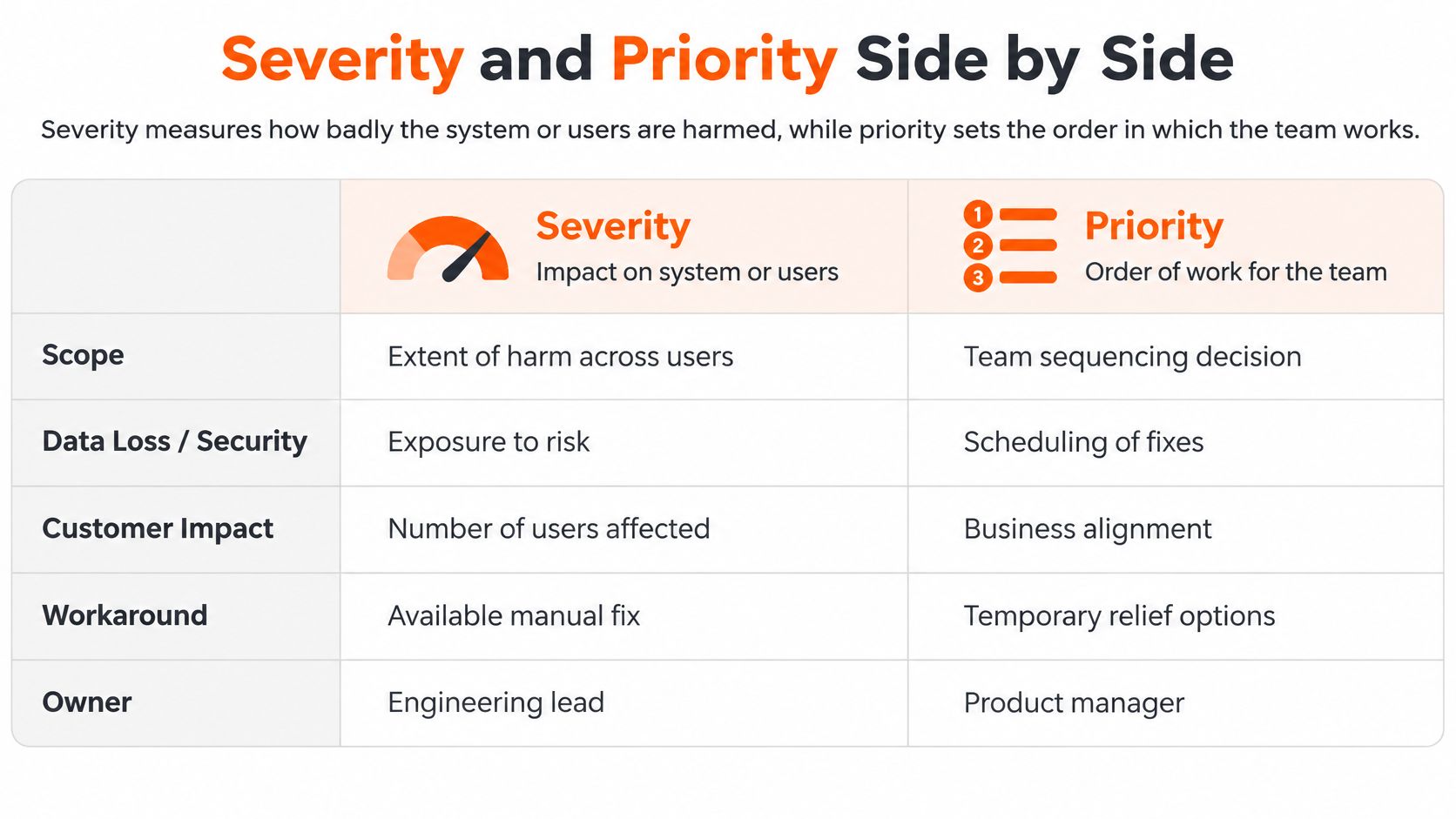
A checkout page makes the split easy to see. A crash that hits one user on a browser you barely support is high severity, low priority: the defect is real, the blast radius is small, and the fix costs a day of debugging a rendering path nobody else walks. A typo in the pricing banner on launch morning is low severity, high priority: the system works perfectly, and every visitor sees the wrong number on the day you're paying for traffic.
Run the same defect through both fields and you get two answers that don't contradict each other. The crash is a serious failure. The typo is an urgent piece of work. Neither field overrides the other, which is exactly why one field isn't enough.
Practical rule: if your tracker has one field, you'll keep finding team members who quietly repurpose severity to mean urgency. Two fields, both visible on the ticket, ends that argument.
Where teams go wrong is the assumption that the two should track each other. They don't, and a triage process that forces them into alignment teaches people to inflate severity whenever something feels urgent, which corrodes the only field that describes actual harm.
Define both fields in writing before the next incident, with one example per level. A definition nobody wrote down is a definition that changes depending on who's in the room.
How Severity Is Scored from Real Impact
A severity scale is only useful if a new engineer can apply it at 2am without asking anyone. Start with the three-level scale Atlassian publishes in its incident handbook, which pairs each level with an example and a response pattern.
| Severity | Definition | Example | Normal response |
|---|---|---|---|
| SEV 1 | Critical, very high impact | Service unavailable to all customers, privacy breach, or customer data loss | Immediate response with continuous 24/7 management |
| SEV 2 | Major, affects a subset of customers or impairs core functionality | Core feature broken for a segment of customers | Immediate response with continuous 24/7 management |
| SEV 3 | Minor, low-impact inconvenience | Workaround available or usable but degraded performance | Handled by the responsible team during business hours |
Notice what the definitions measure: availability, data, privacy, and the share of customers affected. Nothing in them mentions deadlines, contract value or who escalated fastest. That's the point.
Turning impact into a number
Prose definitions drift. Percentages don't. Google's SRE guidance on product-focused reliability works severity from measured feature impact, using a mail service as the example. A major incident includes any impact on sending or receiving mail, or more than 20% impact on core features. A medium incident covers more than 5% impact on core features or more than 20% impact on auxiliary features. A minor incident is any impact above 0% on any feature.
Read as bands, that gives you a chart you can pin next to the on-call laptop:
| Core-feature impact | Chart | Band |
|---|---|---|
| 0 to 5% | ██░░░░░░░░ | Below medium; minor if above 0% |
| Above 5% to 20% | ██████░░░░ | Medium |
| Above 20% | ██████████ | Major |
Headcount-based scales do the same job for customer-facing products. Atlassian's developer incident severity levels set the lowest user band at 1,000 to 100,000 affected users or 3 to 10 affected apps, the middle band at 100,001 to 5,000,000 users, and the top band above 5,000,000 users, escalating also on report volume from more than 2 reports up to more than 15.
The procedure, then the self-check
Count the affected features and users, compare the count against the thresholds, then pick the level. Before you apply Google's major, medium and minor labels, agree a mapping rule onto your own SEV 1, SEV 2 and SEV 3, so every incident is scored on one scale instead of two vocabularies fighting in the same channel.
The self-check before you commit a level: can you name the feature, the percentage and the user group behind it? If not, you're guessing, and the honest label is "unconfirmed" with a time to re-check.
When a scale needs more formal treatment, a structured risk method adds detection and occurrence to the impact score. The FMEA risk ranking guide for engineers explains how risk priority numbers combine those factors. Separately, the impact data behind a severity call only exists if reports capture it, which is why a QA checklist built around reproducible evidence saves hours of triage guesswork.
How Priority Is Set After Impact Is Known
Emergency medicine settled this argument before software existed. In disaster response, severity describes the seriousness of a patient's condition, while priority determines the order in which limited resources are allocated. The distinction became operational with the Simple Triage and Rapid Treatment (START) system, created in 1983 by the Newport Beach Fire and Marine Department and Hoag Hospital in California. START sorts patients into four categories: red for immediate treatment, yellow for delayed, green for minor injuries, and black for deceased or expectant patients.
The Cambridge review of START triage accuracy makes the logic explicit: the system doesn't rank injuries by severity, it converts observations into an action sequence. A severe injury can receive a lower treatment priority when survival is unlikely with the resources on hand, while a seriously injured patient with a good chance of survival goes first. Responders start by identifying who can walk, then assess the rest on breathing, respiratory rate, circulation and mental status.
That's not callousness. It's arithmetic under constraint, and incident response runs the same arithmetic.
The factors that move work up or down
| Factor | Question to ask | Raises priority when |
|---|---|---|
| Urgency and time sensitivity | Is the damage still growing or is a deadline closing? | Data loss or a contractual deadline is hours away |
| Users and customers affected | How many people and which accounts are hit? | A key account or a large user segment is affected |
| Regulatory or safety exposure | Does the defect break a legal, privacy or safety requirement? | A compliance deadline or patient-facing workflow is involved |
| Mitigation available | Is there a tested workaround? | No workaround exists or the workaround is failing |
| Launch or revenue timing | Does the defect touch a launch, billing or sales event? | It lands on a campaign or payment flow during the event |
| Team capacity and ownership | Is an owner available to act now? | The only owner is unavailable and the window is short |
Two rows do most of the work in practice. A tested workaround can hold a high-severity defect at medium priority for weeks. A payment issue during a flash sale can pull a low-severity defect to the top of the queue within an hour.
The response windows you promised in your service level agreement also belong here. They're a priority input, not a separate document living in a sales folder.
Priority isn't a label you set once at intake. It's a decision you re-make every time the facts move.
Which is why the same defect can climb or fall without its severity changing by a single level. A workaround that fails at 4pm changes the priority. The defect didn't.
The Triage Matrix for Severity and Priority
Two fields only pay off when they combine into an action. Here's the decision grid, with severity in rows and priority in columns.
| Severity | Lower priority | Higher priority |
|---|---|---|
| SEV 1 | Amber. Schedule a dated fix while the mitigation holds | Red. Stop current work and start response now |
| SEV 2 | Cool. Plan the fix in the next release cycle | Hot. Respond immediately and track to resolution |
| SEV 3 | Cool. Place in the backlog for normal planning | Amber. Make a small, targeted change before the deadline or launch |
The logic is short. A SEV 1 with high priority means the response starts now and other work stops. A SEV 1 with lower priority usually means someone found a mitigation that holds, so the fix gets a date and an owner rather than an immediate fire drill. A SEV 3 with high priority is the launch-morning typo: small, targeted, and time-boxed. A SEV 3 with low priority is backlog work and shouldn't get a meeting.
The two cells teams misjudge
The first is the stable outage whose remediation window is closing. Stabilised doesn't mean finished, and if the fix path closes at midnight, the work is urgent even while the graph looks flat.
The second is the minor rendering bug on a feature with a launch deadline. Teams routinely let a severe fault in an unused module outrank it because the severity number is bigger, then ship a visible flaw into a campaign.
Practical rule: rank by the column first when a deadline is inside the week. Rank by the row first when nothing time-bound is competing.
Where you draw the line between levels is a judgement, not a discovery. A 2024 study of 990 people in England and Wales, published by the Office of Health Economics, found the public judged health conditions severe at roughly 50% proportional shortfall, against NICE's 85% threshold, and very severe at about 65% against 95%. Same word, different line, different consequences. Your organisation will have its own version of that gap between what the team calls severe and what the business does.
Treat the grid as a starting point the team adapts with its own thresholds, not a substitute for judgement under incomplete facts.
Worked Examples Where Severity and Priority Split
Three cases, each with a clear answer in both fields.
The export crash. A data export tool crashes for two enterprise customers, and a manual workaround exists: support runs the export server-side and emails the file. Severity is high for those users, because their work stops without the file. Priority is medium while the workaround holds, with a dated fix on the board. If the workaround breaks, priority jumps the same day and severity doesn't move.
The launch-week label. A sign-up page has a misaligned field label the week a campaign drives paid traffic to it. Severity is low, the form submits correctly. Priority is high, because every new visitor sees it and the campaign has a budget attached to first impressions. This is a two-hour fix that gets scheduled ahead of a week-long architectural ticket.
The report that's slow for one client. A reporting job takes minutes longer than the contract promises, and that client's renewal review is tomorrow. Severity is moderate. Priority is high for exactly one day, then it drops back the moment the meeting ends.

Why first labels go wrong
Human triage is systematically noisy. A review of pediatric emergency triage, described in the Emergency Severity Index material published by the US government, reported over-triage rates of 40% to 54% and under-triage rates of 12% to 15%. Over-triage spends scarce capacity on cases that prove less urgent. Under-triage gives a serious case too little urgency, which is the failure that hurts people.
Software shows the same distribution. A defect can be technically severe and low priority when it hits a rarely used, noncritical function with a workaround. A moderately severe fault becomes top priority when it touches many customers, a regulated workflow, revenue operations or a time-sensitive business event.
The noisiest input is the reporter. A study of patient-safety event prioritisation in JMIR Medical Informatics reported that a ranking model retrieved 83% of high-severity events within the top 200 cases, against 41% for reporter-assigned severity. Reporter labels are a starting signal, not ground truth.
Treat the first label as a hypothesis. Re-check it at each change of facts, and score it afterwards against the harm that was confirmed.
Assigning Severity and Priority in Your Workflow
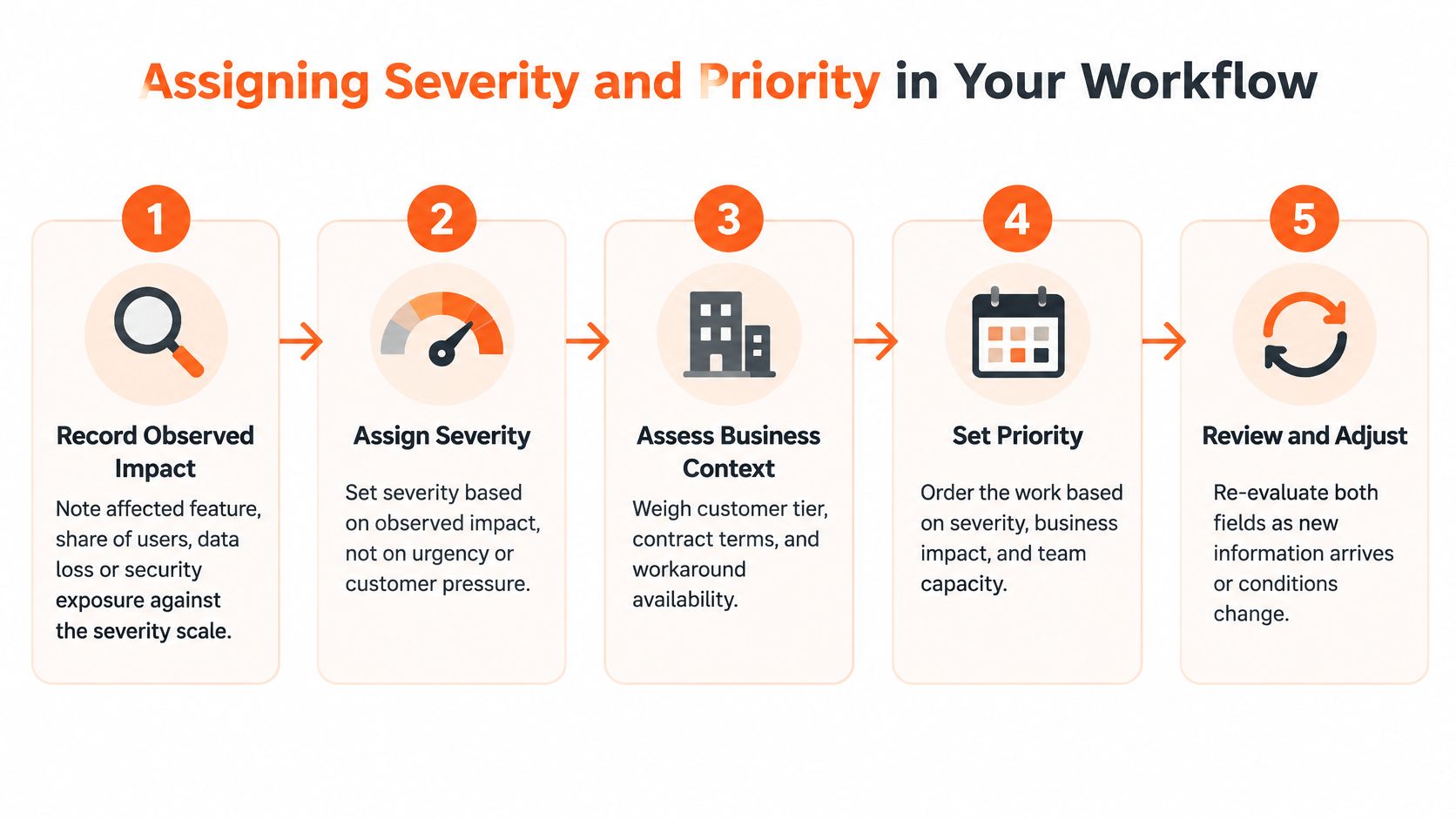
Six steps, in order. Each one has a reason and a familiar way to get it wrong.
Record observed impact first. Name the affected feature, the share of users, any data loss or security exposure, and measure it against your scale. The reason is simple: impact is the only input severity is allowed to use. The common slip is writing a symptom ("page is broken") instead of an impact ("checkout returns 500 for card payments, roughly a fifth of sessions").
Assign severity inside the first minutes, even when you're unsure. A provisional level with a confidence note beats a blank field, because responders need something to work against. The slip is waiting for certainty and leaving the field empty while the clock runs.
Add the priority factors. Deadline, regulatory exposure, mitigation status, launch timing, capacity. Atlassian's incident management guidance is blunt about why this step exists: high severity doesn't automatically put an incident at the top of the priority list, and high priority doesn't always mean the system is down. The slip is skipping this step and letting the severity number decide everything.
Set priority, name one owner, state the response window. One name, not a team alias. The slip is downgrading priority to make a real severity look less alarming, which hides the risk instead of scheduling it.
Re-check both fields at every status change, and whenever a workaround fails or new users report the issue. The two-stage model proves its value at those moments. The slip is setting labels at intake and never revisiting them, so a mitigation that broke at noon is still being trusted at six.
Review after closure. Ask whether the labels predicted the actual impact, then change the rule that missed. The slip is closing the ticket without that question, which guarantees the same misclassification next quarter.
Handling incomplete data and competing demands
Blast-radius numbers are usually wrong in the first ten minutes. Score severity on the confirmed portion, record low confidence, and set a time for the next check. Research on IT-service priority optimisation identifies urgency, impact, reassignment count and resolution time as influential predictors, as set out in this analysis of IT service priority, which is a formal way of saying priority is a live operational decision rather than a synonym for severity. A calibration exercise makes that testable: have responders classify a batch of historical incidents using only what was known in the first five minutes, then measure how much they disagree.
When stakeholders push conflicting demands, the incident lead records each request and decides on the priority factors, not on who asks loudest. A lightweight reporting cadence keeps both fields and their progress visible to everyone without slowing the responders down. We use exactly that: a lightweight reporting cadence that keeps progress visible without getting in the team's way.
For the wider process around these steps, the guide to the incident management process covers escalation paths and post-incident review structure.
Confirm Your Triage Rules Before the Next Incident
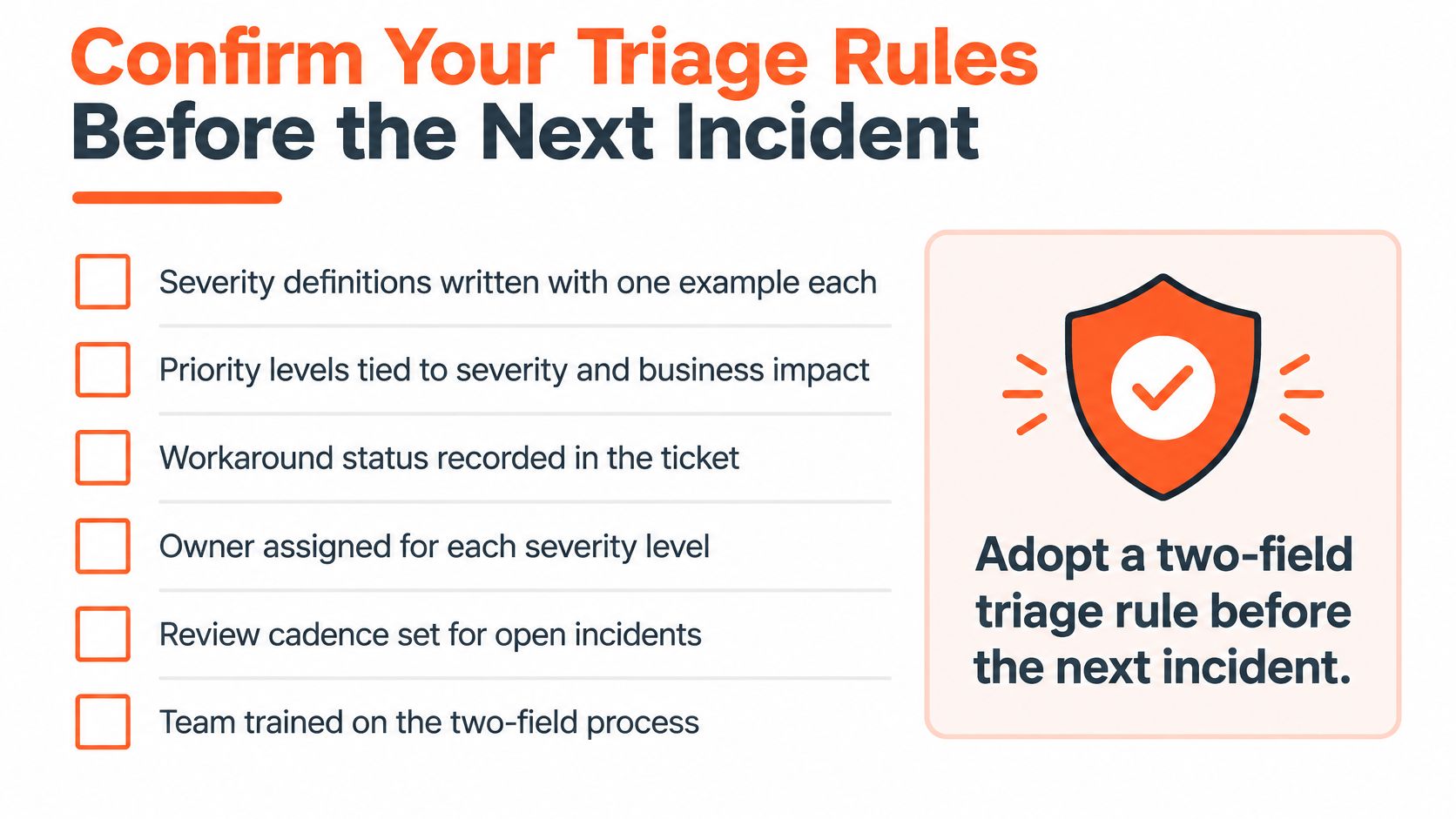
The decision to make now is to adopt a two-field triage rule before the next incident, not during it. Put these items in the issue tracker as short, checkable lines:
- Severity definitions with one real example per level, named by feature and user group.
- The priority factors the team agreed on, written down rather than remembered.
- The matrix pinned where responders look first, not buried three folders deep.
- A named owner for every SEV 1 and SEV 2, with the response window attached to the level.
- An explicit rule that priority can change while severity stays put, with both fields re-checked at every status change.
- A post-incident review question that asks whether the labels matched the confirmed harm, and which rule changes if they didn't.
Teams with thin on-call coverage should settle who owns the matrix and who runs the review before an incident forces the question, because labels nobody owns are the ones that drift. Our Support & Maintenance service takes over a client's support and maintenance operations so the client's core team can keep focus on product innovation, and the first thing that gets fixed in that handover is usually exactly this: one severity scale, one priority rule, one owner.
This week, write the definitions and examples for your three most common incident types. Then run the checklist against your last five incidents and mark where the labels would have changed. That gap is the size of the problem.
Every queue that holds up under pressure has the same thing behind it: two fields, defined in advance, re-checked as facts move, and scored afterwards against real harm. devPulse builds that discipline into the systems and support operations it runs, from incident severity scales to SLA-backed response windows, and modernizes legacy platforms incrementally so the high-impact areas get fixed first. If your triage rules are still one field wide, visit devPulse and start with the conversation about what your team needs to sort first.