














A SharePoint list can hold 30 million items, yet one operation is still expected to process only about 5,000. Microsoft's guidance on large lists and libraries puts that storage ceiling at 6,000 times the default query threshold. That gap is the whole argument for or against SharePoint as database.
Teams that migrate a spreadsheet or a modest SQL table because the item ceiling looks generous often hit threshold errors on the first unfiltered view. Stored rows are the wrong score. The views, joins, and request patterns a design must run decide whether the list stays usable.
Table of Contents
- Limits That Decide Whether SharePoint Works as a Database
- How Lists and Libraries Store Data Behind the Scenes
- SharePoint Lists Against Relational Databases on Key Criteria
- How to Design Views and Queries That Stay Reliable
- Workloads That Fit SharePoint and Workloads That Need a Database
- Hybrid Architectures and Modernization Paths That Keep SharePoint Useful
- Confirm the Fit Before You Migrate Any Data
Limits That Decide Whether SharePoint Works as a Database
SharePoint stores operational volumes in the millions and still processes only a small slice of them at once. Lists and libraries can act as a structured store. Microsoft's list view threshold documentation records that this data lives in SQL Server tables, with queries, indexes, and locks keeping sharing and updates accurate. That documentation sets a ceiling of 30 million items in one list or library and 10 gigabytes for one file or attachment, while a List View Threshold of approximately 5,000 items protects the database from heavy scans.
A document register, case list, or workflow queue can sit well inside the storage ceiling and still fail the moment a view sorts or filters too broadly. Capacity answers whether the rows fit. It says little about whether a query stays reliable, because the storage ceiling dwarfs the slice one operation may process.
Seven limits on one scale
| Limit | Value | What It Governs |
|---|---|---|
| Items in one list or library | 30 million | Total stored items, not query performance |
| Size of one file or attachment | 10 GB | Single item size |
| List View Threshold | About 5,000 items | Items one operation can process |
| Lookup joins per query | 12 (SharePoint Server 2016 and 2019) | Relationships a view can resolve |
| Requests per user | 3,000 per 5 minutes | API throttling in SharePoint Online |
| Remote BLOB storage plus metadata | 200 GB per content database | Content storage boundary |
| Access app SQL database | 1 GB | Database boundary for an Access app |
Read the first two rows as stored-capacity limits. Read the rest as per-operation processing limits, throttling, or content-database boundaries. On a logarithmic scale those two families barely share an axis. Thirty million items and a 10 GB file describe how much you can keep. Five thousand items, 12 joins, and 3,000 requests describe what one view or one user can do.
Three checks follow from the table. Items per view after filtering must stay inside the operation limit. Lookup columns per view must stay inside the join budget. Request volume per user must stay inside the SharePoint Online window. If the most common view touches more than 5,000 unfiltered items, redesign that view before any data moves. A structured pass with the Vight capacity assessment tool makes those three checks visible before a migration locks a bad view in place.
How Lists and Libraries Store Data Behind the Scenes
Picture a facilities team keeping a building-request list, a drawing library, and an approval history in one site. Every new request is a row. Every drawing is a file plus metadata. Both land in SQL Server tables inside a SharePoint content database, where indexes, queries, and locks keep reads and writes consistent for many people at once.
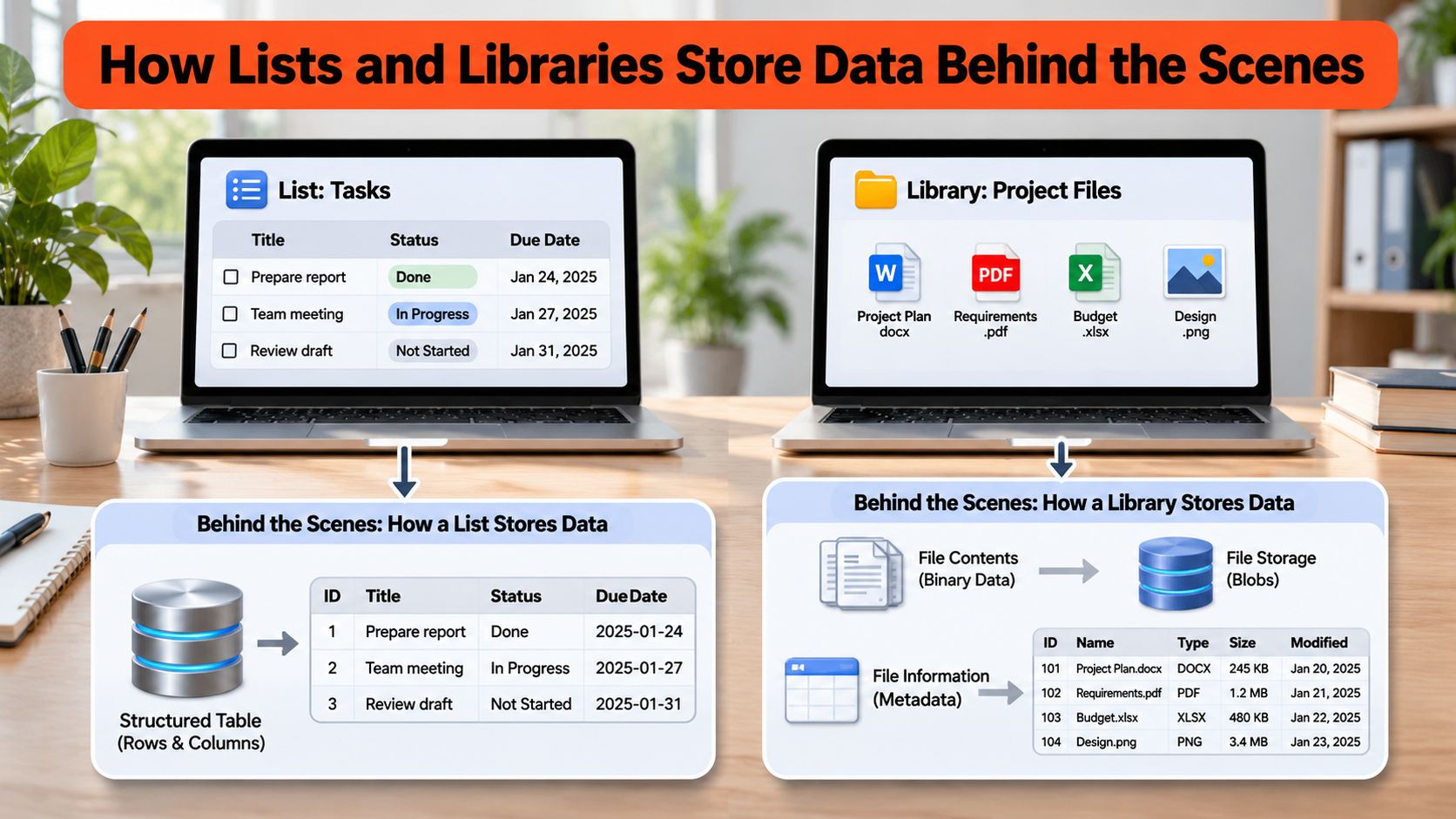
The engine is shared. Lists on that site draw on the same CPU, memory, and lock budget as lists on neighbouring sites. One heavy inventory list doesn't get a private database server. It competes.
Three options people mix up
Access web database. The data sits in SharePoint lists, so list limits apply.
Access app. The data sits in a separate SQL Server database, so the List View Threshold doesn't govern it. Microsoft's software boundaries and limits document a 1 GB SQL Azure database limit for each SharePoint Access app. That separate engine is still a small box.
Plain SharePoint list. This is the default, and it stays inside the shared platform. Forms, attachments, and permissions come with it. Isolation doesn't.
What the storage boundary actually caps
Remote BLOB storage can keep large files outside the content database. The same Microsoft boundaries say the combined volume of remote BLOB storage and metadata in a content database must not exceed 200 GB. When those BLOBs sit on NAS storage, time to first byte should stay within 40 milliseconds for 95% of responses. Miss that latency and the list feels slow even when the row count looks modest.
Content databases, file storage, and platform throttles share a budget. A drawing library that pushes the 200 GB combined boundary can slow the request list beside it. Design as if the neighbours are real, because they are. Systems that need unrestricted joins or database-style isolation belong in a separate store that SharePoint calls, not in another list on the same content database.
SharePoint Lists Against Relational Databases on Key Criteria
The first comparison row often decides the architecture. A list can hold a very large number of records, yet an unfiltered view cannot process all of them in one operation. Microsoft's community guidance on large lists states that the List View Threshold is typically 5,000 items, and that this cap is not a maximum list size. The practical boundary sits around what one view, flow, or query processes at a time. Indexed filters keep that processed set under the line.
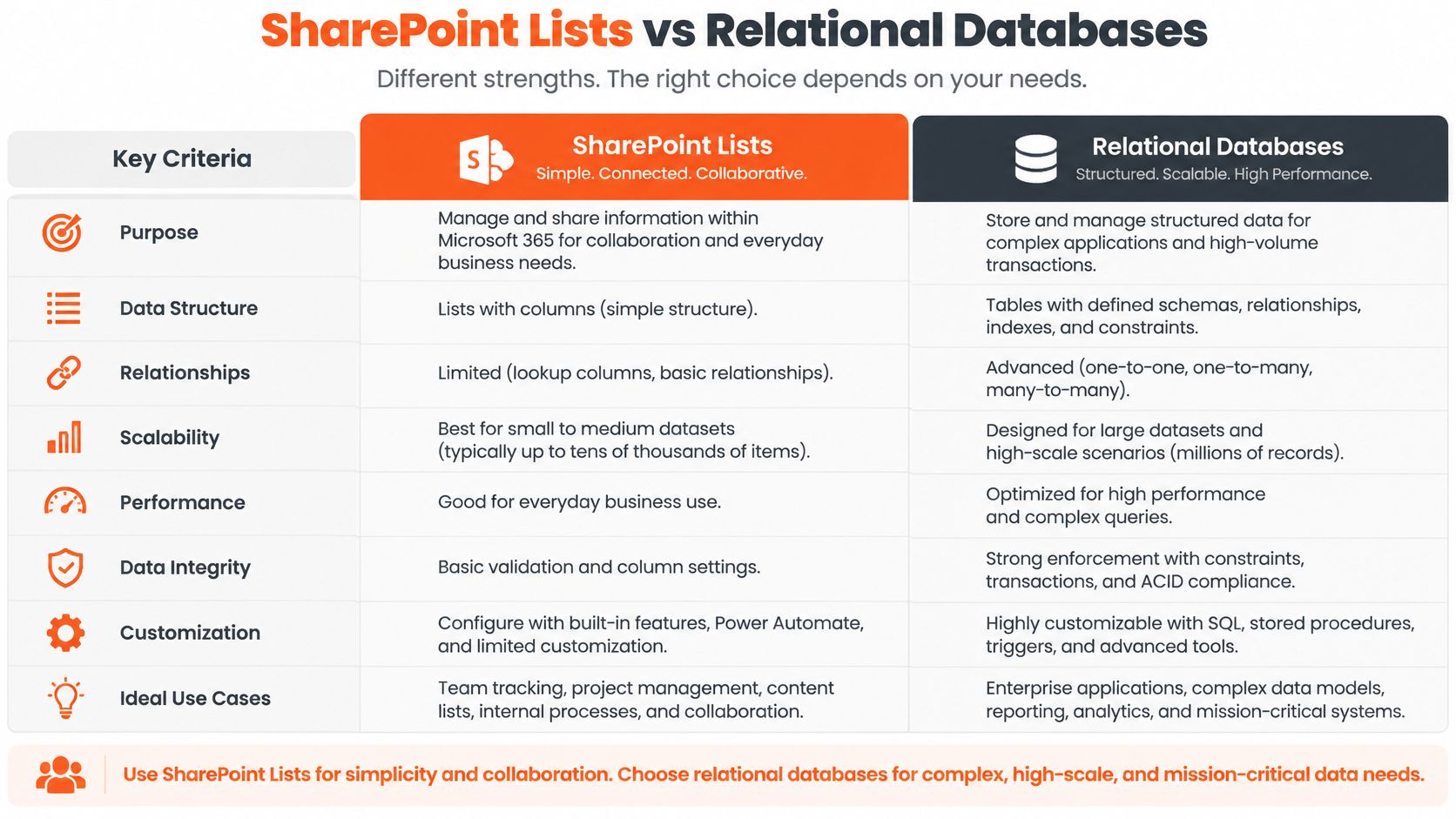
The unique angle is easy to miss. Stored capacity and per-operation capacity are different constraints. A list may contain millions of items, while the design still depends on views that filter early and resolve only a small number of relationships. Row count alone is a weak predictor of failure. The number of joins, the shape of the filter, and the order of operations matter more.
Where the two options part
| Criterion | SharePoint List | Relational Database |
|---|---|---|
| Record count | Millions stored; about 5,000 processed per unfiltered view | Millions processed with indexes and query plans |
| Joins across tables | Lookup and person columns; up to 12 joins per view | Multi-table joins limited by query design |
| Transactions | Item-level updates; no cross-list transactions for typical list work | Multi-table transactions with rollback |
| Schema integrity | Column types, required fields and validation rules | Foreign keys and constraints enforced by the engine |
| Concurrency and throttling | Resource-unit throttling and HTTP 429 responses in SharePoint Online | Locks and isolation levels managed by the engine |
| Reporting | Views and connected reporting tools | Full SQL reporting and analytics |
| Permissions | Item and library permissions, which are costly at scale | Role-based access at the database level |
Joins decide the next group of failures. Lookup, Person or Group, and workflow-status columns each consume a join. A view can resolve up to 12 of them, according to Microsoft's community guidance on large lists. Split customers, projects, owners, and approvals into related lists and a screen can fail while the list still holds only a few thousand rows. The list is within its storage capacity. The view has crossed its working capacity.
Transactions and integrity are the harder gap. A list updates one item at a time and doesn't offer a cross-list transaction you can roll back. A relational engine enforces foreign keys and can commit or undo several tables together. Column types and required fields on a list catch empty values. They don't stop an orphaned project row. That distinction matters when the data represents money, entitlements, inventory, or any state that must remain consistent across several entities.
A list is judged by how it is queried. A database is judged by how it is modeled.
Lists win where people work. Built-in forms, document attachments, versioning, approvals, and item-level permissions arrive without a custom app. That is why a governed register often stays on SharePoint even after the transactional tables move. Teams weighing that split can use a database modernization plan that keeps the collaboration surface and relocates the joins. The non-obvious result is a cleaner boundary. SharePoint remains the place where people review, approve, and attach context, while the database handles relationships and consistency rules that need an engine.
Security and compliance
List permissions inherit from the site, which is simple until you break inheritance on individual items. Unique item permissions multiply permission-related operations and make an access audit harder to explain. Database roles can restrict a user, a column, or a row without cloning a permission entry per record. The comparison is not only about who can open a form. It is about how many permission decisions the platform must evaluate while rendering a view.
Before regulated records land in SharePoint, compliance teams should confirm retention, audit logging, and data residency for that tenant. Those three checks are tenant facts, not features you can assume from the list settings page. The same discipline applies to reporting. Views and connected tools are useful for operational review, while full SQL reporting fits analysis that needs broader aggregation and repeatable query logic.
How to Design Views and Queries That Stay Reliable
A list can hold up to 30 million items and still fail on a view that touches a few thousand. Storage capacity and processing capacity are separate limits, and the second one decides whether a design survives. The per-operation ceiling is about 5,000 items processed, plus a budget of lookup joins each query consumes. Row count is the wrong thing to watch. What matters is the work each view and each call must perform. SharePoint Online enforces this through service protection rather than a fixed requests-per-second quota, so reliability is a routine you build into the design, not a tuning pass after go-live.
Index the column you filter on most. SharePoint can then locate matching items without scanning the list. An index on Status or Project does nothing for a view that never filters on it, so index the predicate you run.
Filter every large view on those indexed columns. The items the operation processes need to stay below about 5,000. A view that shows "all open items" across a mature register will cross that line even when most rows are closed, because closing rows shrinks the storage count without shrinking the scan. Add the indexed filter before you add sort columns.
Count lookup, person, and status columns in each view and keep the total under 12 joins. If a screen must show a customer name on every row, copy that display value onto the list instead of resolving another lookup. Denormalize the label. Keep the identifier if a workflow still needs it.
Batch writes and don't poll on a timer. Every call spends resource units from a limited pool, and Microsoft's throttling guidance for SharePoint Online prices a single-item query at 1 unit, a multi-item query such as listing children at 2, and a permission-related operation at 5. Tenants with 0 to 1,000 licenses receive 18,750 resource units per five minutes, and tenants with 5,001 to 15,000 licenses receive 56,250. Each user is also capped at 3,000 requests per five minutes. A timer job that re-reads the whole queue spends the pool whether or not anything changed.
Treat HTTP 429 as a signal to wait. Back off exponentially. An immediate retry spends another unit and extends the block.
Prefer delta queries and incremental sync when another system reads the list. Ask for what changed. A nightly full export is how a quiet integration becomes the tenant's noisiest client.
The test before go-live
Create the view against a realistic copy of the data. Check the item count it processes and the join count it resolves, not the total rows in the list. A list with 40,000 items passes this test if the indexed view touches 2,000 of them, and a list with 3,000 items fails it if the view scans everything. Confirm the view returns without a threshold error. If it fails here, it will fail after launch, only with more users waiting.
Heavily queried or relational data should be replicated into a purpose-built database or search index. SharePoint stays the governed content and collaboration layer. It shouldn't be the system every report scans.
Workloads That Fit SharePoint and Workloads That Need a Database
A short list can still be the wrong database. A workload that often causes trouble is a normalized model. Customers, projects, classifications, approvals, and owners each become a lookup. Archived SharePoint Server documentation specifies a list-view lookup threshold of 12 join operations per query on SharePoint Server 2016 and 2019. Older versions commonly used an eight-join threshold. The view can fail while the row count is still below 5,000. Fixing the item count doesn't fix the joins, and fixing the joins doesn't fix an unfiltered scan.

Verdict by workload type
| Workload | Typical Volume and Pattern | Best Fit |
|---|---|---|
| Controlled document register with approvals | Thousands of records, low write rate | SharePoint list or library |
| Project or case tracker with few lookups | Hundreds to a few thousand records | SharePoint list |
| Approval or request queue | Thousands per month, filtered by status | SharePoint list with filtered views |
| Inventory with frequent stock updates | Tens of thousands of records, high write rate | Hybrid: SharePoint front end, SQL backend |
| Order processing with multi-table joins | Large volume, high frequency | Relational database |
| Analytics over historical transactions | Millions of rows | Relational or analytics platform |
Four factors pick the column on the right. Write frequency matters more than a one-time import. Query selectivity matters more than the raw row count. Number of relationships matters even when both of those look fine. Reporting depth matters when someone wants history, not today's queue.
Say a project office tracks work in SharePoint. Each view filters to one project and one status, both indexed, and the screen shows owner as a single person column. That list fits. Say an order desk opens a screen that joins customer, line items, warehouse, tax, and shipment across hundreds of thousands of rows, and stock decrements on every save. That screen fails as a list, first on joins, then on write rate.
Measures to collect before you pick
- Expected item count. Include attachments and versions if they change how the library grows.
- Write rate per hour. Peak hour, not the weekly average.
- Lookup columns per view. Count person and workflow-status columns, not only columns named Lookup.
- Reporting needs. Status for a manager is a view. Trend across years is another platform.
Those four measures beat the platform's maximum capacity as a decision tool. A list under a few thousand rows is not automatically a simple workload.
Hybrid Architectures and Modernization Paths That Keep SharePoint Useful
Keep SharePoint as the document, approval, and collaboration layer. Move transactional and relational data to an engine that can join and commit. People still open a library, start an approval, and attach a file. Orders, stock movements, and historical facts live where multi-table transactions are normal. The two sides meet through a sync job with one owner per field.
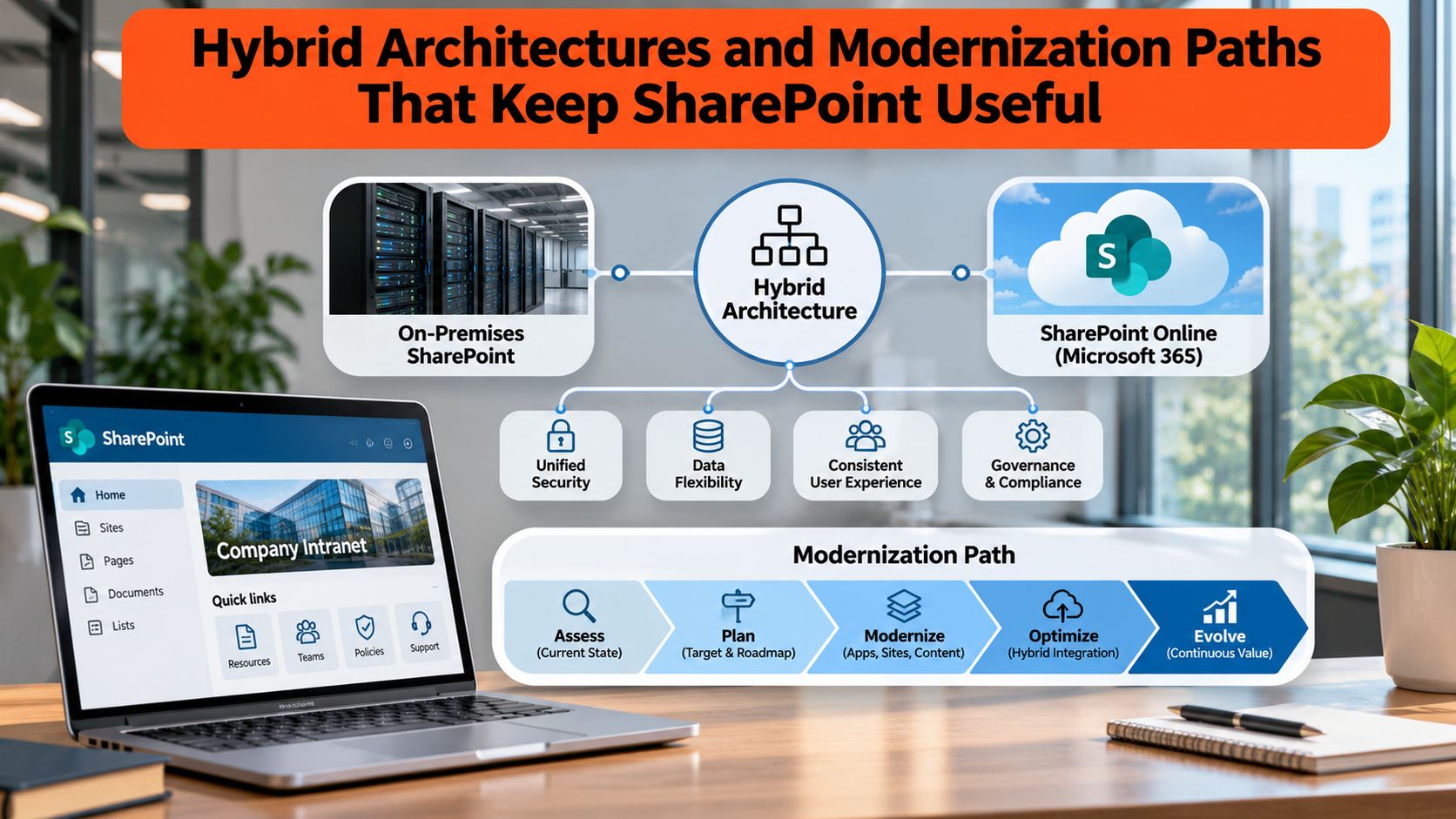
We have used that split when replacing a tired portal. devPulse transformed a legacy portal into a modern, user-friendly platform that streamlines software access, onboarding, and account management. The collaboration surface stayed familiar. The data behind high-change screens didn't stay in lists.
Five places structured data can live
| Option | Best When | Main Trade-Off |
|---|---|---|
| SharePoint lists for small governed sets | Few thousand items, simple views, document-centric records | Hits the 5,000-item and 12-join limits as data grows |
| Azure SQL or SQL Server with a SharePoint front end | High-volume transactions and complex joins | Requires sync logic and database skills |
| Microsoft Dataverse | Relational business apps inside the Power Platform | Licensing and platform lock-in to plan |
| Microsoft Fabric mirroring of SharePoint lists | Reporting and analytics over list data | Read-oriented; not a replacement for transactional writes |
| Custom application with SQL backend and SharePoint for documents | Complex workflows and integrations | Highest build and maintenance effort |
Microsoft has described mirroring of SharePoint lists as a preview path into Fabric, aimed at analytics rather than write-back. Use it to report. Don't use it as the order book.
Sync in practice is narrower than a nightly copy of every column. Use delta queries, move only changed items, and assign each field a single source of truth. If SQL owns quantity on hand, the SharePoint form displays it and doesn't edit it.
Stage the move. A legacy document library and its approval list can enter the hybrid pattern first, while the high-volume order table stays put until the views are proven. In a second phase the order table moves to SQL, and each stage is checked against item count, write rate, lookups per view, and reporting depth. Choosing among these patterns is an architecture decision, closer to the trade-offs in software architecture patterns than to a brand preference for SharePoint or SQL.
Confirm the Fit Before You Migrate Any Data
Decide in one working session. The measures already define the verdict. This pass only records them against the views.
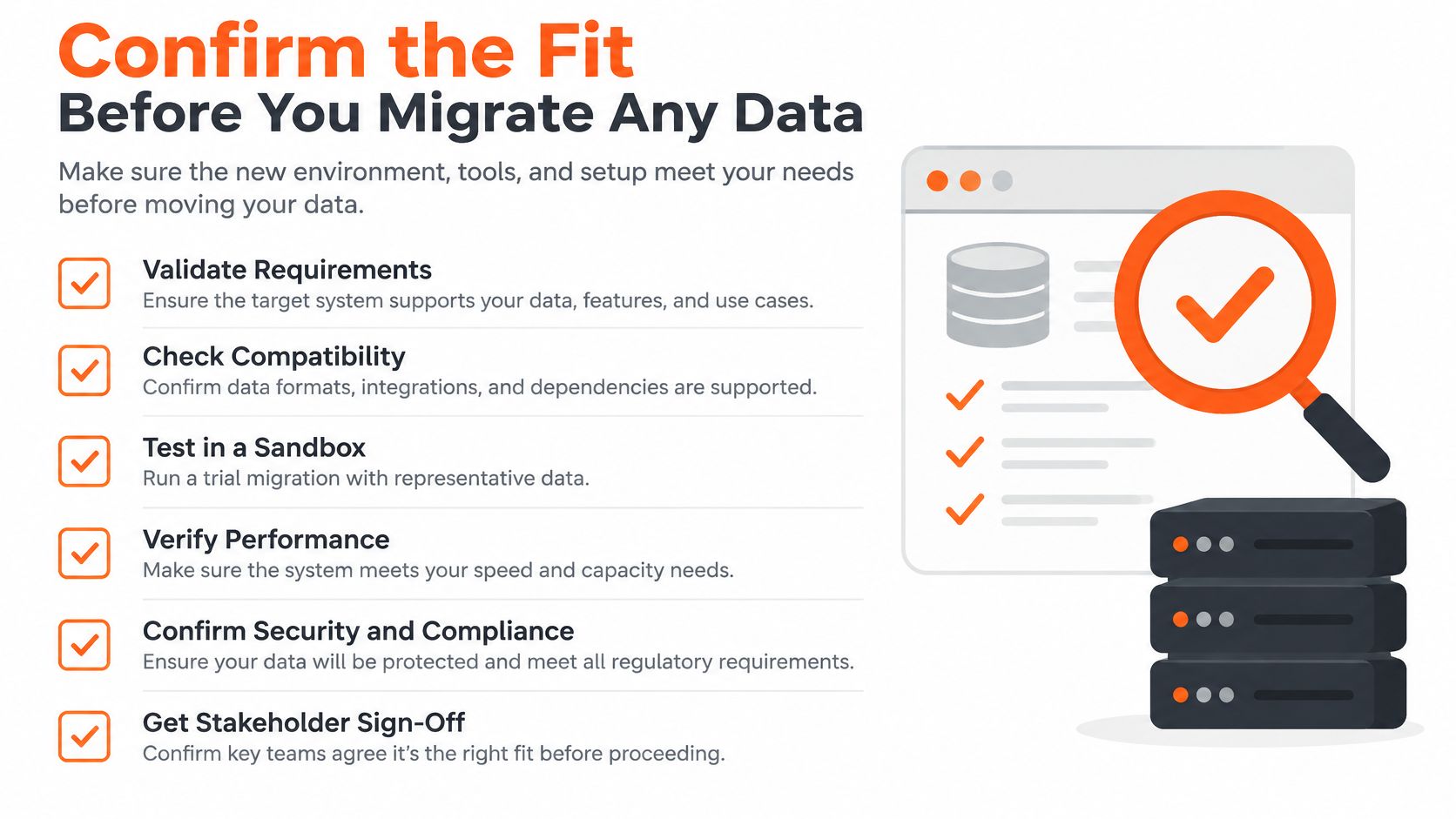
- Prove every view. Fewer than 5,000 processed items and no more than 12 joins, with no threshold error.
- Record write rate per hour and concurrent users from the four workload measures, using the peak hour.
- List permission patterns, especially unique permissions on single items, and cost them at 5 units per permission operation.
- Define reporting. List views cover status. Analytics belongs on a database or an analytics platform.
- Check compliance. Retention, audit logging, and data residency for each tenant.
- Run a 30-day pilot of the most demanding view on realistic data before you commit. A short pilot is cheaper than a rollback, which is the point of data migration best practices.
Keep governed content, documents, and approvals in SharePoint. Move high-frequency transactions and complex joins to a database. devPulse offers legacy system modernization for greater agility, security, and performance when that split needs a build, not another list. If you have a specific workload, share it through our contact form and the development team will return expert guidance on the architecture.
devPulse designs and builds the data-driven platforms behind that split, from enterprise portals and workflow systems to legacy modernization that leaves SharePoint on documents and approvals. If your lists are carrying transactions they were never shaped for, we can map the views, joins, and sync boundaries before data moves. Visit devPulse and send the workload you are deciding on.