













A cross-platform desktop app lets one team ship a product to Windows, macOS and Linux from a largely shared codebase, instead of maintaining a separate application per operating system. For a CEO or engineering leader, the real question is not which framework is fashionable. It is how much code you can share, where the platform differences will still cost you, and how to move an existing Windows-only product there without interrupting customers. We build and modernize desktop products for startups, SaaS companies and enterprises, and the guidance below is the sequence we would walk a leadership team through.
TL;DR
- Cross-platform means sharing one codebase, mostly the business logic and UI, while keeping a thin layer for each operating system’s installers, signing, notifications and shell integration.
- Frameworks differ mainly in how they draw the interface: some bundle a browser engine, some use the system web view, and some render with their own graphics engine. That choice drives app size, consistency and testing effort.
- For a legacy Windows product, incremental modernization usually beats a rewrite: keep the backend, keep shipping, and build the new front end alongside the old one.
- Decide on requirements first (data grids, keyboard shortcuts, docking, integrations), then on the framework.
- Packaging, signing, updates and QA on every target OS belong in the project plan from week one, not at the end.
What a cross-platform desktop app actually is
A native desktop app is written against one operating system’s own UI toolkit. It looks and behaves exactly like that system, but every additional platform means another codebase, another team skill set and another release process.
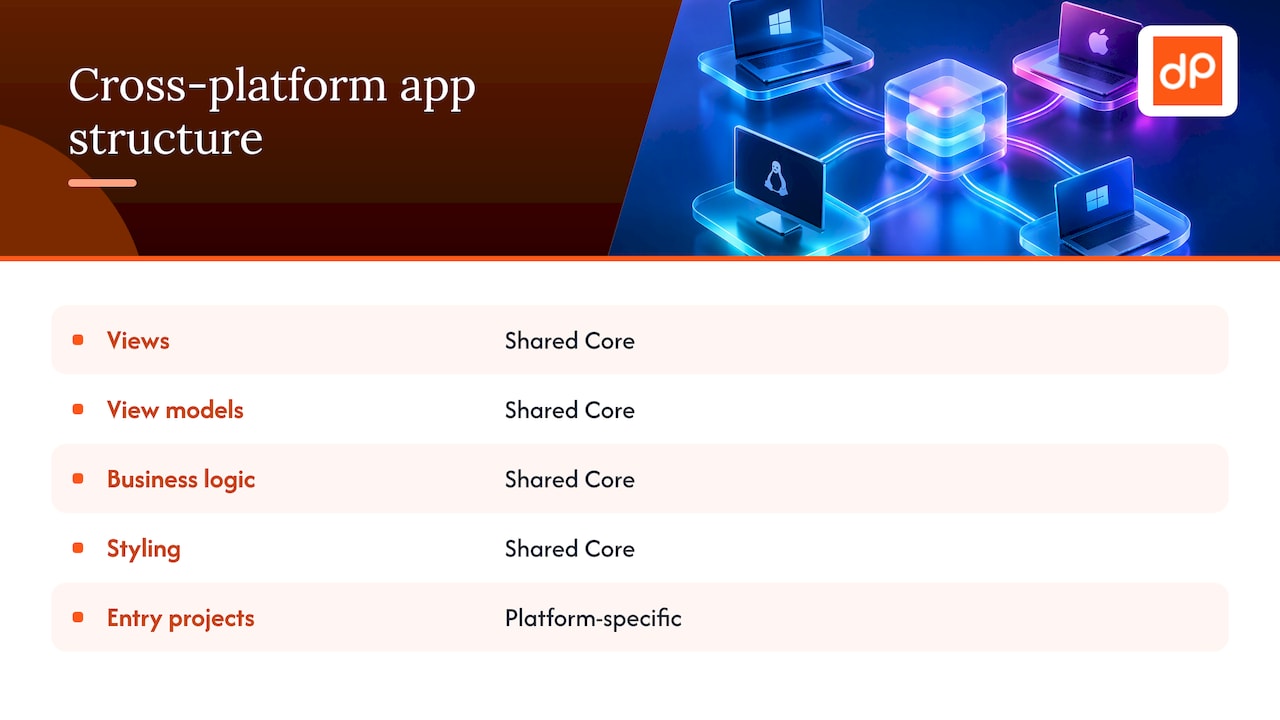
A cross-platform desktop app shares most of that work. The shared part typically covers the views, view models, business logic and styling, with small platform-specific projects acting as entry points. This is how the Avalonia documentation describes the structure: a Core project holding the shared code, plus thin projects per platform.
It also differs from a web application. A desktop app installs on the machine, can work offline, reads and writes local files, talks to hardware and integrates with the operating system’s menus, notifications and file associations. For professional software such as document tools, developer utilities, security consoles and clinical or legal workstations, those capabilities are often the reason the product is a desktop app at all.
Why leadership teams choose cross-platform
The business case usually comes down to four things:
- One team, one roadmap. Features land on every platform at the same time, so customers on macOS stop waiting for what Windows users already have.
- Lower maintenance surface. A bug fixed in shared logic is fixed everywhere.
- Hiring and skills. One stack is easier to staff than three.
- Market reach. Customers who run Windows, macOS or Linux can all buy the same product.
The case is strongest when your users already ask for a platform you do not support, or when your Windows-only product is aging and a rebuild is coming anyway. In that situation, modernizing and going cross-platform in one program is more efficient than treating them as two projects.
How the main approaches differ
Frameworks look interchangeable in a feature list. They are not, because each one answers one architectural question differently: how is the interface drawn?
| Approach | How the UI is drawn | What it means for you |
|---|---|---|
| Bundled browser engine (Electron-style) | Ships its own Chromium and runs web technology | Consistent rendering everywhere and a large web talent pool; larger installers and memory use |
| System web view (Tauri or Wails-style) | Uses the web view the OS provides | Smaller bundles; you must test across different platform engines |
| Own renderer (Flutter, Avalonia, Uno-style) | Draws controls itself, for example with Skia | Pixel-consistent UI; some platform features still need platform-specific code |
| Native per platform | Each OS’s own toolkit | Maximum platform fidelity; the most code to maintain |
Two examples from primary documentation show what “draws its own controls” means in practice. Avalonia renders controls with Skia rather than wrapping each system’s native controls, which gives consistent rendering but can require platform-specific handling for sensors, notifications, Bluetooth, cameras, biometrics and shell integrations. Uno Platform implements WinUI and WinRT APIs across its supported platforms, also rendering with Skia, and its documentation states that parts of that broad API surface are not implemented and are flagged by analyzer warnings.
The lesson is not that one approach wins. It is that every approach has a boundary where shared code stops, and your job in discovery is to find that boundary before you commit.
If your team has a strong web background and wants one UI technology across desktop and web, a bundled-browser approach is often the fastest route to a first release. We have delivered this pattern in our cross-platform document management case study built with Electron. If your product depends on dense, keyboard-driven professional UI, a framework with its own renderer and mature controls may be the better fit. For mobile-adjacent products, our overview of frameworks for mobile application development shows how the same rendering trade-offs play out on phones and tablets.
Choosing a framework: start with requirements, not logos
The most useful framework selection we have seen documented starts with the product’s interaction needs. In its account of modernizing a 20-year-old WinForms application, the QueueExplorer team listed the capabilities that decided the framework: rich grids, filtering and sorting, drag-and-drop, clipboard handling, keyboard shortcuts, context menus, docking and mature third-party controls.
Turn that into your own checklist before any vendor conversation:
- Data-heavy screens. Do you need grids with tens of thousands of rows, grouping, inline editing?
- Power-user interaction. Shortcuts, docking panels, multi-window layouts, drag-and-drop between windows and the OS.
- OS integration. File associations, system tray, notifications, credential stores, auto-start.
- Existing assets. Do you have a .NET, C++ or web backend you want to keep?
- Team. What can your engineers maintain after launch?
- Compliance. Healthcare, legal and security products often need specific controls over data at rest and update channels.
Score each framework against those, build a thin vertical slice on the top two, and compare. A slice that includes your hardest screen and one OS-specific integration will tell you more than any benchmark.
Sharing code without ignoring the operating system
The common failure in cross-platform projects is pretending the platforms are identical. Users on macOS expect different menus, dialog order and keyboard conventions than Windows users. GitHub Engineering described exactly this when its team moved from separate macOS and Windows products to a shared Electron app: shared logic and UI, but retained platform-specific behavior for details such as button case, dialog order, menus and keyboard accessibility. The same account notes that the platform APIs did not cover every need, so the team added platform-specific certificate-store integration.
A workable rule for where to put differences comes from the Chromium multi-platform conventions: keep small differences together with conditional compilation, split implementation files when the differences are substantial, and use separate implementations when almost nothing is shared. The guidance favors placing differences at the implementation boundary and avoiding needless abstraction layers.
In practice, that gives you three tiers:
- Shared core: domain logic, data access, view models, most screens.
- Small divergences: runtime checks or conditional code for minor behavior.
- Platform adapters: interfaces with separate implementations for notifications, credential storage, updates and shell integration.
Define the adapter interfaces early. They keep the shared core clean and make each platform’s quirks testable in isolation.
Modernizing a legacy desktop application
Many of the cross-platform projects we are asked about start with a Windows application that has run the business for a decade or more, written in WinForms, WPF or Win32. Leaders worry about three things: disrupting users, losing data and breaking integrations. A full rewrite risks all three.
Microsoft’s desktop modernization guidance makes the incremental case for the Windows side: WPF, Windows Forms and Win32 applications can adopt modern Windows capabilities without a full rewrite, using WinRT APIs, the Windows App SDK and MSIX packaging, singly or in combination.
For going beyond Windows, the QueueExplorer account is instructive. The team wanted to keep the existing .NET backend, continue Windows releases during the migration, minimize customer disruption and avoid duplicate functionality. It kept the WinForms front end while building a cross-platform front end alongside it, shared the backend, and worked in one source branch to avoid long-lived branch divergence.
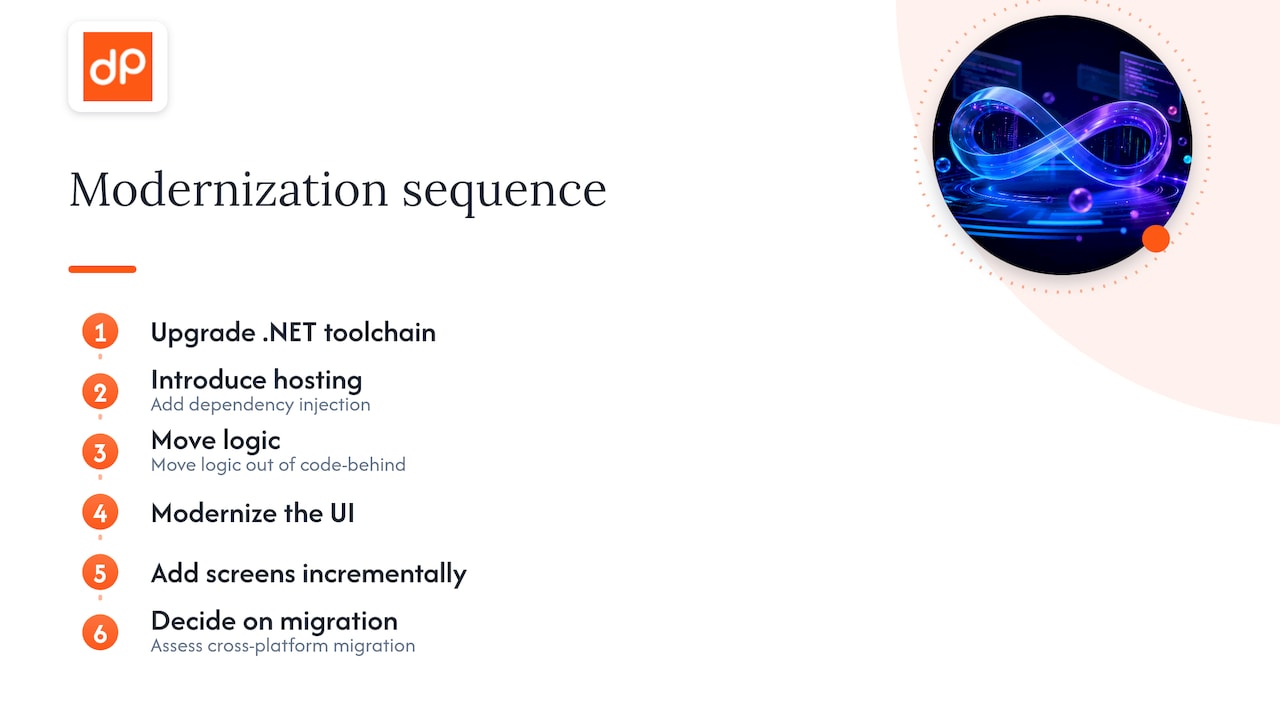
A staged sequence suggested in a .NET desktop UI comparison fits this approach well: upgrade the .NET toolchain, introduce hosting and dependency injection, move logic out of code-behind, modernize the UI, add new screens incrementally, and only then decide whether a cross-platform migration is needed.
A modernization roadmap
- Audit. Map modules, dependencies, integrations, data stores and the screens users spend the most time in. A technical audit surfaces the code that is hardest to move before it becomes a schedule risk.
- Separate logic from UI. Extract business rules from code-behind into testable libraries. This is the single biggest enabler of code sharing.
- Stabilize the backend. Keep it, version its APIs and make sure both old and new front ends use the same contracts.
- Build a vertical slice. One real workflow on the target framework, on every target OS.
- Migrate screen by screen. Ship to Windows continuously; add macOS and Linux when parity on the core workflows is reached.
- Retire the old front end only when usage data shows customers have moved.
This is the work our legacy system modernization practice is set up for, from audit through delivery.
Packaging, security, testing and maintenance
Framework choice does not remove the operating-system work. Each target still needs its own installer, code signing and update path. On Windows, MSIX packaging provides a modern installer with clean uninstall and automatic updates, and some Windows features require package identity at runtime, so packaging decisions can affect which capabilities you can use.
Build these into the plan:
- A CI/CD pipeline that builds, signs and packages for every OS on each release candidate, so that signing is never a last-minute manual task.
- A test matrix covering supported OS versions and, for system web view frameworks, the different web engines each platform provides.
- Automated UI and regression tests around the workflows your customers pay for.
- An update strategy with staged rollout and a way to roll back.
- A security review of local data storage, credentials, update channels and any embedded web content.
The release matrix grows with every platform you add, which is why quality engineering and DevOps are part of the build, not follow-ups. After launch, a maintenance retainer keeps OS updates, dependency patches and framework upgrades from piling up. Our desktop applications portfolio for technical support and maintenance shows what that ongoing work looks like for a long-lived desktop product.
What to ask of an engineering partner
Whether you build in-house, extend your team or hire a firm, a good proposal for a cross-platform desktop project should make the following explicit:
- The shared-code boundary: what percentage of logic and UI is expected to be shared, and where the adapters sit.
- The first slice: which workflow is built first and on which operating systems.
- Continuity: how current Windows releases continue while the new front end is built.
- Release engineering: who owns signing, packaging, update delivery and the test matrix.
- UX per platform: how macOS and Windows conventions are respected. Our UX/UI design practice covers this alongside engineering.
- Handover and support: documentation, knowledge transfer and the maintenance model.
These six items cost nothing to ask for and prevent most of the surprises that stall desktop programs in the second half of the schedule.
How we approach it at DevPulse
We work on cross-platform desktop applications as part of full-cycle product development, legacy modernization and long-term support, for startups, SaaS companies and enterprises in sectors such as healthcare, cybersecurity, legal tech, edtech and professional software. Our approach is designed around integration with your internal teams and an outcome-driven plan: discovery first, then a vertical slice, then incremental delivery. We handle the UX, engineering, quality engineering and DevOps work in one program, so signing, packaging and the cross-OS test matrix are planned from the start rather than added at the end.
If you want a second opinion before committing to a framework, our Technical Audit and Product Discovery services are built for that decision. If you already know the direction, Full-Cycle Development takes the product from design to release and support.
To talk through a desktop product or a legacy migration, start at devpulse.com and tell us what you run today and which platforms your customers need.
Our perspective
The most expensive mistake in a desktop modernization is treating it as a rewrite. The product already encodes years of customer workflows, edge cases and integrations. Throwing that away to reach macOS or Linux trades a visible problem, a missing platform, for an invisible one: regressions in behavior your customers rely on.
Our view is to keep what works, usually the backend and the business rules, and to move the interface in slices, shipping to current customers throughout. That is the pattern in the modernization accounts worth studying, and it matches how we plan delivery: audit, shared core, vertical slice, incremental migration.
We also believe the framework debate is overweighted. Teams succeed when they define the platform boundary early, invest in packaging and testing from the first sprint, and give macOS and Windows users the conventions they expect. Those are engineering and process decisions, and they are where an experienced partner pays for itself.
Vlad
FAQ
Is a cross-platform desktop app cheaper than building native apps?
Usually the shared codebase lowers the cost of building and maintaining features across platforms, because logic and most screens are written once. You still budget for platform adapters, packaging, signing and testing on every operating system. The savings are largest for products with a broad shared feature set and a small number of OS-specific integrations.
Can we modernize our WinForms or WPF application without stopping releases?
Yes. Microsoft documents that these applications can adopt modern Windows capabilities without a full rewrite, and published modernization accounts show teams building a new cross-platform front end alongside the existing one while sharing the backend. The key is separating business logic from the UI and migrating one workflow at a time.
Which framework should we choose?
Start from your requirements: data grids, keyboard-driven workflows, OS integrations, existing backend and team skills. Then prototype your hardest screen on the two most likely candidates. Frameworks that bundle a browser, use the system web view or draw with their own renderer each trade app size, consistency and testing effort differently.
Do we need separate code for each operating system?
Not for most of the product, but some code will always be platform-specific: installers, signing, notifications, credential storage and shell integration. Keep these behind interfaces in thin platform projects so the shared core stays clean.
How long does a desktop modernization take?
It depends on the size of the application, the quality of the existing code and how much logic is trapped in the UI layer. A technical audit and a first vertical slice give a far more reliable estimate than a quote from a feature list, and they show the schedule risk early.
Sources
- Avalonia documentation: cross-platform architecture
- How Uno Platform works
- GitHub Engineering: How four native developers wrote an Electron app
- Chromium: conventions and patterns for multi-platform development
- Microsoft Learn: modernize existing desktop apps
- Modernizing a 20-year-old WinForms application, part 1
- Desktop UI in .NET: WPF, WinForms, WinUI 3, Avalonia or Uno