














For most business products, start with a web-first architecture paired with a cross-platform mobile strategy. That combination maximizes reach, compresses your time-to-market, and keeps a single engineering team productive across every platform your customers use. Reserve native iOS and Android development for cases where you genuinely need deep OS integration, like ARKit-based augmented reality or low-latency audio pipelines, because the added engineering overhead only pays off when the platform APIs demand it.
The reasoning is straightforward. Statista puts the global smartphone base above 6 billion users, so any product strategy that ignores mobile reach is leaving revenue on the table. At the same time, cross-platform frameworks like React Native and Flutter typically ship 20 to 30% faster than building two separate native codebases. Add W3C’s mobile web best practices and OWASP’s security guidance into your planning from day one, and you avoid the two most expensive mistakes we see in engineering engagements: rebuilding for reach you didn’t plan for, and retrofitting security after launch.
Here’s your three-item checklist before you write a line of code:
- Define the smallest coherent MVP flow. Identify the one user journey that proves your core value proposition, and cut everything else from version one.
- Pick your stack and team model together. Your technology choice determines whether you need four specialists or a lean team of two who can cover both web and mobile.
- Schedule a four-week discovery and prototype sprint. Use it to validate technical assumptions, surface integration risks, and produce a clickable prototype before committing to a full build.
Key Takeaways
Web-first architecture combined with cross-platform mobile development delivers the fastest, most cost-effective path to market for most business products, with native reserved for hardware-dependent use cases.
| Point | Details |
|---|---|
| Default to web-first, cross-platform mobile | Reserve native development for apps requiring deep hardware or OS-level API access. |
| Scope the smallest viable MVP | Validate one core user journey before expanding feature scope or platform count. |
| Budget app-store review time separately | Web deployment is instant; app store review can add days to your launch timeline. |
| Build security and testing into the pipeline early | Automated SAST/DAST scans and CI test gates cost less than end-of-project fixes. |
| Partner with an engineering team like DevPulse | DevPulse runs discovery-to-delivery engagements across React, Flutter, Node.js, and .NET stacks. |
Table of Contents
- How Do You Choose Between Web, PWA, Native, and Cross-Platform Development?
- What Technology Stack Should You Choose for Your Project Size?
- What UX Decisions Matter Most for Mobile Users?
- How Do You Optimize Performance on Web and Mobile?
- What Security and Privacy Controls Are Non-Negotiable?
- What Does a Complete Testing Strategy Look Like?
- How Do You Handle Deployment and App Store Distribution?
- How Do You Build Your Team and Estimate Costs?
- When Does Cross-Platform Development Actually Pay Off?
- Which Tools and Standards Should Your Team Actually Use?
- What Should You Ask an Engineering Vendor Before Signing?
- How Can DevPulse Help You Plan and Build Your Product?
- What Standards and Documentation Should Your Team Read Next?
- Sources
How Do You Choose Between Web, PWA, Native, and Cross-Platform Development?
Every option on this list solves a real problem, and picking wrong is expensive to reverse. A web application runs entirely in a browser and requires no installation, which makes it the fastest path to reach any user with an internet connection. A Progressive Web App (PWA) upgrades that experience with offline caching, push notifications, and home-screen installability, closing much of the gap with native apps without app-store friction. Mobile web simply means a responsive site optimized for phone browsers, distinct from a PWA in that it skips the installable, offline-capable layer. Native development (Swift for iOS, Kotlin for Android) gives you full access to platform APIs and the best possible performance, at the cost of maintaining two separate codebases. Hybrid apps wrap web technology in a native container, and cross-platform frameworks like React Native and Flutter compile a single codebase to genuinely native mobile experiences on both platforms.
Toptal’s engineering guidance makes a useful distinction here: mobile web apps are usually faster and cheaper to build than native apps whenever your product doesn’t depend on deep device capabilities. Hybrid approaches exist precisely for the middle case, when you need some native access but not enough to justify two full native builds.
The comparison below breaks down how each approach performs against the criteria that actually drive business decisions.
| Approach | Best for | Time-to-market | Cost (initial + maintenance) | Performance / native access | Reach | Long-term maintenance complexity |
|---|---|---|---|---|---|---|
| Web application | B2B dashboards, internal tools, content platforms | Fastest | Low initial, low maintenance | Good for data-heavy UI, no device hardware access | Any device with a browser | Low; one codebase |
| Progressive Web App | Consumer products needing offline access without app-store friction | Fast | Low to moderate | Good; supports push notifications, offline caching | Broad, installable from browser | Low to moderate |
| Mobile web | Marketing sites, lightweight consumer tools | Fastest | Low | Limited; no offline or device APIs | Universal | Very low |
| Cross-platform (React Native, Flutter) | Consumer apps, MVPs needing both app stores | Fast | Moderate initial, moderate maintenance | Strong; near-native for most UI-driven apps | iOS and Android from one codebase | Moderate |
| Native (Swift, Kotlin) | Apps requiring deep OS integration or peak performance | Slowest | High initial, high maintenance (two codebases) | Best possible; full API access | Platform-specific | High; two codebases to maintain |
| Hybrid | Legacy web teams needing limited device access | Moderate | Moderate | Moderate; bridge overhead limits heavy workloads | iOS and Android | Moderate to high |
Three scenarios come up constantly in scoping conversations, and each points to a different answer:
- Consumer-market MVP with a tight budget: choose cross-platform (React Native or Flutter) to hit both app stores from one codebase and validate demand before scaling engineering spend.
- Internal or B2B dashboard used mostly on desktop: choose a web application with responsive design; you rarely need a native mobile app for tools your team accesses at a desk.
- Product requiring camera, sensor, or offline-first hardware integration: choose native, or at minimum prototype the hardware-dependent module natively before committing the rest of the app to cross-platform.
Pro Tip: Reach for native when your product genuinely depends on ARKit, complex background audio processing, or custom OS widgets. Everywhere else, cross-platform’s 20 to 30% development speed advantage usually outweighs the marginal performance gap, for typical business apps.
What Technology Stack Should You Choose for Your Project Size?
Your architecture should match your product’s actual scale, not the scale you hope to reach in three years. Overbuilding an MVP with enterprise-grade infrastructure wastes budget; underbuilding a SaaS platform means a costly rewrite once you hit real usage.
A simple MVP built for speed typically pairs a React or Vue.js front end with a Node.js backend, a managed Postgres database, and a serverless hosting layer like Vercel or AWS Lambda. This combination lets a small team ship a validated product in weeks rather than months, with minimal DevOps overhead.
A scalable SaaS product needs multi-tenancy, proper authentication, and analytics baked in from the start. Here, Angular or React on the front end paired with Django or .NET on the back end gives you the structure larger teams need, with Postgres or MongoDB depending on whether your data model is relational or document-based. GraphQL becomes attractive once multiple client types (web, mobile, partner integrations) need to query overlapping data without over-fetching.
An enterprise-grade product adds SSO, audit logging, and compliance requirements that shape your architecture from day one. .NET remains a common choice here for organizations already standardized on Microsoft infrastructure, while Node.js and Django both scale well when paired with proper service boundaries.
In a typical architecture, the client layer (web or mobile) talks to an API gateway that handles authentication and rate limiting, which routes requests to a service layer responsible for business logic. That service layer reads and writes to your data stores, and calls out to third-party integrations like payment processors or email providers. Place edge caching and a CDN in front of static assets and public API responses; this single change often cuts perceived load time more than any backend optimization. Our web application architecture guide walks through these trade-offs in more depth, including SSR versus SPA decisions that affect SEO and initial load performance.
For hosting and monitoring, a few combinations come up repeatedly:
- Serverless platforms (AWS Lambda, Vercel, Google Cloud Run) for MVPs and variable-traffic workloads where you don’t want to manage servers.
- Managed container platforms (AWS ECS, Google Kubernetes Engine) for SaaS products with predictable, scaling traffic.
- CDN layers (Cloudflare, AWS CloudFront) to cache static assets and reduce origin server load globally.
- Monitoring stacks (Datadog, Sentry) to catch performance regressions and errors before customers report them.
Our modern enterprise tech stack guide covers cloud service selection in more detail if you’re planning a build that needs to scale past its first year.
What UX Decisions Matter Most for Mobile Users?
Mobile users abandon slow or confusing flows faster than desktop users do, and the constraints of a small screen punish design decisions that work fine on a laptop. Your design checklist should treat mobile as the default, not an afterthought.
- Mobile-first layout. Design for the smallest screen first, then progressively enhance for tablet and desktop; this forces you to prioritize what actually matters on each screen.
- Touch targets sized for fingers, not cursors. Buttons and links need enough spacing to avoid mis-taps, particularly for older users or anyone on a moving train.
- Onboarding that respects attention spans. Get users to their first meaningful action in under a minute, and defer account creation until after they’ve seen value where possible.
- Progressive disclosure. Show only what’s needed for the current step, and reveal complexity gradually as users demonstrate they need it.
- Offline and intermittent connectivity handling. Cache critical data locally and queue actions for sync when connectivity returns, rather than showing a blank error screen.
W3C’s mobile best practices specifically call out minimizing application and data size, using client-side storage thoughtfully, and adapting content to the device’s actual capabilities rather than assuming desktop-level bandwidth and processing power. Chrome’s Web Fundamentals guidance adds a practical layer to this: set your meta viewport correctly, minimize perceived latency with skeleton screens or optimistic UI updates, and test under real network throttling rather than assuming everyone has fast Wi-Fi.
Pro Tip: Design for multiple interaction methods from the start, touch, keyboard, and voice, because you cannot predict how a given user will access your product a year from now. Track time-to-interaction and week-one retention as your two north-star UX metrics; they surface problems faster than satisfaction surveys ever will.

Our UX/UI best practices guide goes deeper into design patterns specific to enterprise and SaaS products, if your project falls into that category. For teams building complex workflow-heavy SaaS tools, Alytics’ guide to designing scalable SaaS workflows offers a useful complementary framework for structuring multi-step processes without overwhelming the interface.
How Do You Optimize Performance on Web and Mobile?
Performance isn’t a nice-to-have feature you add later; it’s a determinant of whether users complete the action you built the app for. A slow product with great features loses to a fast product with fewer features, almost every time.
Start with the fundamentals: minimize your critical rendering path by reducing render-blocking CSS and JavaScript, minify and concatenate your assets, and compress and lazy-load images so users aren’t downloading a 4MB hero image on a 4G connection. For PWAs, service workers let you cache assets aggressively and serve content instantly on repeat visits, even when connectivity drops.
The metrics that matter most for measuring this:
- Time to Interactive (TTI) measures how long until a user can actually use your page, not just see it.
- First Contentful Paint (FCP) measures how quickly something meaningful appears on screen.
- Lighthouse (built into Chrome DevTools) scores your app across performance, accessibility, and best practices in one automated run.
- WebPageTest lets you test real-world performance from different global locations and network conditions.
- DevTools Device Mode simulates mobile screen sizes and network throttling directly in your browser, and its flame charts pinpoint exactly which JavaScript function is blocking your main thread.
If you’re working in a cross-platform framework, watch for bridge call overhead, the communication layer between your JavaScript logic and native components can become a bottleneck if overused. Reduce your JavaScript bundle size aggressively, and drop down to native modules for genuinely heavy computational work like image processing or complex animations.
Statistic Callout: With more than 6 billion smartphone users worldwide and cross-platform frameworks delivering 20 to 30% faster development than parallel native builds, performance optimization for mobile isn’t a late-stage polish item. It’s a core requirement that should be budgeted into your MVP timeline from the first sprint.
What Security and Privacy Controls Are Non-Negotiable?
Security debt compounds faster than almost any other kind of technical debt, and retrofitting it after launch costs far more than building it in from the start. A handful of controls should be considered mandatory, not optional, for any professional web or mobile project.
- TLS everywhere. Every connection between client and server needs encryption in transit, with no exceptions for “internal” traffic.
- Secure storage on mobile. Use the platform keychain (iOS) or keystore (Android) for sensitive tokens and credentials, never plain local storage.
- Proper token management. Short-lived access tokens with refresh token rotation limit the damage from a leaked credential.
- Input validation on every boundary. Never trust client-side validation alone; validate again server-side before any data touches your database.
- Server-side authorization checks. Client-side permission checks are a UX convenience, not a security control; enforce every permission decision on the server.
Reference OWASP’s Mobile Top 10 and OWASP’s Web Top 10 during your architecture planning, not after a penetration test flags a gap. If you’re serving European users, factor GDPR requirements into your data handling design from the outset, particularly around consent management and data retention policies.
Early-phase quick wins that pay off disproportionately:
- Run a threat model during discovery, before any code exists, to identify your highest-risk attack surfaces.
- Set up secrets management (like AWS Secrets Manager or HashiCorp Vault) instead of hardcoding credentials in your codebase.
- Add automated dependency scanning to catch known vulnerabilities in third-party packages before they ship.
Pro Tip: Build security gates into your delivery pipeline as automated SAST and DAST scans plus dependency checks, rather than treating security as a final review before launch. Teams that integrate these checks early consistently ship with less security debt and fewer late-stage delays than teams that bolt security on at the end.
What Does a Complete Testing Strategy Look Like?
A testing strategy that only catches bugs after release is really just a bug-tracking system with extra steps. Effective QA layers coverage across every stage of development, catching cheap-to-fix issues before they become expensive production incidents.
| Testing level | What it covers | Where it runs | Recommended tools |
|---|---|---|---|
| Unit | Individual functions and components in isolation | CI pipeline, local development | Jest, Mocha |
| Integration | Multiple components or services working together | CI pipeline | Jest, Mocha with test databases |
| End-to-end | Full user flows across the entire application | CI pipeline, staging environment | Cypress, Detox, Appium |
| Device / browser | Real-world rendering and behavior across devices | Device labs, cloud testing services | BrowserStack |
| Production monitoring | Live error tracking and performance regression | Production environment | Sentry, Datadog, Crashlytics |
Before calling a release ready, check it against a concrete readiness list: test coverage above your team’s agreed threshold, performance budgets met on your key pages, your device compatibility list validated on real hardware (not just simulators), and security regression tests passing clean.
Keep automated tests running in every CI build, not just before releases, and treat flaky tests as a priority bug rather than something to silence with retries. A test suite nobody trusts is worse than no test suite at all, because it trains your team to ignore failures. When production issues do occur, a documented triage runbook, who gets paged, how severity gets assessed, where logs live, cuts your mean time to resolution significantly compared to improvising each time.
How Do You Handle Deployment and App Store Distribution?
Deployment for a web app and deployment for a native mobile app follow completely different clocks, and conflating them in your project timeline is one of the most common planning mistakes we see.
Your CI/CD checklist should cover:
- Automated build pipelines that compile and package your app on every commit to your main branch.
- Automated test execution gating every merge, so broken code never reaches production.
- Artifact storage that versions your build outputs for rollback if needed.
- Canary or blue/green deployment patterns for your web backend, letting you roll out changes to a small percentage of traffic before a full release.
Web and PWA distribution is nearly instant: you push to your hosting provider, and users get the update on their next page load. App store distribution is a different world entirely. iOS App Store review typically takes one to three days but can stretch longer for apps with in-app purchases, privacy-sensitive permissions, or first submissions from a new developer account. Google Play review is often faster but not guaranteed, and both platforms can reject a submission for reasons that require a resubmission cycle.
Your app store submission checklist should include: complete app metadata and screenshots for every supported device size, a published privacy policy URL, working test accounts for reviewers, correct versioning, and any required compliance disclosures (data collection practices, age ratings).
A realistic small-scale timeline looks like this:
- Day 1: Code merges to main, CI runs full test suite, build artifact generated.
- Day 1 to 2: Web deployment goes live via blue/green rollout; monitoring confirms no regressions.
- Day 1: Mobile build submitted to both app stores simultaneously.
- Day 2 to 5: App store review completes (budget extra days for first submissions or apps requesting sensitive permissions).
- Day 5 to 7: Mobile release goes live to users, staged rollout percentage increased over several days.
Budget for that app-store review window explicitly in your launch plan; it’s the single most common source of missed launch dates we encounter in scoping conversations.
How Do You Build Your Team and Estimate Costs?
Getting the team model right matters as much as getting the technology right, because the wrong team structure inflates both your timeline and your budget regardless of how good your stack choice was.
A typical project team includes a product manager (owns scope and priorities), a tech lead (owns architecture decisions), backend engineers, frontend or mobile engineers, a QA engineer, a DevOps engineer (often part-time for smaller projects), a designer, and, increasingly, a data or analytics engineer once the product needs to measure its own usage patterns.
| Role | Primary responsibility | Typical involvement |
|---|---|---|
| Product manager | Scope, priorities, stakeholder alignment | Full project duration |
| Tech lead | Architecture decisions, code quality | Full project duration |
| Backend engineer | API, business logic, data layer | Full project duration |
| Frontend/mobile engineer | Client-side UI and interaction | Full project duration |
| QA engineer | Test strategy, release readiness | From mid-project onward |
| DevOps engineer | CI/CD, infrastructure, monitoring | Part-time, ramps up pre-launch |
| Designer | UX flows, visual design | Heaviest in early sprints |
| Data/analytics engineer | Instrumentation, reporting | From launch onward |
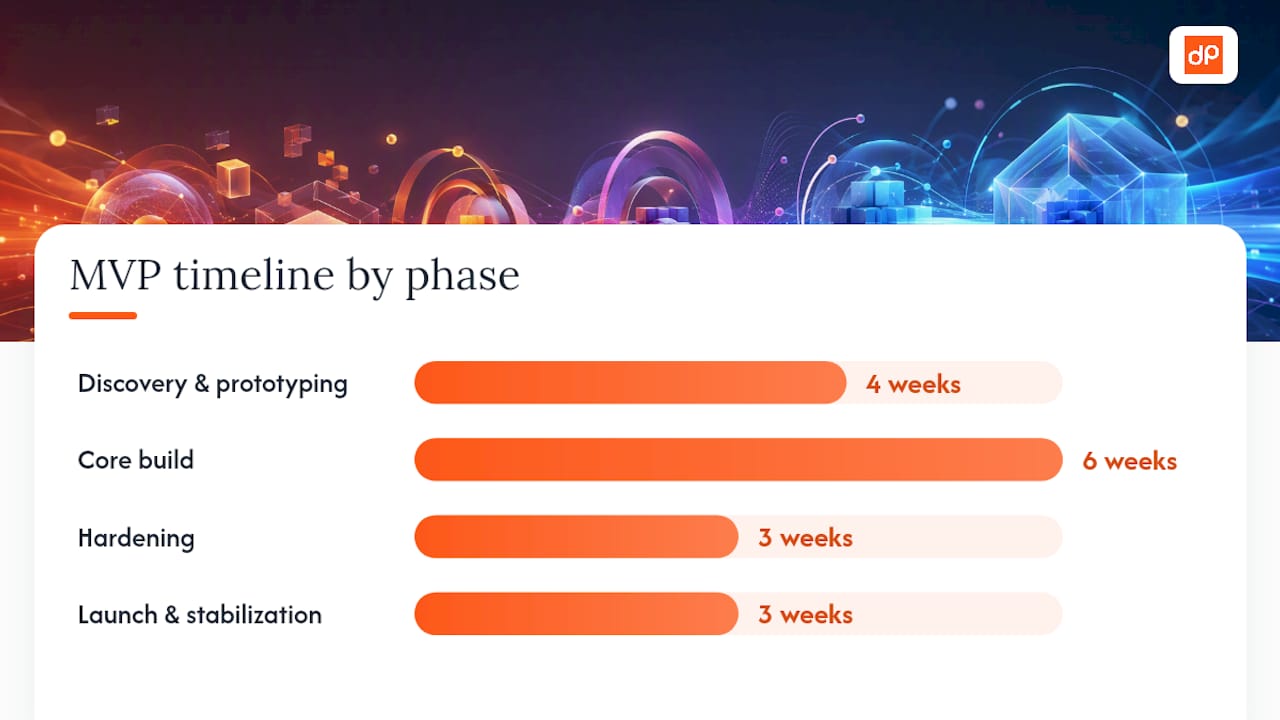
A sample MVP timeline breaks into four phases:
- Weeks 1 to 4: Discovery and prototyping. Validate the core user flow, finalize technical architecture, and produce a clickable prototype.
- Weeks 5 to 10: Core build. Implement the primary user journey end to end, with weekly demos to catch drift early.
- Weeks 11 to 13: Hardening. Testing, performance optimization, security review, and app store submission preparation.
- Weeks 14 to 16: Launch and stabilization. Staged rollout, monitoring, and rapid bug fixes based on real usage data.
Cost drivers that move your estimate the most: the number of third-party integrations (each one adds testing surface and potential failure points), the number of platforms you’re targeting simultaneously, compliance requirements like HIPAA or SOC 2, the depth of performance optimization required, and ongoing maintenance once you’re live.
On process, a lean discovery phase followed by timeboxed sprints beats a fully fixed-scope waterfall plan for most product builds, because it lets you course-correct based on what you learn in weeks one through four. Whether you outsource or hire in-house depends largely on how core the product is to your long-term competitive advantage; core platforms often justify in-house teams, while modernization projects or well-defined feature builds are strong candidates for outsourcing. If you go the outsourcing route, insist on a detailed statement of work with clear acceptance criteria, not just a budget and a deadline. Our engineering outsourcing guide covers vendor selection criteria in more depth, and our guide on scaling engineering teams for SaaS is useful once you’re past MVP and planning your next hiring phase.
When Does Cross-Platform Development Actually Pay Off?
The strongest evidence for cross-platform development isn’t theoretical, it shows up directly in delivery timelines. Building separate native codebases for iOS and Android means duplicating your business logic, your testing effort, and often your bug-fixing work across two teams. Cross-platform frameworks eliminate most of that duplication.
Statistic Callout: Cross-platform development with frameworks like React Native or Flutter is typically 20 to 30% faster to ship than building and maintaining two separate native codebases, for apps that are primarily UI and data-driven rather than dependent on deep platform APIs.
Translate that percentage into managerial terms and the impact compounds. A faster ship date means earlier revenue and earlier user feedback. A single shared codebase means one team, not two, maintaining feature parity, which reduces your ongoing headcount need and eliminates the drift that happens when an iOS team and an Android team implement the same feature slightly differently. Code reuse across platforms also means your QA surface area shrinks, since you’re testing one core logic layer instead of two separate implementations.
That said, cross-platform isn’t the right call for every project. It works best when a specific set of conditions holds:
- Your UI is largely standard components (lists, forms, navigation) rather than highly custom animations or platform-specific interaction patterns.
- Your feature set doesn’t depend on advanced device APIs like ARKit, custom Bluetooth protocols, or low-latency audio and video pipelines.
- You need to iterate quickly based on user feedback, and maintaining two native codebases would slow that iteration cycle.
- Your team’s core competency is in JavaScript, TypeScript, or Dart rather than deep native Swift or Kotlin expertise.
When those conditions don’t hold, particularly when your product’s differentiation depends on hardware integration, native development’s lower integration overhead usually justifies the extra engineering investment.
Which Tools and Standards Should Your Team Actually Use?
You don’t need every tool in the ecosystem; you need the right handful for your project’s specific stage. Here’s the shortlist that comes up in nearly every engagement:
- React for teams needing a large talent pool and a mature ecosystem for complex, interactive web UIs; best suited to SaaS and enterprise products.
- React Native for cross-platform mobile when your team already knows React; strong fit for MVPs and consumer apps needing both app stores fast.
- Flutter for cross-platform mobile when pixel-perfect custom UI matters more than sharing a codebase with an existing web team; a solid choice for consumer apps with distinctive branding.
- Angular for large enterprise teams that benefit from its opinionated structure and built-in tooling for big, long-lived codebases.
- Vue.js for teams wanting React’s reactivity model with a gentler learning curve, often a good fit for small to mid-size product teams.
- Node.js for backend teams wanting JavaScript end to end, particularly strong for real-time features and API-heavy architectures.
- Django for teams needing a batteries-included backend framework with strong built-in security defaults, common in data-heavy or admin-heavy applications.
- .NET for enterprise environments already standardized on Microsoft infrastructure, or teams needing strong typing and mature enterprise tooling.
- Lighthouse for automated, free performance and accessibility auditing built directly into Chrome DevTools.
- WebPageTest for deeper, real-world performance testing across geographic locations and network conditions.
- Sentry for production error tracking that surfaces issues before customers file support tickets.
- BrowserStack for testing across real device and browser combinations without maintaining a physical device lab.
For deeper reading on the standards behind these recommendations, W3C’s mobile web application best practices, Chrome’s Web Fundamentals, and OWASP’s security guidance form the backbone of most professional engineering standards today. Our frameworks guide for mobile application development breaks down the trade-offs between these mobile options in more granular detail.
What Should You Ask an Engineering Vendor Before Signing?
The most expensive mistakes in software projects almost never come from writing bad code. They come from scoping the wrong thing, ignoring a platform constraint until it’s expensive to fix, or accepting acceptance criteria vague enough that “done” becomes a negotiation.
Over-scoping is the most common failure mode we see in initial proposals. A vendor eager to win a contract will often say yes to a feature list that should have been three separate phases, and the client discovers the cost of that generosity six months in, when the timeline has quietly doubled. A close second is ignoring platform constraints early, discovering during development that a “simple” feature actually requires a native module because a cross-platform framework’s bridge can’t handle the workload efficiently. The third recurring problem is poor acceptance criteria: without a specific, testable definition of “done” for each milestone, disagreements about scope creep in almost immediately.
Before signing with any engineering partner, bring a specific list of questions to the scoping workshop:
- What are the concrete performance targets for this build, and how will they be measured post-launch?
- What telemetry and monitoring will be built in from day one, not added as an afterthought?
- What does your maintenance SLA look like once the initial build is delivered?
- How do you handle security audits, and are SAST/DAST scans part of your standard pipeline?
- Can you walk me through architecture diagrams and sample sprint plans from a comparable past project?
Ask for proof points, not promises. A vendor with real experience should be able to produce case studies with specifics, not just logos, along with architecture diagrams that show they thought through the trade-offs rather than defaulting to whatever stack they know best.
How Can DevPulse Help You Plan and Build Your Product?
If you’ve made it this far, you already know that choosing the right approach is only half the battle: execution is where most projects actually succeed or fail. DevPulse runs discovery engagements specifically to close that gap, mapping your product requirements to a concrete architecture, team plan, and MVP roadmap before a single sprint begins.
Our engineering teams build across the full stack this guide covers, React and Vue.js on the front end, React Native and Flutter for cross-platform mobile, Node.js, Django, and .NET on the back end, so your architecture decision doesn’t get boxed in by a vendor who only knows one stack. We’ve applied this exact cross-platform approach in projects like our document management modernization work, where a shared codebase reduced maintenance overhead compared to separate platform builds. Beyond initial delivery, we handle legacy modernization, cloud migration, and ongoing support once your product is live and generating real usage data.
If you’re weighing an approach for your next build, the fastest way to get clarity is a working session with our engineering team. Request a project estimate for your custom software development and get a concrete architecture recommendation, timeline, and cost range based on your actual requirements, not a generic template.
What Standards and Documentation Should Your Team Read Next?
Every recommendation in this guide traces back to a standard or a documented engineering practice, and your team should have these bookmarked before kicking off a build.
- W3C Mobile Web Application Best Practices: the definitive standard for resource efficiency, offline behavior, and adapting content to device capabilities.
- Chrome Web Fundamentals: practical guidance on build tooling, DevTools Device Mode, and performance debugging for mobile web.
- OWASP Mobile Top 10: the industry-standard checklist for mobile-specific security vulnerabilities, essential reading before your first security review.
- Framework documentation for React, React Native, and Flutter: each maintains official docs covering architecture patterns, performance tuning, and platform-specific quirks that generic tutorials miss.
Treat these as living references, not one-time reading. Standards evolve, framework best practices shift with major version releases, and a security checklist from two years ago may already be missing a category of vulnerability that’s become common since.